




 You may like



Rangefinder Highlights
Completely free: All tools in the software are free, and users can enjoy professional-level measurement services without paying any fees.
Wide range of applications: Whether at home, in the office or outdoors, users can take measurements anytime and anywhere without having to carry additional measuring tools.
Friendly interface: The software interface design is simple and elegant, easy to understand. Even first-time users can easily get started without complicated steps.
Rangefinder features
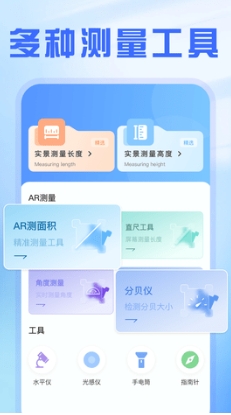
A variety of measurement tools are readily available: The Precision Distance Meter Master software not only has traditional length measurement functions, but also integrates a variety of practical tools such as real-life measurement, AR measurement, level, flashlight, compass, etc. Whether you need to measure room dimensions, furniture height, or position yourself on an outdoor adventure, this software has you covered.
Accurate and reliable measurement: With the help of the mobile phone's high-precision sensor, the software can accurately measure the length, height and spacing of objects with minimal error. Whether you are doing home decoration, furniture placement, or professional building measurements, you can get accurate and reliable measurement results.
Easy to operate: The software interface is simple and clear, and the operation is easy to understand. Users only need to open the software, point at the object to be measured, and tap the screen to complete the measurement. Even first-time users can master the use of the software in a short period of time.

Rangefinder function
Length measurement: The software provides a ruler tool accurate to millimeters and supports the moving ruler function, making the measurement results more accurate and reliable. In addition, a protractor function is integrated to facilitate users to measure angles.
Height measurement: Through simple operation steps, the software can accurately measure the height of a person or the height of a building. Users simply enter their height or take a photo at the base of a building to get accurate measurements. This function has wide application value in home decoration, children's growth monitoring, etc.
Good things for home: The software also provides a wealth of home measurement tools to help users easily solve measurement problems in home life. Whether it is measuring the size of curtains, the position of hanging pictures, or adjusting the placement of furniture, you can get accurate data support.

Rangefinder FAQ
Inaccurate measurement
Reason: It may be that the mobile phone sensor is not accurate enough, the measurement environment interferes, or the operation method is improper.
Solution: Make sure to operate in a stable measurement environment, follow the software instructions to correctly align the measurement target, and try multiple measurements to average them to improve accuracy.
Unable to measure specific objects
Reason: It may be that the reflective ability of the object surface is weak, the measurement distance exceeds the software range, or the object shape is irregular.
Solution: Try to place reflective material on the surface of the object to enhance the reflected signal, ensure that the measurement distance is within the software range, and try to choose objects with regular shapes for measurement.
Rangefinder update log:
1. Fixed several bugs;
2. Optimize details;
Huajun editor recommends:
The editor has been using rangefinder software for many years, but this software is still the best.Dumpling cloud game,TFun games,Unbounded community,A signature design,Youyoubao merchant versionIt is also a good software and is recommended for students to download and use.















Your comment needs to be reviewed before it can be displayed