
Hot search terms: 360 Security Guard Office365 360 browser WPS Office iQiyi Huawei Cloud Market Tencent Cloud Store
Hot search terms: 360 Security Guard Office365 360 browser WPS Office iQiyi Huawei Cloud Market Tencent Cloud Store

study education Storage size: 130.19 MB Time: 2022-02-24
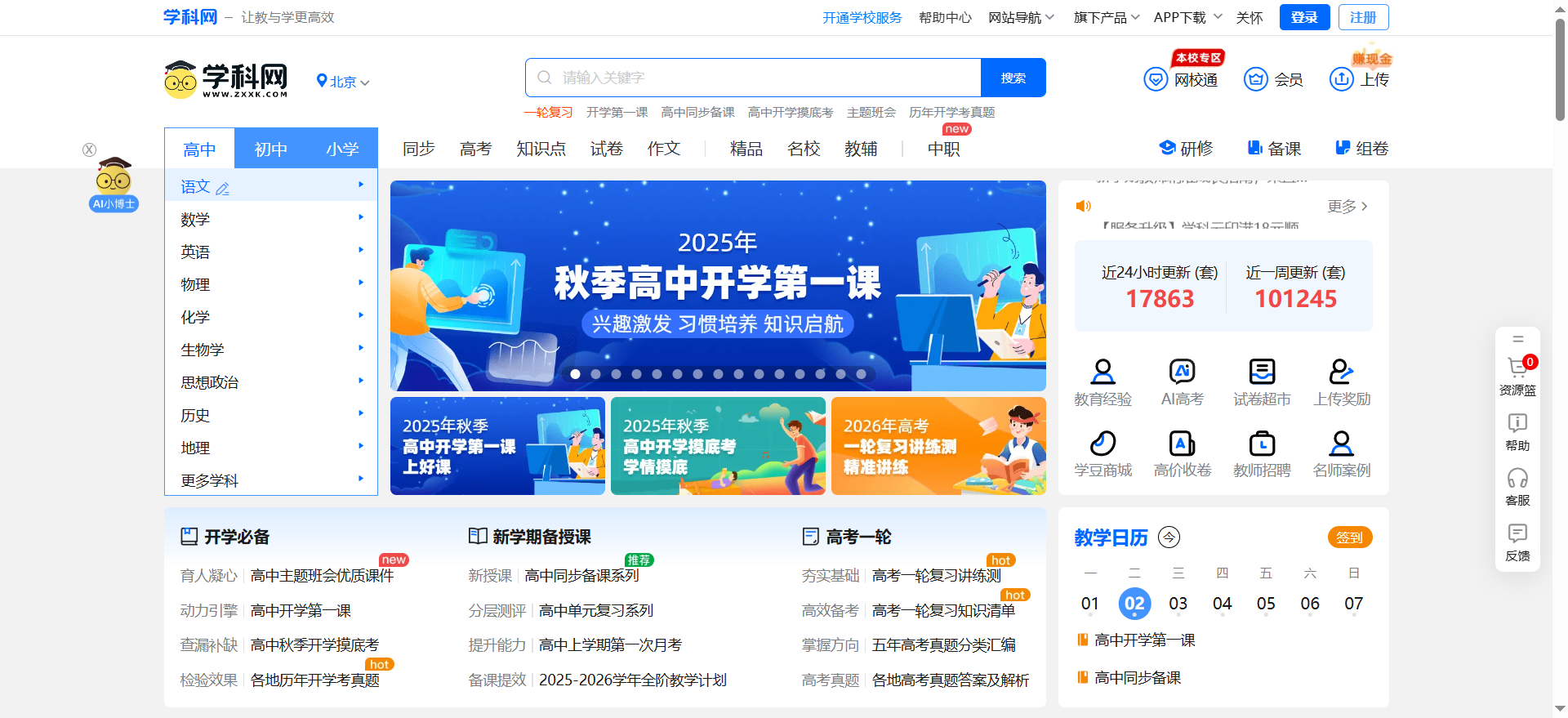
Software introduction: The Android version is an online application that consolidates students' knowledge and provides high-quality resources. The Subject Network app covers comprehensive subject content from elementary school to junior high school, and is available every day...
The web version of the Subject Network is the core carrier of the educational resource sharing platform for primary and secondary schools. It relies on the browser to achieve online acquisition and tool-based application of teaching resources for all school stages and multiple subjects. As the most basic service form under the subject network, its core value lies in integrating massive educational resources and intelligent tools, covering the entire teaching process from lesson preparation, test writing to academic analysis, while supporting the differentiated needs of teachers and students. For example, teachers can generate personalized test papers through the "Exam Formation Network", and students can directly download simultaneous exercises and analysis of real questions to achieve a "test-study-practice" closed loop. The web version of the Subject Network is not only a resource library, but also a digital assistant for the entire teaching process. Teachers can save time on writing questions through the "Examination Form Network" and optimize teaching design with the help of "AI Little Doctors"; students can accurately obtain synchronized resources and achieve efficient review through wrong question books. Its core value lies in empowering educational equity with technology - whether teachers from prestigious schools in first-tier cities or students in remote areas, they can improve teaching effectiveness through standardized tools and high-quality resources. For example, a rural teacher downloaded experimental videos through the web version, which made up for the lack of offline teaching aids and significantly improved student performance.

Official website address of the subject website: www.zxxk.com
Subject NetworkHow to log in?
Ordinary user login:
After visiting the official website, click the "Login" button in the upper right corner, enter your mobile phone number/user name and password to enter. New users need to click "Register" first and complete account creation through SMS verification.
If you need to use advanced functions (such as AI-generated courseware), it is recommended to complete real-name authentication (upload ID card or teacher qualification certificate) to unlock permissions.
School/institution user login:
Some schools use a single sign-on system. Users need to log in through the work/student ID and initial password (such as "123456") provided by the school. After logging in for the first time, they need to bind their mobile phone number and change their password.
For example, teachers and students of East China Normal University can access directly through the campus IP without additional registration.
Third-party account association:
Supports quick login with third-party accounts such as WeChat and QQ, and automatically associates the subject network account after scanning the QR code to simplify the operation process.
Subject NetworkWhat's the use?
1. Resource acquisition and teaching support
Full scene resource coverage:
Provides synchronized courseware, lesson plans, test papers and other resources, adapts to 400+ textbook versions such as the People's Education Press Edition and the Jiangsu Education Press Edition, and updates an average of 2000+ sets of original content every day. For example, teachers can download the "First Lesson of School" PPT for direct use in class, and students can obtain "Monthly Exam Sprint Papers" for targeted review.
Exclusively includes resources from prestigious schools (such as Tsinghua High School mock papers) and real high school and college entrance examination questions, and supports three-level filtering by "grade - subject - knowledge point".
Intelligent volume formation and job management:
Through the "Examination Form Network" (zujuan.xkw.com), teachers can generate test papers with one click:
Accurate question selection: Filter test questions by difficulty (easy/medium/hard), question type (choice/answer) or knowledge point (such as "Mechanics").
Intelligent typesetting: Automatically generate test papers in Word format, supporting personalized settings such as sealing lines and question number sorting.
After students submit their homework, the system automatically counts the accuracy and generates a learning report, marking weak knowledge points.
2. Tool-based functions improve efficiency
AI-assisted lesson preparation:
The new “AI Little Doctor” function supports one-click generation of courseware and teaching design. For example, enter "quadratic function in junior high school mathematics", and the system will automatically generate a PPT containing animated demonstrations and layered exercises, and the outline structure can be adjusted online.
Teachers can also upload local courseware and optimize content logic and visual design through the AI intelligent rewriting function.
Resource management and sharing:
Teachers can store frequently used resources in "My Resource Library", which supports batch downloading, classified storage and sharing to the school library. For example, a teacher packaged and shared the "High School Entrance Examination Review Topics" with teachers in the same group to avoid duplication of work.
Students can view download records in the "Personal Center" and organize wrong question books by subject for easy review.
3. Multi-scenario Adaptation and Security Guarantee
Cross-terminal and offline use:
Supports multi-terminal synchronization on mobile phones, tablets, and computers, and downloaded resources can be used offline. For example, after teachers save test papers to a USB flash drive, they can print and distribute them in a non-network environment.
The mobile “Discipline Network APP” communicates with the web version of data in real time, making it easy to check learning progress at any time.
Permission control and data security:
Ordinary users can download 350 resources for free every week, and members enjoy more benefits (such as priority use of AI tools). School administrators can set download limits to avoid resource abuse.
Encryption technology is used to protect courseware copyright and prevent unauthorized dissemination.
4. Special services and value-added functions
Exam preparation and teaching and research support:
Provide special resources such as "College Entrance Examination Round Review Package" and "Final Sprint Paper", including answer analysis and proposition trend analysis.
Teachers can join the "Xingtan Hui" community to exchange teaching experience with peers across the country and participate in the selection of high-quality course examples.
Personalized learning path:
After students use the "study analysis" function, the system automatically recommends strengthening exercises for weak knowledge points. For example, those who are weak in mathematics will receive "specialized training on functions," and English learners will receive a "cloze high-frequency word list."

 Bleach vs Naruto online free to play - Bleach vs Naruto web version online free to play
 Zhihu is down: computers and mobile phones can’t be used! Latest situation~~
 Windows 10 will be “out of service” soon!
 Youyi Teaching Web Version Entrance-Youyi Teaching Resource Network Online Entrance
 Chaoxing Xuetong web version login portal - Chaoxing online student login portal
 Steam
Steam
 Tencent Video
 WPS Office
 iQiyi
iQiyi
 Sohu video player
 Lightning simulator
 MuMu emulator
 Eggman Party
 WPS Office 2023
 Recommended collection of summer games
 How to work from home during the epidemic-Introduction to home office software
 How to set Chinese for teams-How to set Chinese for teams
 How to convert pdf to word-How to convert pdf to word
 How to type the comma on the keyboard? How to enter comma on keyboard