
Hot search terms: 360 Security Guard Office365 360 browser WPS Office iQiyi Huawei Cloud Market Tencent Cloud Store
Hot search terms: 360 Security Guard Office365 360 browser WPS Office iQiyi Huawei Cloud Market Tencent Cloud Store

Utility tools Storage size: 62.7 MB Time: 2023-06-27
Software introduction: Pre-registration for the overseas server of King of Glory is open, experience game acceleration, and be one step ahead! OurPlay accelerator is a free...
OurPlay accelerator is an accelerator that supports Steam game store acceleration, such as CS2, PlayerUnknown's Battlegrounds, Apex Legends and other popular games. It covers acceleration nodes in multiple regional servers around the world, including international servers, European and American servers, Asian servers, Japanese and Korean servers, Hong Kong, Macao and Taiwan servers, Southeast Asian servers, etc. Support Chinese localization of popular mobile games to solve language problems and improve the gaming experience. Next, let the editor of Huajun explain to you how to play League of Legends on ourplay and how to play League of Legends on ourplay!
first step
After opening the OurPlay app, register or log in for an account.

Step 2
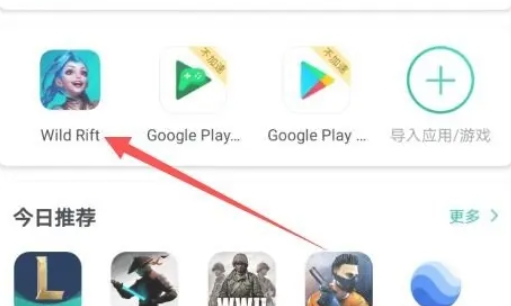
On the OurPlay startup interface, click [Import Apps/Games].
Step 3
If "League of Legends Mobile Game" is already installed on your phone, select the game to import.
Step 4
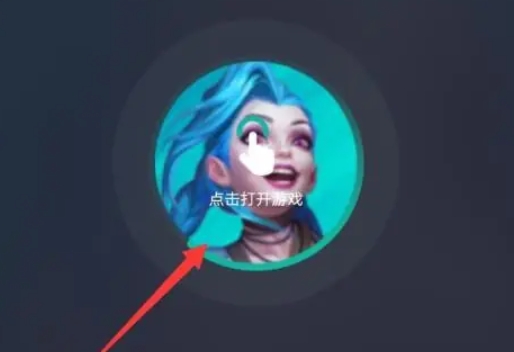
If it is not installed on your phone, you can enter [League of Legends Mobile Game] in the OurPlay search box and click on the game in the search results to download and install it. After the game is imported, select the appropriate acceleration route in OurPlay. OurPlay provides a variety of accelerated routes for users to choose from, including free ordinary routes and more stable high-speed routes (VIP membership may be required).

Step 5
On the OurPlay startup interface, click the imported "League of Legends Mobile Game" icon to start the game. Wait for the game to finish loading. Loading times may vary depending on network conditions and game size.
Step 6
After the game is loaded, click the [Play] button in the lower right corner to start matching or enter the game.
The above is how the editor of Huajun compiled for you how to play League of Legends on ourplay and how to play League of Legends on ourplay. I hope it can help you!

 How to check the list style in Kuai Technology? -Quick Technology’s method of viewing list styles
 How to cancel the account in Kuai Technology? -How to cancel your account in Kuai Technology
 movie paradise
 Quark Browser
 little red book
 Chinese University MOOC computer version
 Xiaoetong
 Traffic control 12123
 Minecraft Bedrock Edition
 KMPlayer
 watermelon video
 How to use Fliggy’s student discount? List of student certification methods on Fliggy
 How to find the help center for Panzhi Sales - How to find the help center for Panzhi Sales
 How to change ID card with taptap-How to change ID card with taptap
 How to add friends on steam mobile version - How to add friends on steam mobile version
 How to Chineseize ourplay with one click - How to Chineseize ourplay with one click


