
Hot search terms: 360 Security Guard Office365 360 browser WPS Office iQiyi Huawei Cloud Market Tencent Cloud Store
Hot search terms: 360 Security Guard Office365 360 browser WPS Office iQiyi Huawei Cloud Market Tencent Cloud Store
If the English version is opened after installation, please switch to the Chinese version as shown below:
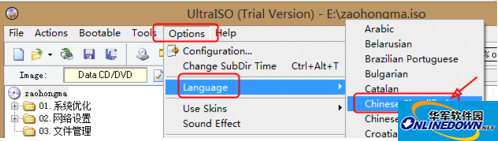
Switch between Chinese and English
Function 1: Extract files and directories from ISO
UltraISO can very conveniently extract the files and directories in the CD image ISO file. First open the target ISO file, find the file that needs to be extracted, right-click, select "Extract to...", then select the storage path of the file to be extracted and click "OK".
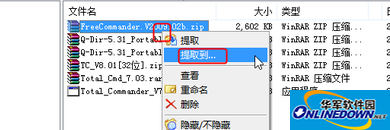
Extract
Function 2: Directly edit ISO files, delete files in ISO disc images, and add new files
First open the ISO disc image, select the file you want to delete, right-click and select "Delete".
To add a file, just drag the ISO disc image that is open in the upper pane from the lower pane of the main interface of UltraISO.
Whether you are deleting or adding files, you must click "Save" at the end to save the changes to the disc image file.
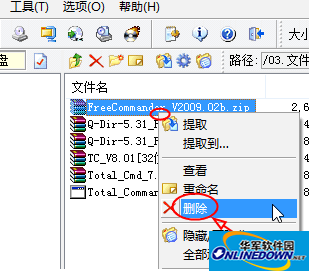
Delete
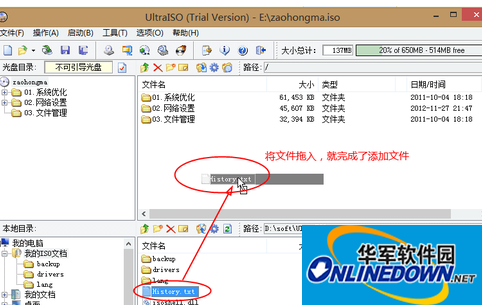
File addition
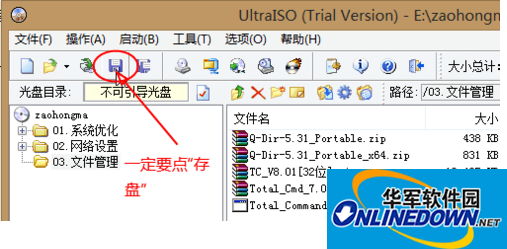
save

 How to upgrade software in 360 Software Manager? -How to upgrade software in 360 Software Manager
 Microsoft Edge browser
 Steam
Steam
 Tencent Video
 WPS Office
 iQiyi
iQiyi
 Sohu video player
 Lightning simulator
 MuMu emulator
 Eggman Party
 What to do if there is no sound after reinstalling the computer system - Driver Wizard Tutorial
 How to switch accounts in WPS Office 2019-How to switch accounts in WPS Office 2019
 How to clear the cache of Google Chrome - How to clear the cache of Google Chrome
 How to fire bullets in scratch-How to fire bullets in scratch


