
-
Super class schedule
- Size: 81.0M
- Language: Simplified Chinese
- Category: study education
- System: android
- Manufacturer:Guangzhou Super Weekend Technology Co., Ltd.

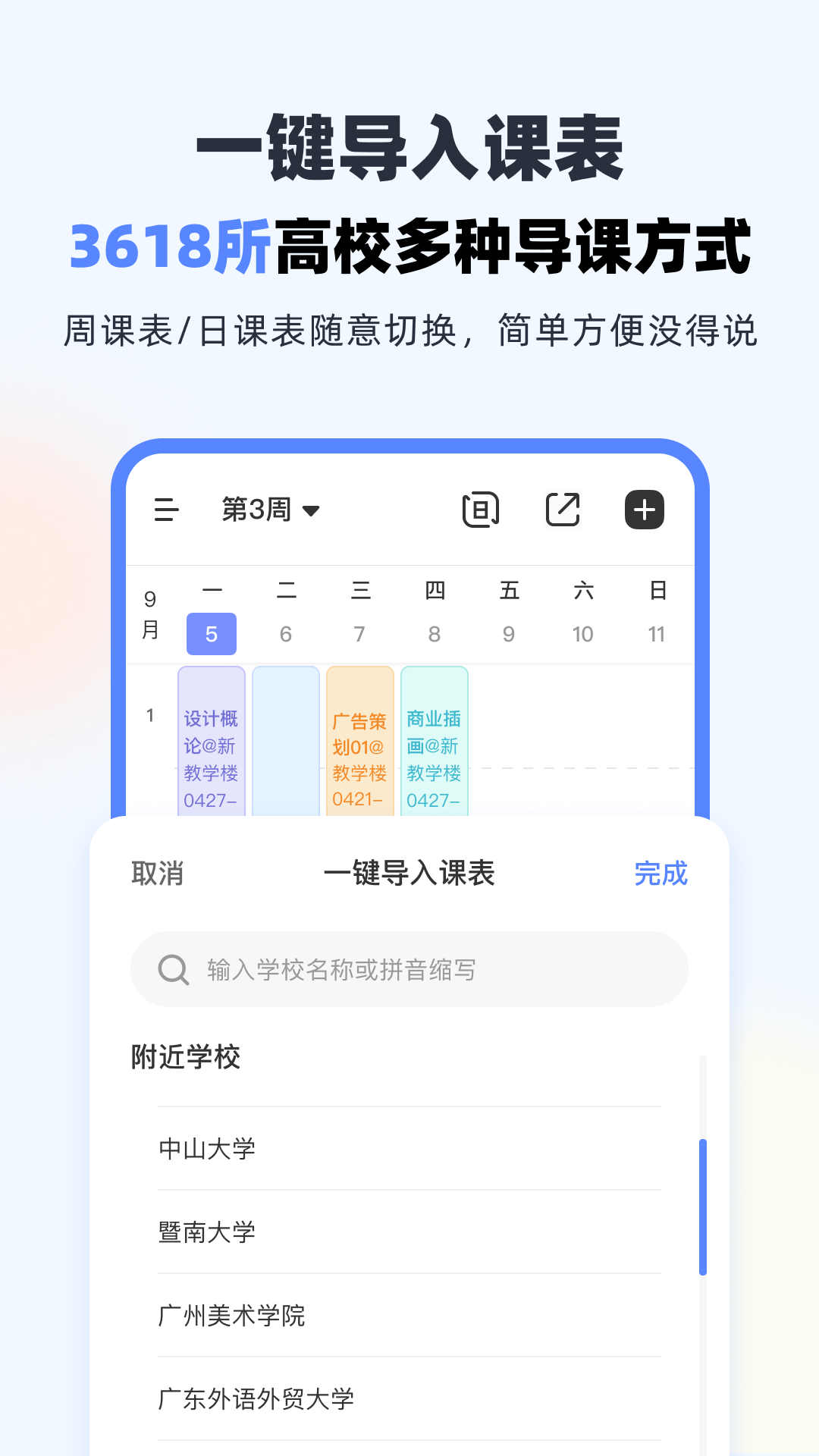


Super course schedule app——A smart timetable tool software used by college students. It is directly connected to the educational administration system of colleges and universities. It can import your timetable directly to your mobile phone. The course information is clear at a glance. Say goodbye to printed paper timetables from now on! There are also functions such as class reminders, score inquiries, and exam countdowns to make your study & life more convenient!Huajun Software Park provides you withSuper curriculum latest Android version,Friends who need it, please download it quickly!

Highlights of Super Course Schedule Software
Intelligent timetable management
It supports the docking of the academic affairs systems of more than 3,000 universities across the country, imports course schedules with one click, and automatically synchronizes course time, location and teacher information.
When adjusting courses, users only need to update in the educational administration system, and the APP can synchronize the latest class schedule, avoiding the cumbersome manual modification.
Exam reminder and planning
Automatically synchronize official exam time, generate countdown reminder, and support user-defined reminder methods (such as schedule, alarm clock).
Provides an exam calendar view to help users coordinate review plans and avoid missing important exams.

Super curriculum app function introduction
Campus Socialization and Interaction
"Chat after class" community: Covers sections such as "Playground", "Hot Photo Scoring" and "Limited Night Chat", supporting text, voice, and picture interaction. Users can participate in topic discussions and get to know classmates from the same school or across schools.
"Small Notes" function: Supports anonymous or real-name private messages to facilitate communication with classmates inside and outside the classroom and expand your social circle.
Utility integration
Score Inquiry: Connected to the educational administration system, supporting score inquiries for CET-4 and CET-6, computer grade examinations, etc.
Empty Classroom Query: Display vacant classrooms in real time to facilitate self-study or club activities.
Class Notes: Support text and picture recording, archive according to course classification, and support cloud synchronization.
Campus Headlines: Aggregates campus information, club activities, flea markets and other information, and obtains campus news with one click.

Cross-school class function
It contains tens of millions of course information, and users can browse courses from other colleges and universities, apply to audit, and break inter-school resource barriers.
Personalization
It supports customization of class schedule backgrounds and theme skins, and provides personalized tools such as schedule countdown and anniversary records.
The interface design is simple, supports synchronization of multiple terminals (mobile phones, tablets, computers), and is easy to operate.
Data Security and Privacy Protection
Encryption technology is used to protect user information. Authorized login is required to connect to the educational system to ensure that the data source is legal and compliant.

How to check grades on the Super Course Timetable app?
1. Open the Super Course Schedule app. If you are a new user, fill in your school, college, year of admission and other relevant information.

2. If you are an old user, log in with your super account of the super class schedule app.

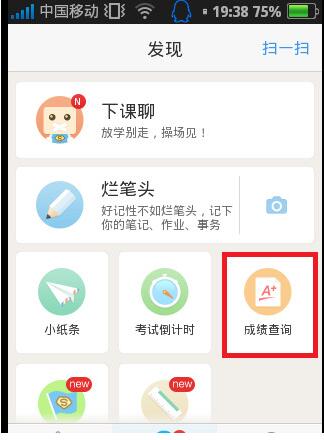
3. After logging in, click on the "Discover" column with your finger. On this page you will find the "Score Query" function.
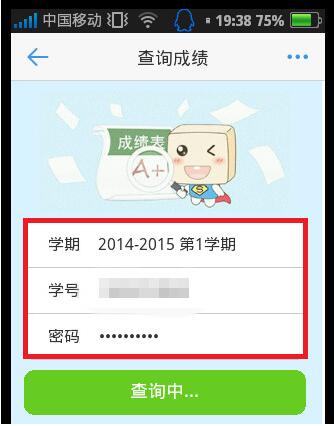
4. Click on the score query to enter the "Query Score Page", select your semester, enter your student ID and password.
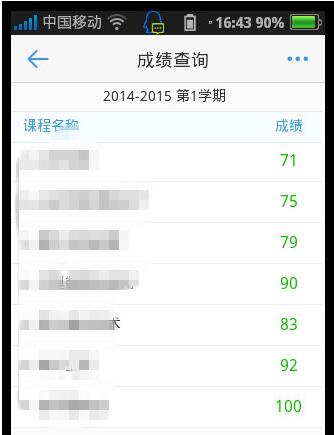
5. Click Query, and in a few seconds, you will be able to get your grades for this semester.
Frequently Asked Questions about Super Course Schedule App
Incomplete display or incorrect formatting
Reason: The mobile phone screen size adaptation problem or the improper setting of the number of lessons in the class schedule.
Solution:
Adjust the maximum number of periods in the class schedule: Go to "Discover" → "Course Schedule Settings" and adjust the "Maximum number of periods in the class schedule" to the maximum value (such as 8 periods).
Add a curriculum plug-in on the mobile phone desktop: long press a blank space on the desktop → select "Edit Mode" → add a super curriculum plug-in (such as 4×4 format).
Cannot delete or modify course
Reason: Wrong operation path or software BUG.
Solution:
Delete a course: Click on the course → "..." in the upper right corner → "Delete from class schedule" → Confirm deletion.
Modify a course: Click Course→Edit information and save.
If the problem persists, restart the app or reinstall the latest version.
Super course schedule appChange log
-After importing the course, you can set the starting time of the week;
-Optimize the display of dynamic information, and add blocked content and unblock buttons;
- Strengthen the blacklist function to prevent malicious harassment more effectively;
Huajun editor recommends:
After you use the super curriculum, I think you may also need software such as ABCmouse, Batch Butler, Cloud Machine Manager, etc. Come to the Huajun Software Park to download and use it!
Version: v9.9.40 | Update time: 2025-10-23
Similar recommendations






Latest updates





Freshman Guide|Essential University APP
How to check the list style in Kuai Technology? -Quick Technology’s method of viewing list styles
How to cancel the account in Kuai Technology? -How to cancel your account in Kuai Technology
How to submit feedback on Kuai Technology? -How to submit feedback on Kuai Technology
How to send a private message to Toutiao today? -How to send private messages to Toutiao today
How to change Toutiao password? -How to change password in Toutiao
How to set the font for Toutiao today? -How to set font in Toutiao
Super Curriculum Review
-
1st floor Huajun netizen 2020-09-09 22:38:45The super curriculum has been installed and is indeed the latest version.
-
2nd floor Huajun netizen 2019-02-26 05:59:02Recently, many people have recommended the Super Course Schedule, and it’s pretty good after I tried it.
-
3rd floor Huajun netizen 2018-01-18 03:46:13It’s so good that I saved it directly. The super curriculum is highly recommended.
Recommended products









- Diablo game tool collection
- Group purchasing software collection area
- p2p seed search artifact download-P2P seed search artifact special topic
- adobe software encyclopedia - adobe full range of software downloads - adobe software downloads
- Safe Internet Encyclopedia
- Browser PC version download-browser download collection
- Diablo 3 game collection
- Anxin Quote Software
- Which Key Wizard software is better? Key Wizard software collection




