So friends who like to play games, please install and download this software before running the game.
XNA4.0 software features
1. Speed up game development. In the past, DirectX was used to develop Windows platform games. Game development companies spent about 80% of their time on program development and only 20% on game creativity. The use of XNA.NET Framework for game development greatly reduces the developer's workload. It not only reduces the cost of development, but also allows more attention to the creativity of the game in game development.
2. The developed game can run cross-platform between Windows and Xbox 360. At the same time, it is easier to use and has higher scalability. The XNA Framework encapsulates all the underlying technologies used for game programming. As a result, game developers can focus most of their energy on game content and concept development, without having to worry about porting the game to different platforms. As long as the game is developed on the XNA platform, all hardware that supports XNA can run.
3. Support 2D and 3D game development. XNA Framework supports both 2D and 3D game development, and also supports XBox360 controllers and vibration effects.
XNA4.0Installation method
1. Download from this site
2. Install VS2012 and XNA 4.0
(I won’t say anything more in this step.)
3. Copy the XNA project template to VS2012
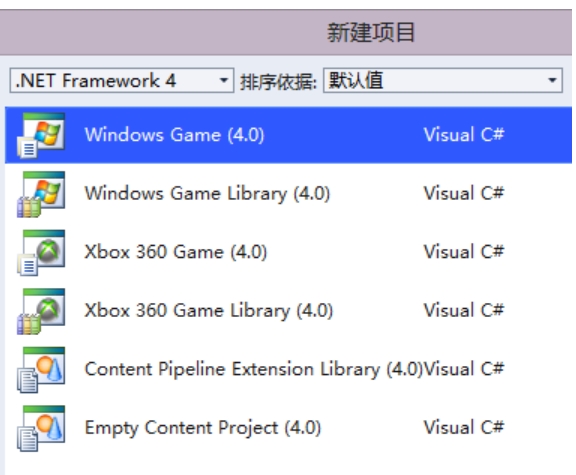
After installing XNA, when you open VS2012, you will find that there is no XNA template when creating a new project. Well, now we have to start processing it.
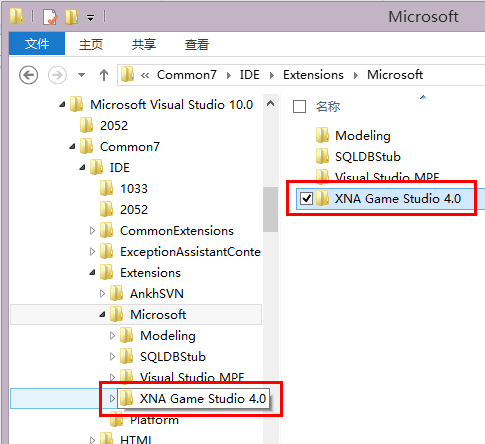
By default, XNA will be installed in the Common7IDEExtensionsMicrosoft folder of VS2010. Please find the installation directory of VS2010 according to your own situation.
I have a 64-bit system here and it is installed on the C drive by default. Then my directory is:
C:Program Files (x86)Microsoft Visual Studio 10.0Common7IDEExtensionsMicrosoft
Copy the entire "XNA Game Studio 4.0" folder to Common7IDEExtensionsMicrosoft under the VS2012 folder
For example, the default installation path here is:
C:Program Files (x86)Microsoft Visual Studio 11.0Common7IDEExtensionsMicrosoft
4. Update the template of VS2012
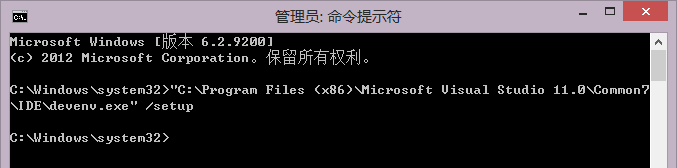
Open the command prompt as an administrator, and then execute the following command: (Please determine the path of devenv.exe yourself, the following is my path)
"C:Program Files (x86)Microsoft Visual Studio 11.0Common7IDEdevenv.exe" /setup
Then wait for devenv.exe to complete execution. . . You can view it through Task Manager. . .
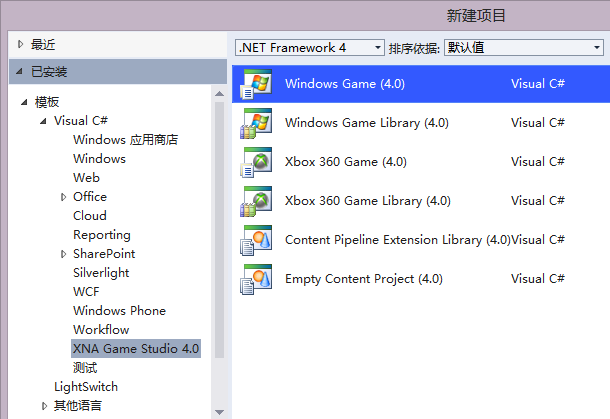
5. Open VS2012, done!
Now open VS2012, you can see the XNA template when creating a new project.
How to use XNA4.0
Note: Before installing XNA4.0 version, please install Microsoft .net Framework 4.0 and above.
Some games require the XNA environment to run, please install this program before running.
XNA Framework is built on NET Framework 2.0, and also adds some category libraries focused on game development to maximize code reuse on designated platforms. The XNA Framework runs on a version of the Common Language Runtime specifically designed for managed games. This runtime supports Windows XP, Windows Vista, and XBox 360.
Since the game is developed at the execution layer, the game can run on all platforms that support the XNA Framework with little or no changes. Currently all games on the XNA Framework must be developed using C# and the XNA Game Studio Express IDE.
XNA4.0 FAQ
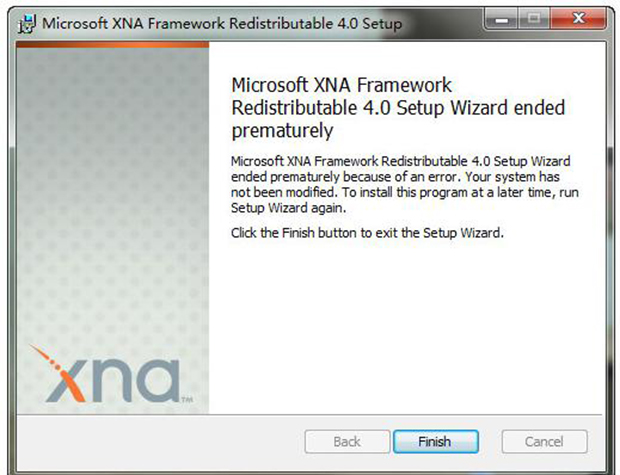
XNA4.0 cannot be installed, why?
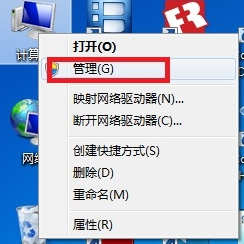
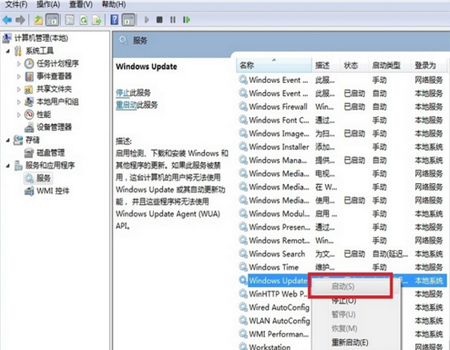
1. Find “Computer” on the desktop, right-click and select “Manage”, as shown in the figure.
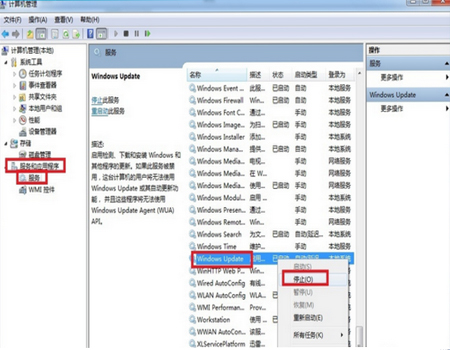
2. In the "Computer Management" window that opens, follow the path "Services and Applications - Services" to open it. Find "Windows Update" in the list and right-click to select "Stop".
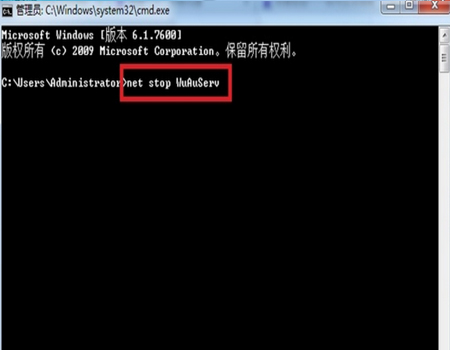
3. Press and hold the "Win+R" keys to open the run dialog box, enter cmd and press Enter. In the opened interface, enter net stop WuAuServ and press Enter (stop the windows update service), as shown in the figure.
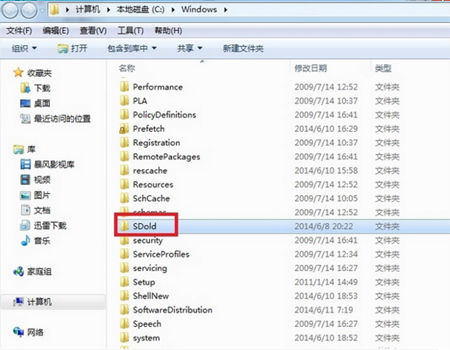
4. Press and hold the "Win+R" keys to open the run dialog box, enter cmd and press Enter. In the opened interface, enter net stop WuAuServ and press Enter (stop the windows update service), as shown in the figure.
5. At this time, open the original "Computer Management" window and follow the path "Services and Applications - Services". Find "Windows Update" in the list and right-click to select "Start". At this time, install the Microsoft .NET Framework 4.54.0 installation package and it will pass smoothly.
Microsoft XNA Framework FAQ
What types of game development does the XNA Framework support?
XNA Framework supports both 2D and 3D game development, providing developers with rich graphics and sound effects processing functions.
How to use XNA Framework for cross-platform development?
The XNA Framework allows developers to write code once and run games on Windows and Xbox 360 platforms. This greatly simplifies the process of cross-platform development.
Microsoft XNA Framework update log:
Working day and night just so you can be happier
Mummy, Mummy, coax~all the bugs are gone!
Huajun editor recommends:
The operation steps of Microsoft XNA Framework software are very simple and very fast, so users can use it with confidence. In addition, it is also recommended to download and use related software such as Batch Butler, Cloud Machine Manager, and .NET.