
-
360 secure browser
- Size: 105M
- Language: Simplified Chinese
- Category: web browsing
- System: Win All






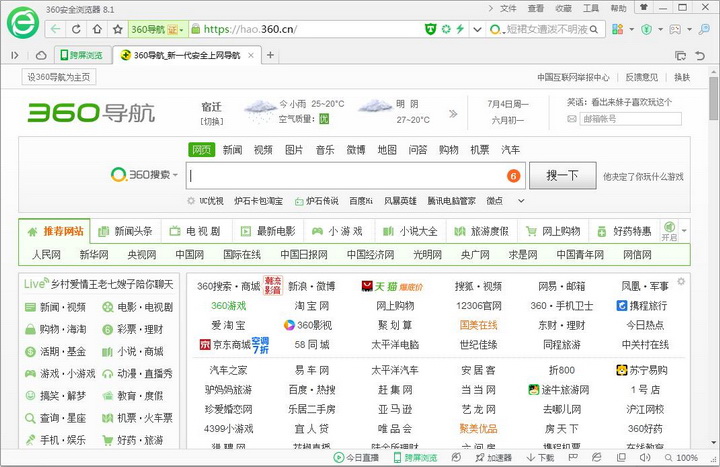

360 secure browserUsing advanced malicious URL interception technology, it can automatically intercept malicious URLs such as Trojans, fraud, and online banking counterfeiting. 360 Secure Browser is powerful, easy to use, user-friendly in design, safe and fast! 360 Secure Browser has unique incognito browsing mode and isolation mode, which not only completely protects privacy, but also allows safe access to dangerous websites! 360 secure browser free download.
Highlights of 360 Secure Browser
Interface and skin
Theme replacement: Provides a large number of skins and wallpaper libraries, and supports custom background images.
Simple mode/classic mode: switch the toolbar layout to adapt to different usage habits.
Expand ecology
2000+ extension tools: covering ad blocking (such as uBlock Origin), mouse gestures (such as CrxMouse), developer tools and other scenarios.
Featured recommendations: Officially screen high-quality extensions to avoid low-quality plug-ins affecting performance.
Newbie guidance and help
Function tutorial: An animation guide will pop up when you use it for the first time, so you can quickly get started with the core functions.
Intelligent customer service: Menu → Help → Online customer service, answer questions 24/7.

Features of 360 Secure Browser:
Performance optimization technology
Chromium kernel upgrade: The latest version uses the Chromium 132 kernel, which increases web page loading speed by 30% and supports 4K video hardware acceleration.
Intelligent resource scheduling: Automatically optimize CPU usage when browsing multiple tabs to avoid lagging.
Low memory mode: Optimized for older devices, memory usage is 20% lower than similar browsers.
Smart search and navigation
Super search box: Enter keywords to directly call AI search to get expert answers (such as "How to write a year-end summary?").
Intelligent URL completion: Enter part of the URL to automatically prompt the complete address, and support Pinyin search (for example, entering "taobao" will automatically jump to Taobao).
Commonly used website navigation: The homepage displays news, videos, shopping and other category icons, and supports custom additions.
Sync across devices
Network favorites: After logging in to your account, your favorites, passwords, and settings are automatically synced to your mobile phone/computer.
Tab relay: Scan the QR code on your mobile phone to synchronize the current web page to your computer to continue browsing.
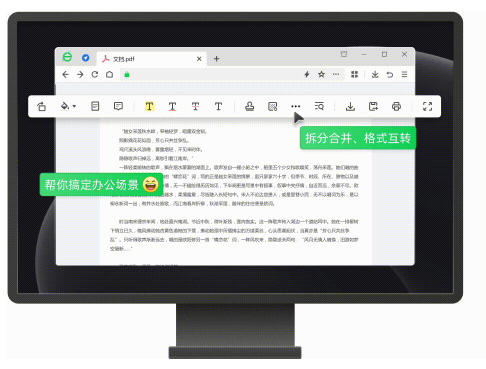
360 secure browser installation steps:
1. Download 360 Secure Browser from this site, enter the installation wizard, check the box to read and accept the license agreement, and click "Continue"

2. It is recommended to install the software on the D drive. In addition, we can also choose whether to add the 360 Safe Browser to the desktop shortcut, add it to the system quick startup, set it as the default browser, set the 360 Navigation as the homepage and lock it, click "Continue"

3. 360 Secure Browser is being installed. The process is very fast. Please wait patiently.

4. 360 Secure Browser is installed successfully. At this time, the installation wizard will automatically exit and 360 Secure Browser will automatically run.
360 Secure Browser FAQ
Network connection issues
Phenomenon: All web pages are inaccessible.
Solution:
Check whether the router/modem indicator lights are normal and restart the device.
Test the same network with a mobile phone or other device to confirm whether it is a local network failure.
Contact the network operator to confirm whether there is a regional disconnection.
360 Safe Browser update log:
1. Optimized some functions
2. Solved many unbearable bugs
Huajun editor recommends:
The editor guarantees that as long as you use 360 Safe Browser, if you don’t like it, you can come and hit me! The editor has also prepared Firefox, Google Chrome, and Firefox Enterprise Edition for you
Version: 16.0.1378.0 | Update time: 2025-10-23
Similar recommendations


Latest updates






How to log in to 360 Secure Browser? -How to log in to 360 secure browser
How to take screenshots in 360 Secure Browser? -How to take screenshots with 360 Secure Browser
How to install the plug-in for 360 Secure Browser? -How to install plug-ins for 360 Secure Browser
How to speed up 360 Secure Browser? -360 secure browser acceleration method
How to clear the cache of 360 Secure Browser? -How to clear the cache of 360 Safe Browser
How to save URLs in 360 Secure Browser? -How to collect URLs in 360 Secure Browser
How to clear the cache of 360 Secure Browser? -How to clear the cache of 360 Safe Browser
360 Safe Browser Review
-
1st floor Huajun netizen 2022-03-07 13:19:35360 Secure Browser software is very easy to use, downloads quickly and is very convenient!
-
2nd floor Huajun netizen 2021-11-17 20:38:10The overall feeling of 360 Secure Browser is good, I am quite satisfied, the installation and operation are very smooth! Followed the installation step-by-step instructions and it went very smoothly!
-
3rd floor Huajun netizen 2021-12-01 07:00:20360 Secure Browser is not bad. It downloads very quickly. I give you a good review!
Recommended products










- Diablo game tool collection
- Group purchasing software collection area
- p2p seed search artifact download-P2P seed search artifact special topic
- adobe software encyclopedia - adobe full range of software downloads - adobe software downloads
- Safe Internet Encyclopedia
- Browser PC version download-browser download collection
- Diablo 3 game collection
- Anxin Quote Software
- Which Key Wizard software is better? Key Wizard software collection




