
-
Kuaikuai cloud library
- Size: 39.01M
- Language: Simplified Chinese
- Category: network sharing
- System: WinAll







Kuaikuai cloud libraryIt is the world's leading cloud storage-based team file sharing platform with unlimited cloud storage space. On the one hand, Gokuai Cloud Library achieves unlimited storage of file data with extremely high cost performance and zero occupation of local hard drives. On the other hand, it can realize the integration of file sharing, transmission and discussion among teams, greatly improving work efficiency. In addition, Gokuai Cloud Library also supports multiple platforms and systems such as PCs and mobile phones, making mobile office fast and convenient.

Features of Kuaikuai Cloud Library
Zero hard disk usage
Kuaikuai products use "index synchronization" technology to enable storage without occupying local hard disk space. The so-called index synchronization is a technology that only synchronizes the file directory to the local while leaving the file content still stored in the cloud.
Unlimited storage
Gokuai products changed the charging model based on storage space to charging based on the number of cloud libraries and the number of users, giving users unlimited storage space based on "cloud library units".
file lock
Kuauai products support locking files to resolve conflicts that arise when multiple people on a team operate on the same file at the same time.
Document discussion
Gokuai products break through traditional network disks by emphasizing the attributes of single storage and support members to discuss files directly, quickly and conveniently.
Multiple permission settings
Gokuai product supports the granting of progressive operation permissions to different team members based on office needs, helping enterprises manage files in a more reasonable and controllable manner.
file history
Gokuai product supports the recording of all additions and modification history of files by members in the database, making it easy for return visits or tracing, and improving the convenience of team collaboration.
Device management
Gokuai products support multi-device management, and can disable or restart any device account anytime and anywhere to prevent a series of security issues such as file leakage caused by device loss.
File external link
Gokuai products support file external linking functions, perfectly integrate existing file transfer habits, and effectively manage file exchanges with external customers.
Mobile office
Gokuai products support mobile office. Users can use PC, mobile phone or MAC to log in to the cloud library at any time to achieve file-based browsing and collaboration.
API interface
Gokuai products can set up API interfaces according to customers' existing offline deployment needs, which not only improves the efficiency of file sharing among customer enterprise teams, but also further improves the return on investment in the field of comprehensive enterprise IT deployment.
Hybrid cloud storage
Gokuai products can support enterprises to implement hybrid storage of public and private clouds and locals based on the attributes of file data through port settings, giving enterprises more choices and eliminating customers' concerns about the safe storage of special files.
Kuaikuai cloud library usage tutorial
1. Create a library
Click the library creation button, enter the library name and click, select the library icon and click OK. The library is created successfully.

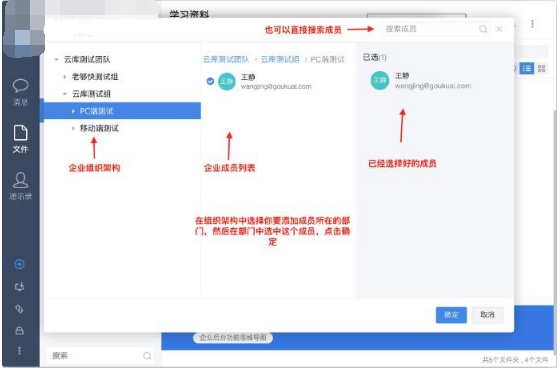
2. Add library members
Select the library to which you want to add members, click the member management button in the upper right corner, and when the member interface pops up, click Add Member. Select the member to be added in the enterprise, select the role to be assigned to the member, and click OK.

Frequently Asked Questions about Kuaikuai Cloud Library
How to sync files?
Manual synchronization: Add files to the cloud library, or drag files directly to the cloud library client to synchronize files on your computer to the cloud.
Automatic synchronization: Set the synchronization folder in the cloud library client. After the setting is completed, the files in the synchronization folder on the hard disk will automatically be synchronized with the cloud.
How to set up sync folders?
Select the folder you want to set up synchronization in the cloud library client, "right-click--More--Sync Settings". After the settings are completed, the folder will be synchronized with the cloud save. Files placed in the Kuaikuai client will automatically synchronize the latest information of the files.
Can deleted files be recovered?
After files in the Gokuai cloud library are deleted, they will first be stored in the library recycle bin. Deleted files can be restored in the library recycle bin.
How to exit a joined cloud library?
1. Ask the administrator to delete your account from the team members.
2. You can also "Exit this library" in the library information and select "OK" to exit the library, which will take effect immediately without administrator confirmation.
Version: 2.0.12.0 official version | Update time: 2025-06-26
Similar recommendations







Latest updates





Kuaikuai Cloud Library Comments
-
1st floor Huajun netizen 2021-06-12 06:19:09Kuaikuai Cloud Library is very useful, thank you! !
-
2nd floor Huajun netizen 2021-04-10 07:37:41Kuaikuai Cloud Library is awesome! 100 million likes! ! !
-
3rd floor Huajun netizen 2021-09-22 08:50:26The overall feeling of Kuaikuai Cloud Library is good and I am quite satisfied with it. The installation and operation are very smooth! It went very smoothly following the installation step-by-step guide!
Recommended products









- Diablo game tool collection
- Group purchasing software collection area
- p2p seed search artifact download-P2P seed search artifact special topic
- adobe software encyclopedia - adobe full range of software downloads - adobe software downloads
- Safe Internet Encyclopedia
- Browser PC version download-browser download collection
- Diablo 3 game collection
- Anxin Quote Software
- Which Key Wizard software is better? Key Wizard software collection




