
-
FireShot
- Size: 2.7M
- Language: Simplified Chinese
- Category: Network assistance
- System: winall






The official version of FireShot is a chrome plug-in for web page screenshots. The latest version of the FireShot plug-in can capture various forms of pictures. The entire screenshot, the visible part, and the selected area can be taken. You can also choose a variety of output methods. At the same time, FireShot also supports graffiti and editing of captured pictures. The functions are very comprehensive and easy to use.
Basic introduction to FireShot
When we browse the web, we will encounter some valuable things and take screenshots to save them and share them with friends. At this time, we will use the screenshot tool. You can take screenshots through the Chrome developer tools, but it is a bit cumbersome to use and not suitable for ordinary users. And there is another nerve-wracking problem. Chrome browser is not as easy as mobile phones to capture long images, which is very troublesome. Here I recommend a practical chrome screenshot plug-in to capture web page screenshots. - FireShot. Let’s take a look together.
FireShot installation tutorial
Method 1: .crx file format plug-in installation
1. First, the user clicks the customization and control button in the upper right corner of Google Chrome and selects settings in the drop-down box.
2. Select the extension on the left side of the extension manager of the opened Google Chrome or enter directly: chrome://extensions/
3. Find the Chrome offline installation file xxx.crx that you have downloaded, and then drag it from the resource manager to Chrome's extension management interface. At this time, the user will find an additional "Drag to install" plug-in button in the central part of the extension manager.
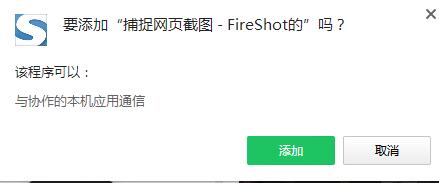
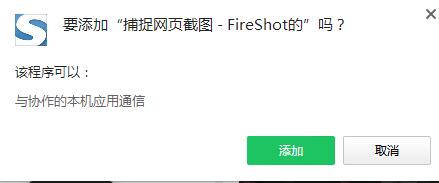
4. Release the mouse to install the plug-in currently being dragged into Google Chrome. However, Google considers the user's security and privacy and will give the user a prompt to confirm the installation after the user releases the mouse.
5. At this time, the user only needs to click the Add button to install the offline Chrome plug-in into the Google Chrome browser. After successful installation, the plug-in will be immediately displayed in the upper right corner of the browser (if there is a plug-in button). If there is no plug-in button, the user can also find the installed plug-in through the Chrome extension manager.
Method 2: Folder format plug-in installation
1. First, the user clicks the customization and control button in the upper right corner of Google Chrome and selects settings in the drop-down box.
2. Select the extension on the far left side of the extension manager of the opened Google Chrome.
3. Check the developer mode, click to load the unzipped extension, and select the folder to install the plug-in.
How to use FireShot
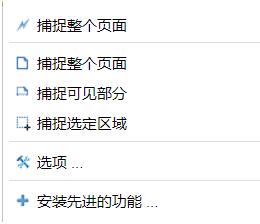
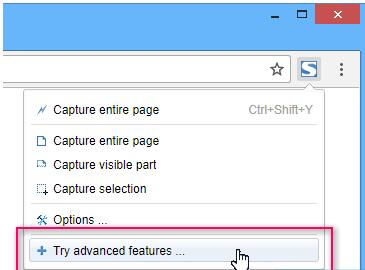
1. Use FireShot to take screenshots. Browse the web, press the FireShot extension icon, and select from the pop-up menu: capture the entire page, capture the visible part, or capture the selected area.
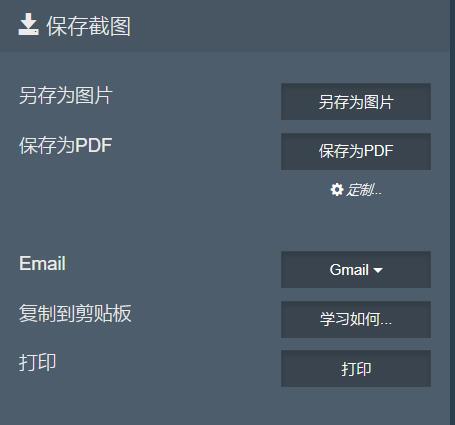
2. Save the screenshot to a file. FireShot will open a new tab with the screenshot displayed on the top and the option to save the screenshot below, which can be saved to a file or saved as a pdf.
3. Save the screenshot to the clipboard. Right-click on the screenshot and select "Copy Image" on the pop-up menu to copy the screenshot to the clipboard.
4.FireShot option settings. Click the FireShot icon and select "Options" on the pop-up menu to perform the FireShot option setting function. You can set options such as image format, screenshot hotkeys, and image output folder.
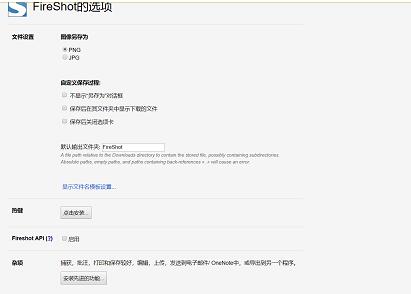
5. Edit the screenshot. Click "Install advanced features" in the option settings function to install the FireShot screenshot editing plug-in. After upgrading to the premium version, some more functions will be added. For example, after taking a screenshot of the entire web page, you can edit or graffiti the screenshot. After taking the screenshot, there will be an additional row of tools on the interface. Of course, all functions will be enabled only if you purchase the pro version.
FireShot update log
1: Brand new interface, refreshing, simple and efficient
2: Performance is getting better and better
Huajun editor recommends:
FireShot has the same complete functions as the official product, the interface is more beautiful and elegant, and the design is more complete. It continuously meets the needs of users. Welcome to download. If you are interested, you can also download Google Chrome, Batch Butler, and Cloud Machine Manager
Version: 1.2 Official version | Update time: 2024-12-31
Similar recommendations






Latest updates





How to delete history in Video Pioneer? -How to delete history records by Video Pioneer
How to set the skin for Video Pioneer? -How to set skin for Video Pioneer
How to upgrade software in 360 Software Manager? -How to upgrade software in 360 Software Manager
How to draw a lottery in 360 Software Butler - How to draw a lottery in 360 Software Butler
FireShot Review
-
1st floor Huajun netizen 2022-02-11 18:43:32FireShot is very useful, thank you! !
-
2nd floor Huajun netizen 2022-03-12 13:13:51The interface design of FireShot is easy to use and has rich functions. I highly recommend it!
-
3rd floor Huajun netizen 2021-10-19 22:10:28FireShot is awesome! 100 million likes! ! !
Recommended products
-

Tianyifei young campus client
-

P2P terminator
-

Baidu Shangqiao
-

578010wifi password viewer
-

Yiyiyun mobile phone verification software
-

Agricultural Bank of China Online Banking Assistant
-
Agricultural Bank of China Online Banking Assistant
-
Agricultural Bank of China Online Banking Assistant
-

inSSIDer
-

Cheetah free WIFI
- Diablo game tool collection
- Group purchasing software collection area
- p2p seed search artifact download-P2P seed search artifact special topic
- adobe software encyclopedia - adobe full range of software downloads - adobe software downloads
- Safe Internet Encyclopedia
- Browser PC version download-browser download collection
- Diablo 3 game collection
- Anxin Quote Software
- Which Key Wizard software is better? Key Wizard software collection




