
-
Useful card recorder
- Size: 4.8M
- Language: Simplified Chinese
- Category: Game assistance
- System: Android
- Manufacturer:Changsha Tianzhijing Mobile Internet Co., Ltd.
The latest version of Haoyong Card Recorder is an auxiliary tool specially created for card games such as Landlords and Mahjong. The easy-to-use card recorder Android version helps players make card decisions and increase their chances of winning the game. It is easy to use the card recorder to record the cards played by each player, count the number of remaining cards, assist players in making decisions about playing cards, increase the chance of winning the game, and experience the fun of the game.

Introduction to useful card recording software
Support Happy Landlords, Xianlai Landlords, Xianlai Run Fast, Pippi Run Fast, Pippi Landlords, JJ Landlords, Yingle Landlords, Weiying Run Fast, Xinyi Jilin Ma Jiang, Shicheng Mahjong, Spades Chess and Cards, Wanbei Doucai, Yifa Games, Friends and Family Chess and Cards, QKA Games, Xunyou Chess and Cards, Juyou Linyi Mahjong, Chang Lai Run Fast, Miracle Chess and Cards, Qinhuangdao Mahjong;
Record the cards played by each player, count the number of remaining cards, assist players in making card decisions, increase the chance of winning the game, and experience the fun of the game. This software is independently developed and does not contain any ads or plug-ins. Each player can download it for a free 10-day trial period.
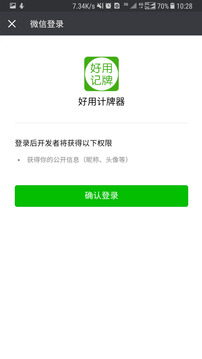
Easy-to-use card recorder software features
Game records: Real-time display of the remaining cards and cards played to help players keep track of the game dynamics.
Card status prompt: When the number of remaining cards is 0, the card automatically dims and clicks are prohibited to avoid misoperations.
Multi-device adaptation: Optimize the interface for different screen sizes to ensure smooth use on mobile phones, tablets and other devices.
In-app purchase expansion: Provides in-app purchases of permanent usage rights for Landlords, Landlords, Four-player Landlords and other gameplays. Users can choose according to their needs.
Auxiliary statistics: Help players count important information besides recording cards, such as how many points are left outside, which cards other players have not played, and the unique cards for upgrades (tractors), etc.
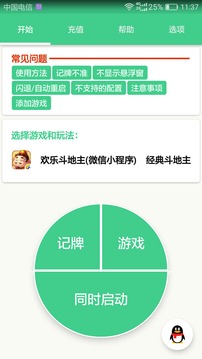
Features of easy-to-use card recorder software
Novice friendly: Provide novice players with a free trial period, allowing players to familiarize themselves with the software functions without pressure.
No advertising plug-ins: The software is independently developed and does not contain any advertisements or plug-ins, ensuring that players are not disturbed during the game.
Easy to operate: The interface design is simple and clear, and the functional divisions are clear, so players can get started easily.
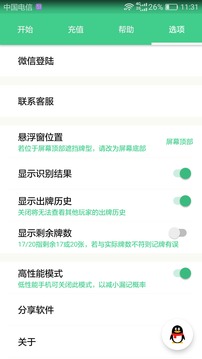
Easy to use card recorder instructions
Card play record interface: records the card play record of the current game; when passing cards, you can see the clear cards of the passing players; when the tractor is dealing cards quickly, you can directly see all the cards in your hand; users can hide this interface or not display their own card play records.
Remaining card interface (main interface): Count the types of cards in the hands of other players (excluding the cards in your own hand, the cards played by everyone, and the cards you can see), so that you know what other cards are out there. The big king is represented by Z, and the small king is represented by F.
Auxiliary statistics interface: Helps players count important information besides recording cards, such as how many points are left outside, which cards have not been played by other players, the unique card situation of upgrading [Tractor], etc. Depending on the game, the auxiliary information display content is also different.
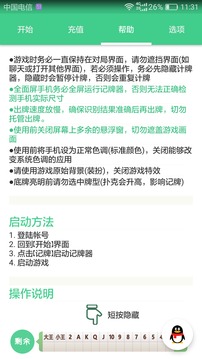
Things to note when using a card recorder
This tool is a pure green auxiliary application. This application does not have the function of modifying or tampering with in-game data or damaging the game. The application is only designed to assist players in the game, making it more convenient and easier to play the game.
This tool is a green auxiliary application for chess and card games. It can help players record the cards played by each player and automatically count the cards that have not been played except for themselves. Users can also achieve the same effect using paper and pen.
Frequently Asked Questions about Easy to Use Card Recorder
Question: What should I do if the signboard floating window is not displayed?
Answer: 1) Settings (or Mobile Manager) - Permission Management (or Security Center/Security and Privacy) - Floating Window Management - Automatic Card Counter - Allow
2) OPPO mobile phone: Mobile phone manager-application permission management-automatic card recorder-display floating window-allow
3) VIVO mobile phone: iButler-Software Management-Floating Window Management-Automatic Card Counter-Allow
Q: What are the functions of virtual key mode and advanced settings?
Answer: Please turn off this function when the phone can play full-screen games. If it is in half-screen mode or is affected by virtual keys, you can try to enable this function. Advanced settings can automatically detect the game screen area. The default is off.
Q: Why does the card recorder automatically shut down or restart?
Answer: If abnormal phenomena occur during use of the card recorder, such as automatic shutdown, automatic restart, etc., please try to lock the card recorder in recent tasks; add the card recorder to the automatic cleaning whitelist of the system mobile phone manager; turn off the power saving mode and allow the card recorder to keep running when it consumes high power in the battery options
Comparison of similar software
I love card markersIt is an auxiliary card recorder tool for chess and card games. It can help players record the cards that have been played by each player, and automatically count the cards that have not been played except for themselves. Depending on the gameplay, the auxiliary statistical function displays different contents. Currently, I Love Card Recorder supports the latest QQ games, and more game support is being added continuously.
Café de Coral card recorderThe official version is one of the Café de Coral series of card recorders launched by Chess and Cards Home. The free version of the Café de Coral card recorder can record by suit to help users calculate the remaining cards and the cards played by each player. It can automatically detect whether the game is running, and can also automatically display or close the card recorder interface. Café de Coral’s card recorder is one of the essential auxiliary tools for chess and card game players and a good helper for chess and card game players.
Huajun editor recommends:
It is easy to use the card recorder to record the cards played by each player, count the number of remaining cards, assist players in making decisions about playing cards, increase the chance of winning the game, and experience the fun of the game. , Hungry Kitten, .NET, and Batch Butler are also good software and are recommended for students to download and use.
Version: 5.0.1 | Update time: 2025-11-05
Similar recommendations







Latest updates





How to back up the Flash Wizard - How to back up the Flash Wizard
How to clear the cache of Movie Paradise? -How to clear the cache of Movie Paradise
How to check the privacy policy of Movie Paradise? -How to view the privacy policy of Movie Paradise
How to give feedback on Movie Paradise? -How to give feedback to Movie Paradise
How to give feedback on Movie Paradise? -How to give feedback to Movie Paradise
How to check the user agreement of Movie Paradise? -How to view the user agreement in Movie Paradise
Reviews on useful card recorders
-
1st floor Huajun netizen 2022-01-23 00:46:19I love this easy-to-use card recorder. It downloads very quickly! !
-
2nd floor Huajun netizen 2022-02-19 19:24:04Easy to use card recorder. The gameplay and plot are excellent.
-
3rd floor Huajun netizen 2022-03-07 01:50:11A masterpiece of easy-to-use card recording equipment! ! Like it very much~
Recommended products




- Diablo game tool collection
- Group purchasing software collection area
- p2p seed search artifact download-P2P seed search artifact special topic
- adobe software encyclopedia - adobe full range of software downloads - adobe software downloads
- Safe Internet Encyclopedia
- Browser PC version download-browser download collection
- Diablo 3 game collection
- Anxin Quote Software
- Which Key Wizard software is better? Key Wizard software collection




