How to uninstall the One-Click Restore Wizard - Steps to uninstall the One-Click Restore Wizard
Time: 2021-01-06Source: Huajun Software TutorialAuthor: dim sum
How to uninstall the one-click restore wizard? Some friends may not know yet, so today I will bring you the steps to uninstall the one-click restore wizard. Friends who don’t know yet can come and learn.
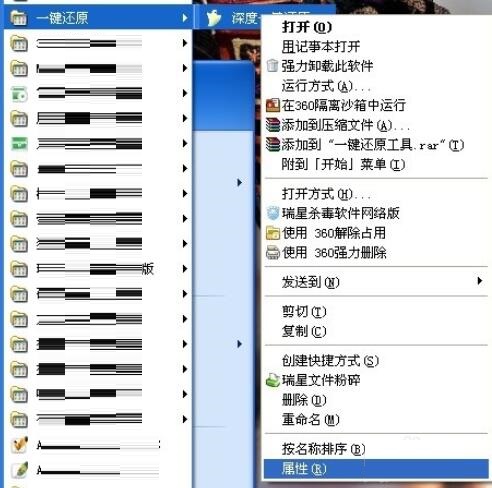
Start - All Programs - "One-key Restore" - Right-click "Deep One-key Restore" - Click Properties
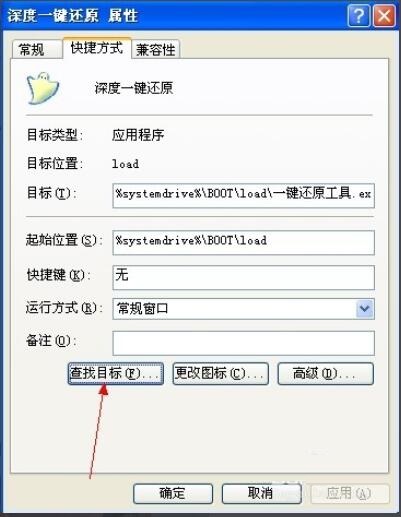
In the window that comes out, click: Shortcut - Find Target
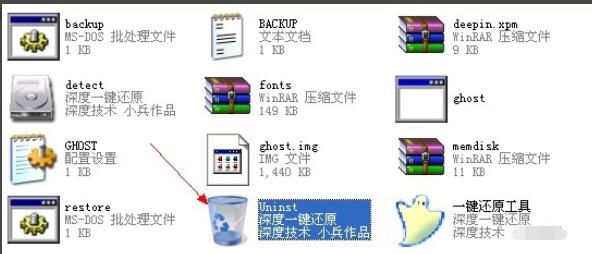
Find its location and see if Uninst is there. This is the uninstalled program. Click on it to uninstall the broken one-click restore program. The same goes for other programs, one-stop service.
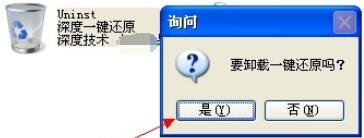
Start - All Programs - "One Key Restore" - Right click on "Deep One Key Restore" - Delete its shortcut.
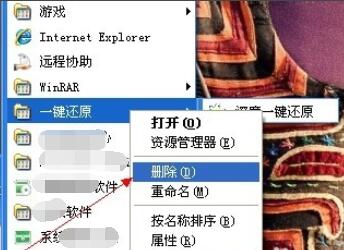
The above are the steps for uninstalling the one-click restore wizard brought by the editor. I hope it can help you.
Popular recommendations
-
-
Cloud backup client KLS IceArchiver
Version: v1.1.0.3Size: 14.70 MB
The latest version of the cloud backup client KLSIceArchiver is a cloud backup software. Cloud backup client KLS
IceArchiver official version can efficiently prepare...
-
ghost64
Version: 12.0.0.4112 official versionSize: 40.24MB
The official version is a well-known hard disk software. Symantec can copy all the contents on one disk to another disk, and it can also...
-
-
Shadow system Shadow Defender
Version: 1.5.0.726Size: 2.94 MB
The latest version of Shadow System ShadowDefender is a compact and powerful system restoration software. Shadow system Shadow
Defender official...