How to add LAN friends in FeiQ
Time: 2019-11-13Source: Huajun Software TutorialAuthor: Shaobing
FeiQ, an instant messaging software, is very popular, and LAN transmission is very convenient. So how to add LAN friends in FeiQ? Below I will share the steps for adding LAN friends on FeiQ. I hope it will be helpful to you.
Start FeiQ software.

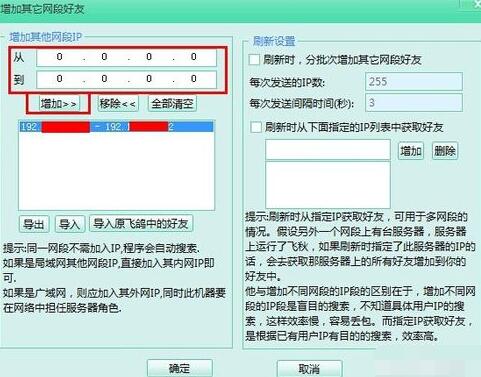
In the friend list, right-click and select "Add friends from other network segments" in the drop-down menu.

In the Add Network Segment interface that opens, you can manually enter the IP address segment and click Add.
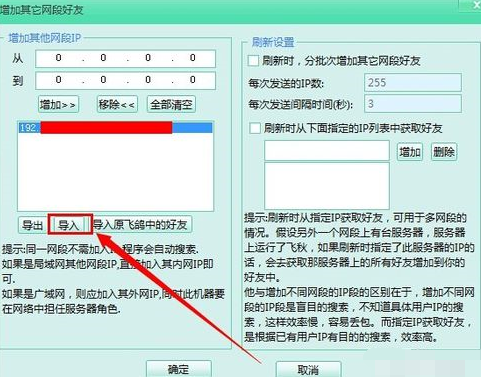
You can click "Import" to quickly import a large amount of network segment information.
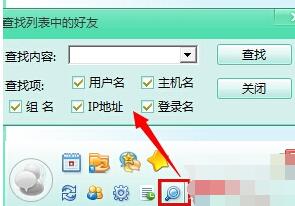
Click Search at the bottom of the main interface to search for your friends.
In the friend list, right-click and select "New Group" from the drop-down menu to group friends.

The above article explains the steps for adding LAN friends in FeiQ. I hope friends in need can learn from it.
Popular recommendations
-
soft sky community
Version: 0.2.12Size: 82.81 MB
Soft Sky Community Software is a comprehensive platform that integrates resource sharing, community interaction, game downloading and management. As an independent software, it...
-
FeiQ
Version: 3.0.0.2 latest versionSize: 17.44MB
, is a free instant tool for downloading. The Feiqiu chat tool suitable for LAN also has the basic, file sharing, and other functions supported by QQ, only...
-
Enterprise WeChat
Version: 5.0.0.8002Size: 532.80 MB
WeChat windows platform chat OA enterprise WeChat software FAQs
The administrator logs in to the management background [Application Management-Punch-Clock-Punch-in and Off-duty-Settings...
-
Enterprise WeChat
Version: 5.0.0.8002Size: 526.67 MB
The PC version of WeChat Enterprise is a social networking tool created by Tencent for corporate office use. It has a similar concept to DingTalk. Enterprise WeChat integrates announcements, exams...
-
Enterprise WeChat
Version: 5.0.0.8002Size: 532.80 MB
The PC version of Enterprise WeChat is a professional office management tool specially created by Tencent for enterprises. Enterprise WeChat interoperates with WeChat messages, mini programs, WeChat payment, etc., providing...