Hot search terms: 360 Security Guard Office365 360 browser WPS Office iQiyi Huawei Cloud Market Tencent Cloud Store
Hot search terms: 360 Security Guard Office365 360 browser WPS Office iQiyi Huawei Cloud Market Tencent Cloud Store

FTP tool Storage: 11.81MB Time: 2022-11-04
Software introduction: FileZilla is a fast and free cross-platform FTP software, a practical and multi-functional FTP client with an intuitive interface. Although it is free software...
FileZilla is a fast and free cross-platform FTP software, a practical and multi-functional FTP client with an intuitive interface. Sometimes when using the ftp tool to connect, there will be a failure to read the directory. How to solve it? The editor will teach you below.
1. Check whether filezilla's transfer mode is passive, and if it is passive, set it to default or active
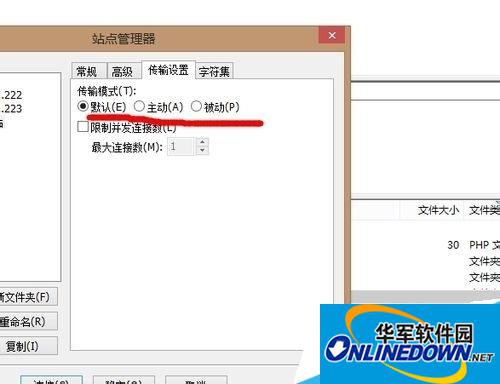
2. This operation step is File---》Site Management

3. If other machines can connect, this machine fails or makes an error.
4. Confirm the reason for turning on the firewall
If it doesn’t work, restart the computer
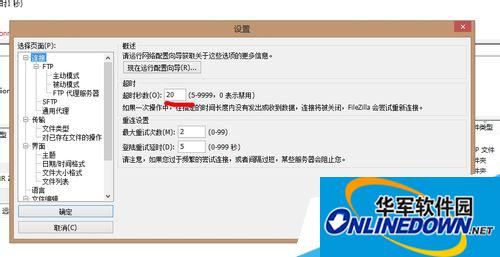
Network instability causes connection timeout
Sometimes the network is unstable or the server is unstable, causing the connection to time out. You can set the timeout, as shown below, edit -----》Settings

 Microsoft Edge browser
 Steam
Steam
 Tencent Video
 WPS Office
 iQiyi
iQiyi
 Sohu video player
 Lightning simulator
 MuMu emulator
 Eggman Party
 What to do if there is no sound after reinstalling the computer system - Driver Wizard Tutorial
 How to switch accounts in WPS Office 2019-How to switch accounts in WPS Office 2019
 How to clear the cache of Google Chrome - How to clear the cache of Google Chrome
 How to fire bullets in scratch-How to fire bullets in scratch