
-
Wolfram|Alpha
- Size: 0.1M
- Language: Simplified Chinese
- Category: Network assistance
- System: winall






Wolfram|Alpha official version is a plug-in tool suitable for Chrome browsers. The latest version of Wolfram|Alpha plug-in can help users query professional knowledge in finance, food, mathematics, medicine, stocks, spacecraft, word games, weather and other related fields. After installing the Wolfram|Alpha plug-in, users can search for professional knowledge on the web page.
Wolfram|Alpha development background
Although the amount of information on the Internet is currently very large, users must use a fast search method to find the knowledge they want in such a large Internet database. Common search engines such as Google and Baidu have become deeply rooted in people's hearts and have become the first entry point for people to access the Internet. When users use these search engines, most of them need to enter the homepage of the search engine before they can continue searching. If the user encounters related professional problems while browsing the web and does not want to open a new web page, he or she needs to install a Chrome plug-in in Google Chrome to solve the problem.
Introduction to the Wolfram|Alpha plug-in
The official version of Wolfram|Alpha is a search engine plug-in that can help users search for professional issues in multiple fields. The official version of the Wolfram|Alpha plug-in can help users search for professional knowledge in finance, food, mathematics, medicine, stocks, spacecraft, word games, weather and other related fields. Users have installed W in Chrome In the future, the olfram|Alpha plug-in can quickly search for professional questions provided on the web page without opening a new tab. The search results will be displayed to the user in real time in a pop-up window. The Wolfram|Alpha plug-in can not only quickly help users find the answers they want, but also help users in a silent way without interrupting the user's current reading.
Wolfram|Alpha installation method
1. First, the user clicks the Customize and Control button in the upper right corner of the browser, selects more tool options in the drop-down box, and then clicks on the extension to enter the Chrome browser's extension manager page.

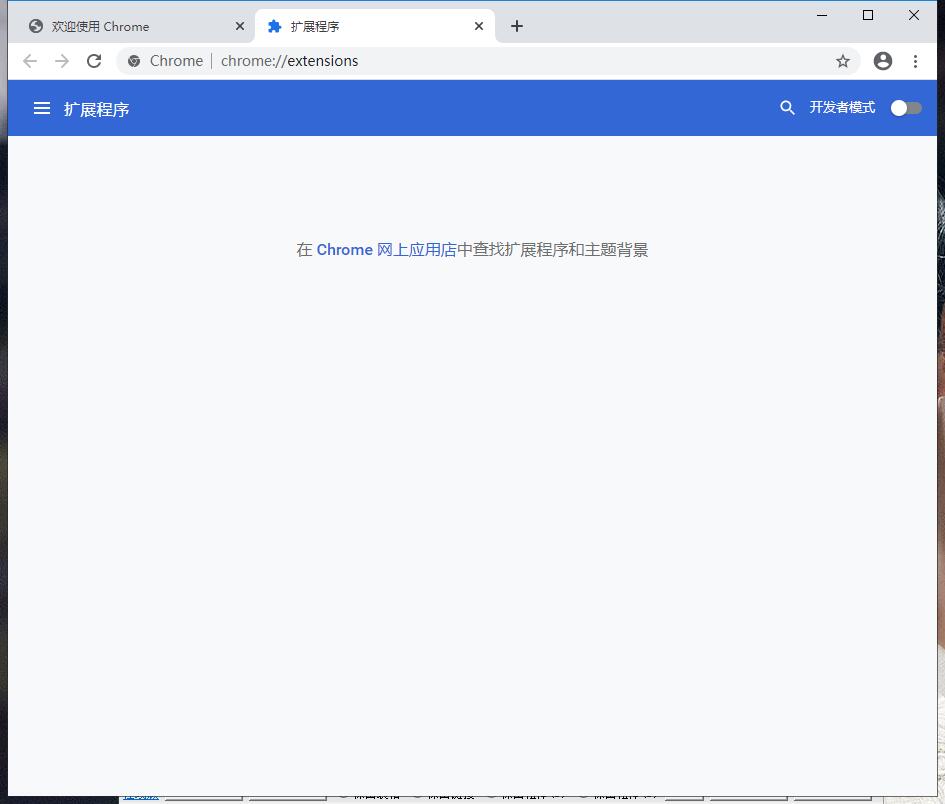
2. In the extension manager of the opened Google Chrome, the user can see some installed Chrome plug-ins, or there is no Chrome plug-in at all.
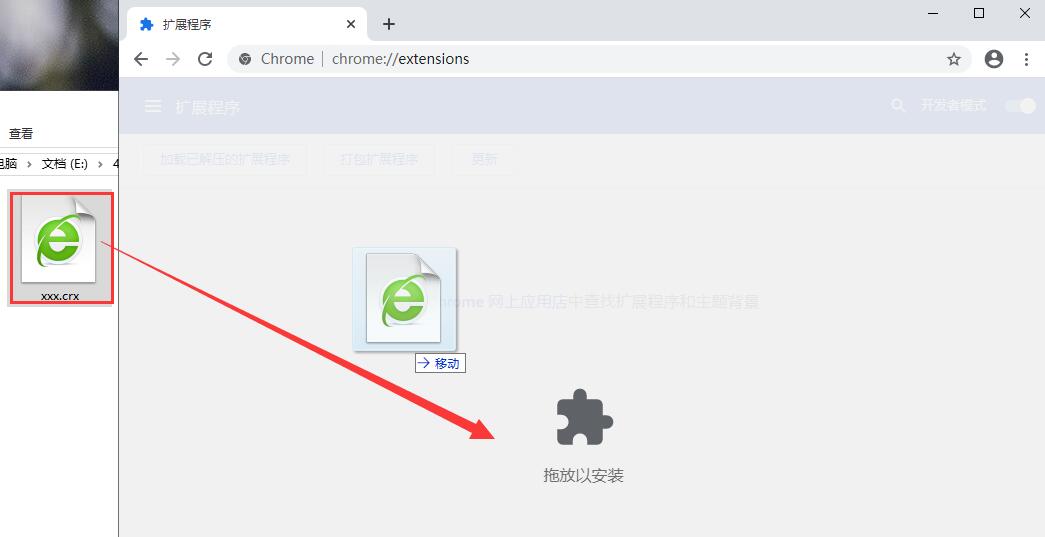
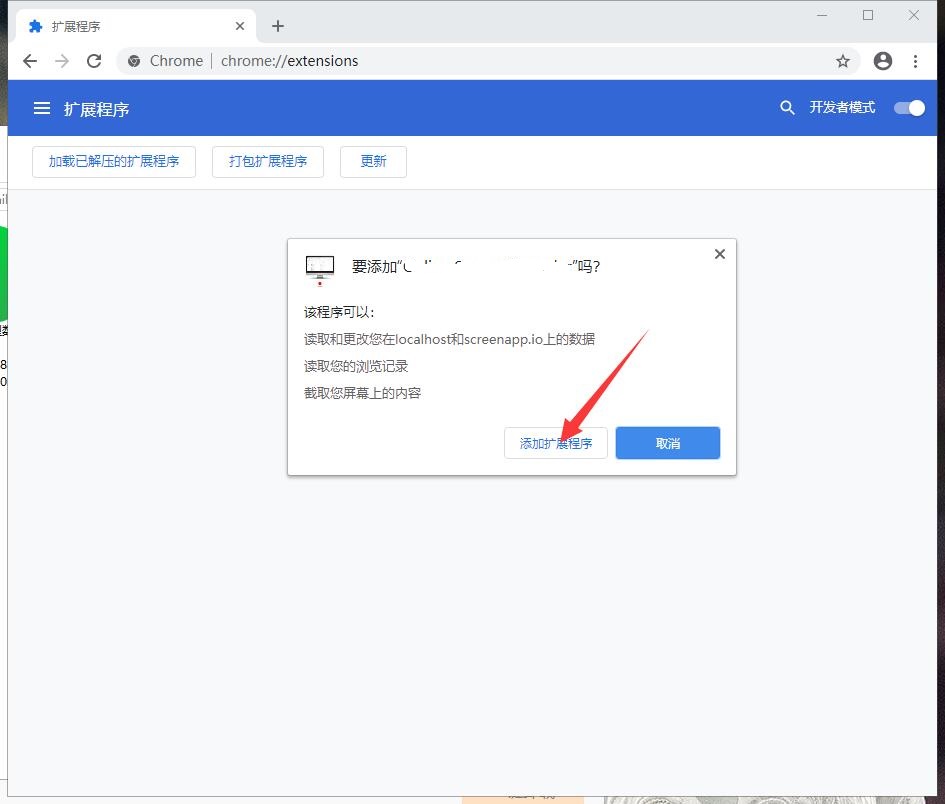
3. Find the Chrome offline installation file xxx.crx that you have downloaded, and then drag it from the resource manager to Chrome's extension management interface. At this time, the browser will prompt you to "Add xxx"? We click "Add Extension" to successfully install the plug-in.
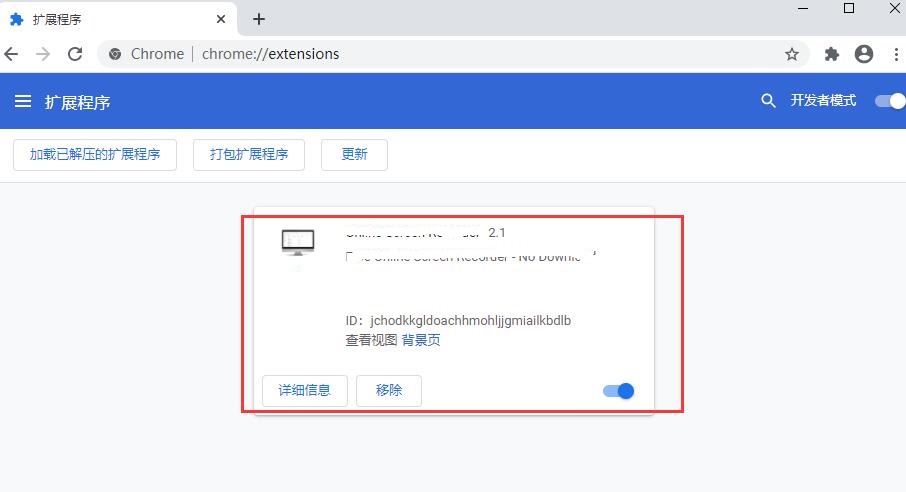
4. It shows that the plug-in has been successfully installed. Click "Remove" to uninstall, which is quite simple.
How to use Wolfram|Alpha
1. Download and install the official version of Wolfram|Alpha plug-in in Google Chrome, and click the start button in the list of Chrome extension manager to start the search function.
2. Open a webpage that needs to solve the problem, and click the Wolfram|Alpha plug-in button in the upper right corner of the Chrome browser to launch the search function pop-up window.
3. Enter the question you want to query in the search box provided in the search window and click the search button on the right side of the search box.
4. Find the answer you want in the search results page.
5. Users can also search for problems encountered on the web page through the right-click menu provided by the Wolfram|Alpha plug-in.
6. When the Wolfram|Alpha plug-in is not needed, right-click the Wolfram|Alpha plug-in button in the upper right corner of the browser to pop up the page to disable the button and click it.
Wolfram|Alpha update log
1. Sweep the bug out and carry it out to the end
2. The most stable version ever
Huajun editor recommends:
Wolfram|Alpha software feels really good! The editor specially tested it for this purpose, and it is really great to use. Number Cube, Desktop Taobao, Cloud Manager, etc. are all very good software tested by the editor. Come and choose the one that suits you!
Version: 1.0 official version | Update time: 2024-12-30
Similar recommendations






Latest updates





Wolfram|Alpha Review
-
1st floor Huajun netizen 2020-12-13 22:21:20Wolfram|Alpha is awesome! 100 million likes! ! !
-
2nd floor Huajun netizen 2021-08-24 17:31:27The overall feeling of Wolfram|Alpha is good and I am quite satisfied with it. The installation and operation are very smooth! It went very smoothly following the installation step-by-step guide!
-
3rd floor Huajun netizen 2022-01-23 09:39:14Wolfram|Alpha is comprehensive and easy to use.
Recommended products
-

Tianyifei young campus client
-

P2P terminator
-

Baidu Shangqiao
-

578010wifi password viewer
-

Yiyiyun mobile phone verification software
-

Agricultural Bank of China Online Banking Assistant
-
Agricultural Bank of China Online Banking Assistant
-
Agricultural Bank of China Online Banking Assistant
-

inSSIDer
-

Cheetah free WIFI
- Diablo game tool collection
- Group purchasing software collection area
- p2p seed search artifact download-P2P seed search artifact special topic
- adobe software encyclopedia - adobe full range of software downloads - adobe software downloads
- Safe Internet Encyclopedia
- Browser PC version download-browser download collection
- Diablo 3 game collection
- Anxin Quote Software
- Which Key Wizard software is better? Key Wizard software collection




