
-
Everbright Securities Golden Sunshine Excellent Edition
- Size: 130.97M
- Language: Simplified Chinese
- Category: Stock trading software
- System: Winall






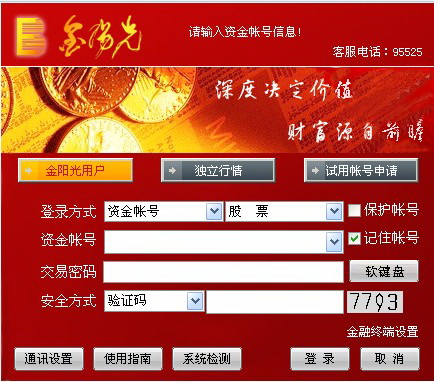
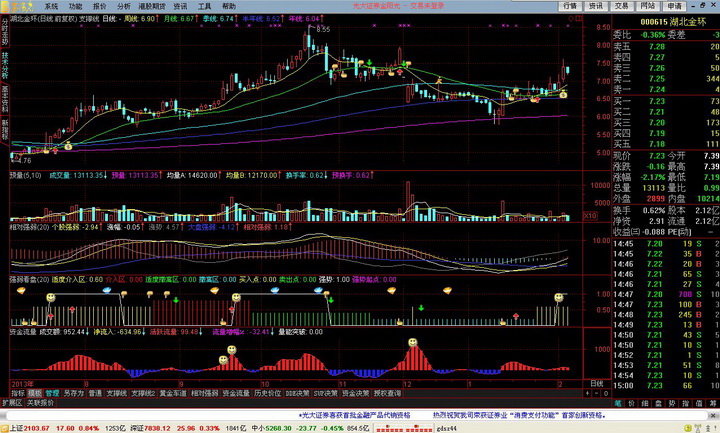
Everbright Securities Golden Sunshine Excellent EditionIt is provided by securities companies for the majority of investors and is currently the most mainstream in the market.Tong Da Xinversion of market trading software. Everbright Securities Golden Sunshine Excellent Edition is a comprehensive securities investment that integrates [Stock Market Quotes], [Quick Trading] and [Investment Information].financial managementThe platform supports margin trading and securities lending business and mobile certificate entrustment method login, and provides non-shareholding reduction and performance forecasts of listed companies,FuturesMarket and delayed Hong Kong stock market data. Huajun Software Park provides downloads of Everbright Securities trading software. If you are interested, come and take a look.

Instructions for use of Everbright Securities Golden Sunshine Excellent Edition
How to find quasi-trading limit stocks:
1. Hot spotsstocksThe distinctive feature of the continued climb is that it is attached to high-quality short-term hot themes.
2. Before the launch of the GEM, individual stocks in the venture capital sector and the small and medium-sized board, especially those new stocks with relatively small circulating capital, such as Shilian Holdings, as well as leaders in the venture capital field such as Dazhong Public Utilities and Lihe Holdings, etc., had shown a strong momentum of continuous rise.
3. The country’s strong support for the development of new energy has undoubtedly injected a boost in premium expectations for relevant stocks.
4. International gold futures have repeatedly reached new highs. However, when investors get involved in such stocks, they need to keep in mind the essence of "short, flat, and fast" operations and have a deep understanding of the coexistence of risks and returns. Such stocks tend to fluctuate with the fluctuations of the futures market. Therefore, when participating in investment, be sure to be fully prepared to stop losses.
5. Reorganization, as the most fascinating and enduring theme in the Chinese stock market, is not only a magical incubator for the ugly duckling to transform into a white swan, but also the source of market vitality and opportunities.
Everbright Securities Golden Sunshine Excellent Edition shortcut keys
Everbright Securities Golden Sunshine Online Commission SoftwareShortcut keysThe design is very comprehensive and divided into four categories to make the user's operation more convenient and efficient.
First, there are the categories of numeric keys, including 1, 61, 81, 10, 91, etc. These shortcut keys directly correspond to specific functions without cumbersome operations.
Next is the click series keys, such as .101, .201 to .909, etc., which provide users with a series of rich click functions, allowing users to quickly locate when needed.
The function keys cover common keys such as F1 to F12, space bar, minus key, TAB, etc. These keys can be used in different combinations to implement various functions such as restoring and restoring before switching (Ctrl+V), system settings (Ctrl+D), and quickly entering the main order (Ctrl+J).
In addition, key combinations are also a highlight of the Everbright Securities Golden Sunshine online commission software, such as Ctrl+V, Alt+1, Ctrl+Z, etc., which realize more complex and powerful functions through the combination of different keys on the keyboard, such as adding to a board (Ctrl+Z) or deleting from a board (Shift+Ctrl+Z).
In the time-sharing chart or analysis chart interface, users can use Ctrl+W to perform interval statistics on this screen, use Ctrl+M to enter the multi-stock interface according to the current stock collection, and use Ctrl+O to overlay stocks and Ctrl+G to delete the overlay. At the same time, Ctrl+J can quickly enter the main large order interface, and press it again to return.
In order to further enhance the user's operating experience, Everbright Securities Golden Sunshine Online Commission Software also provides a wealth of quick ranking and popular sector analysis functions, which users can easily achieve by simply tapping a series of keys ranging from .202 to .226 or .400. In addition, users can also customize the layout according to their own needs and quickly switch through the dot series keys from .001 to .099.
During the browsing process of financial information and information mines, users can quickly switch between the title area and the content area by continuously pressing the Enter key or double-clicking the mouse. At the same time, the new version also supports a variety of new functions such as 16 (information mines), 18 (share reform information), 19 (investment diary), etc.
For advanced functions such as line drawing tools, conditional stock selection, and full-screen display, Everbright Securities Golden Sunshine Online Commission Software also provides corresponding shortcut key support. For example, users can use Alt+F12 to start the line drawing tool, use .905 or Ctrl+T for conditional stock selection, and use Ctrl+P to switch between full screen and non-full screen, etc.
In addition, the software also supports market-wide growth rankings and comprehensive rankings (shortcut keys 67 and 87), as well as advanced functions such as Atl+numeric keys to switch multi-day time-sharing charts on the trend chart screen, and the number of sub-windows on the analysis chart screen. At the same time, the TAB key can switch market information and financial information on the market quotation screen, switch the morning and afternoon halves on the time-sharing chart screen, and superimpose or delete the superimposed moving average on the analysis chart screen, which also greatly improves the user's operating efficiency.
Finally, for users of version 5.51 or above, the software also provides support for new shortcut keys such as 30 (switching related stocks), 31 (financial abacus), 32 (personal finance), etc. At the same time, Ctrl+Q (new version) allows users to mark a certain stock with text information, while Ctrl+Tab can quickly switch between multiple open windows.
Everbright Securities Golden Sunshine Excellent Edition Frequently Asked Questions
Q: How to uninstallEverbright SecuritiesGolden Sunshine Excellent Edition software?
Answer: Method 1: Install and open the computer housekeeper software, select the software management option, click the uninstall option, find the Everbright Securities Golden Sunshine Excellent Edition software in the list, and click to uninstall.
Method 2: Install and open 360 Software Manager, find Everbright Securities Golden Sunshine Excellent Edition software in the list of uninstall options, and click to uninstall.
Everbright Securities Software Features
1. After Everbright Gold Sunshine Securities is successfully downloaded, it can provide data on the size of listed companies, non-reductions and performance forecasts, futures prices and delayed Hong Kong stock prices;
2. Support margin trading and securities lending business and mobile certificate entrustment method login;
3. Provide core reports, hold small meetings, expert online services, and provide personalized investment portfolios and other service methods.
4. Provide investment guidance, investment management and other comprehensive investment secretarial services.
Everbright Securities software installation method
1. After downloading Everbright Securities Golden Sunshine Excellent Edition from this site, get an .exe file locally on your computer. Double-click the .exe file to enter the software installation program interface. Click [Next] to install the software.
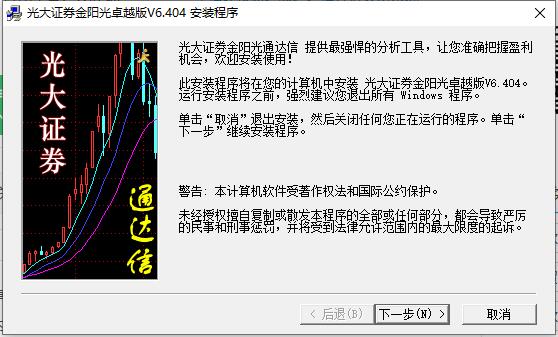
2. Just wait patiently for the installation of Everbright Securities Golden Sunshine Excellent Edition to be completed.
Everbright Securities software usage
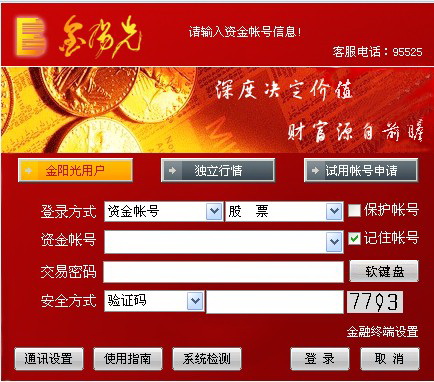
1. Double-click the shortcut of Everbright Securities Golden Sunshine Excellent Edition to open the software. You need to enter your account to log in to the software. If you do not have an account, click [Application for Trial Account].
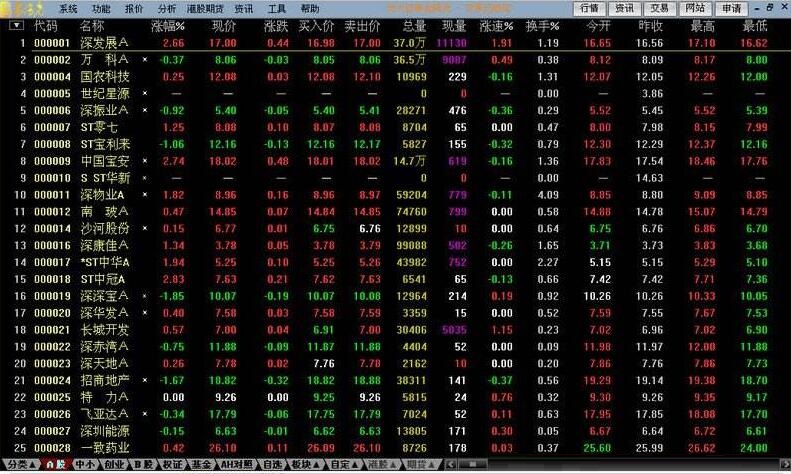
2. After logging in to Everbright Securities Golden Sunshine Excellent Edition software, you can see stock information, and you can click on the categories at the bottom to select different categories.
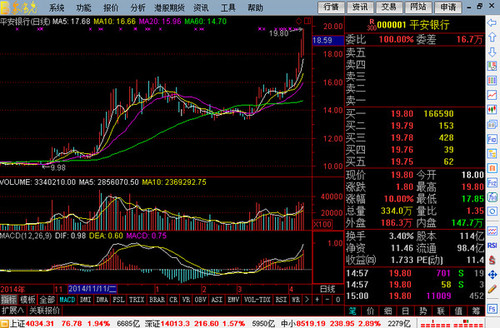
3. Click on one of the stocks to enter the detailed interface of detailed stock information.
FAQ
Forgot password
Problem description: The user has forgotten the login password or transaction password of the software.
Solution:
Try using the software's password retrieval function to reset your password.
If you cannot retrieve it, you can contact Everbright Securities customer service support to reset or unlock the password.
Software interface problem
Problem description: The software interface displays abnormally, such as blurred fonts, disordered layout, etc.
Solution:
Adjust the computer screen resolution and display settings to ensure that the software interface can be displayed normally.
Check the interface options in the software settings to make sure no wrong display parameters are set.
Everbright Securities Software Update Log
Supports Everbright Securities software to download the 5 real-time quotes of Southbound Trading
Support Everbright Gold Sunshine Securities to download information on margin trading, quotation repurchase, fund intelligent fixed investment business, cash treasure business, B to H business, delisting board business and other information.
Huajun editor recommends:
Everbright Securities Golden Sunshine Excellent Edition is a comprehensive securities investment and financial management platform that integrates [Stock Market Quotes], [Quick Trading] and [Investment Information]. It provides data on the size of listed companies, non-holding reductions and performance forecasts, futures quotes, and delayed Hong Kong stock quotes. In addition, this site also has software such as Pay Bar, Today's Target, and Hanwang Attendance Management System. Welcome to download from Huajun Software Park!
Version: 7.76 | Update time: 2025-10-23
Similar recommendations






Latest updates





Everbright Securities Golden Sunshine Excellent Edition Review
-
1st floor Huajun netizen 2021-06-10 16:22:38The interface design of Everbright Securities Golden Sunshine Excellent Edition is easy to use and has rich functions. I highly recommend it!
-
2nd floor Huajun netizen 2017-10-23 11:09:56Everbright Securities Golden Sunshine Excellent Edition software is very easy to use, the download speed is very fast, and it is very convenient!
-
3rd floor Huajun netizen 2018-08-19 11:33:25Everbright Securities Golden Sunshine Excellent Edition is super awesome! 100 million likes! ! !
Recommended products
-

Xiangcai Securities Jinhe Financial Analysis Terminal
-

Luzheng Futures Boyi Master
-

Guojin Securities Xeon Edition
-

PhD of Haitong Securities Shenzhen Fuhua 3rd Road Securities Sales Department
-

Tongdaxin Financial Terminal
-

Wenhua Finance
-

China Galaxy Securities Neptune Edition
-

Boyi Master
-
Everbright Securities Golden Sunshine Excellent Edition
-

Shenwan Hongyuan Securities
- Diablo game tool collection
- Group purchasing software collection area
- p2p seed search artifact download-P2P seed search artifact special topic
- adobe software encyclopedia - adobe full range of software downloads - adobe software downloads
- Safe Internet Encyclopedia
- Browser PC version download-browser download collection
- Diablo 3 game collection
- Anxin Quote Software
- Which Key Wizard software is better? Key Wizard software collection




