
-
CCTV
- Size: 115.2M
- Language: Simplified Chinese
- Category: Video playback
- System: Win All
- Manufacturer:China Central Radio and Television











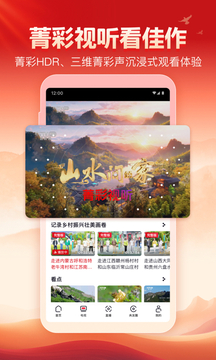
CCTVis made ofcentralA comprehensive audio-visual program launched by China Radio and Television Station based on new technologies such as 5G+4K/8K+AInew mediaThe flagship platform is also China’s first national-level 5G new media platform. Since its official launch on November 20, 2019,CCTVWith its rich program resources and advanced technological advantages, it has quickly become the most popular video social media platform among users.Relying on 5G and 4K/8K technology to present high-definition live broadcast. It aggregates all channels of CCTV and local satellite TV, "News Network" and other classic replays and popular events, and supports split-screen/picture-in-picture multi-content viewing at the same time. Adapted to keyboard shortcut operations, including program list query, appointment reminder and background playback functions, the interface is simple and ad-free, allowing authoritative information and diverse excitement to be smoothly presented on the big screen.

Features of CCTV PC version software
Authoritative current affairs content: Provides domestic and foreign current affairs news information, allowing users to understand world events at the first time.
Live broadcast of popular events: Covers live broadcasts of popular sports events such as the Chinese Super League and the five major leagues to meet the viewing needs of sports fans.
Watch back classic plays: It gathers "Animal World", "World Football", "Aerial China", "Bite of Tongue" and countless other popular new and old shows. Users can watch back classic plays at any time.
Pan-style, pan-information, pan-knowledge content: Provides rich entertainment, animation, film and television content, as well as exclusive videos created for CCTV by well-known anchors, reporters, editors and directors and other "celebrities" of the station.

CCTV PC version software functions
Multi-channel live broadcast and review: The PC version of CCTV aggregates live TV programs from more than 30 channels of CCTV and local satellite TVs. Users can watch various programs in real time. At the same time, the software also supports the live broadcast playback function, so users can miss the live broadcast time and watch the exciting content back.
High-definition picture quality experience: With the help of 5G and 4K/8K technology, CCTV PC version provides ultra-high-definition picture quality, allowing users to enjoy a clear and delicate visual feast whether it is a small mobile phone screen or a large projection screen.
Personalized recommendations: The PC version of CCTV uses big data on user behavior and program evaluation data to make personalized intelligent recommendations, ensuring that each user can find content that meets their interests and needs.
Social interaction function: CCTV PC version is positioned as a video social media. Users can follow their favorite accounts, participate in interactive comments, share opinions and feelings, and communicate with like-minded people.
Multi-terminal simultaneous viewing: The PC version of CCTV supports multi-terminal simultaneous viewing. Users can log in to their accounts on mobile phones, tablets, TVs and other devices to watch their favorite programs anytime and anywhere.
Intelligent voice and search: The PC version of CCTV has an intelligent voice recognition function that can automatically recognize and convert voice content. At the same time, the software also provides a powerful search function so that users can easily find content of interest.

Features of CCTV PC version software
Advanced architectural design: The PC version of CCTV adopts an advanced "large, medium and small front desk" design, connecting traditional media production links and physical space through cloud services, achieving sharing and interconnection from content data to user data.
Innovative technology applications: CCTV PC version integrates new technologies such as 5G, 4K/8K, and AI to bring users a new audio-visual experience. For example, the application of intelligent speech recognition, virtual anchors, smart tags, smart review and other functions has improved the efficiency of content production and dissemination.

Advanced technology and innovation: Adopting an advanced "large, medium and small front desk" design, and connecting traditional media production links and physical spaces through cloud services, the sharing and interconnection of content data to user data are realized technically and process-wise. It adopts new technologies such as 5G+4K/8K+AI to bring users a new audio-visual experience.
Strong social interaction: Positioned as a high-quality video social media, breaking the traditional single publishing model, combining the existing video advantages of the main station with users’ favorite social methods. Users can follow accounts, participate in topic discussions, and share opinions. The platform implements a commercial-free playback strategy. There are no advertisements during the full playback of feature films, ensuring an instant viewing experience for short videos, live broadcasts and other content.
Covering a wide range of people: The content covers a wide range of age groups, from children to adults, everyone can find programs that suit them. Whether it is animation, documentaries, variety shows, or sports, it can meet the viewing needs of different users.
Multi-terminal simultaneous viewing: Supports multi-terminal simultaneous viewing function. Users can log in to their accounts on mobile phones, tablets, TVs and other devices to watch their favorite programs anytime and anywhere.
How to use CCTV PC version
1. CCTV version short video
As a national-level 5G new media platform under China Central Radio and Television, the recommended content on the homepage of CCTV closely follows current hot topics. If you are a news lover, the current affairs column here can definitely meet your needs accurately - you no longer need to watch the TV and wait for "Xinwen Lianbo", you can get authoritative information in a timely manner by opening the APP, which is convenient and efficient.
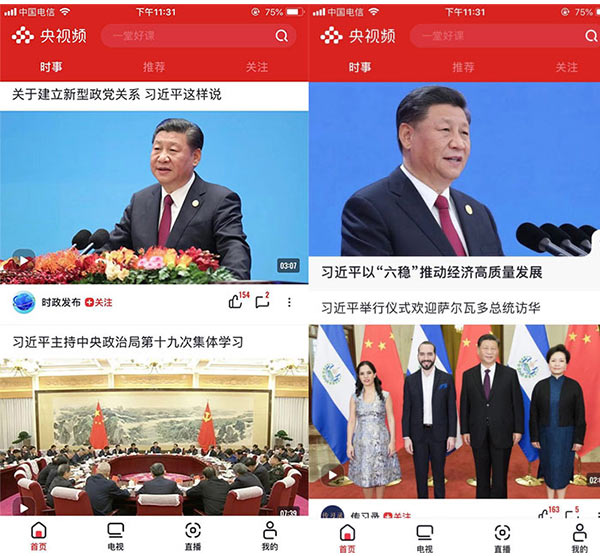
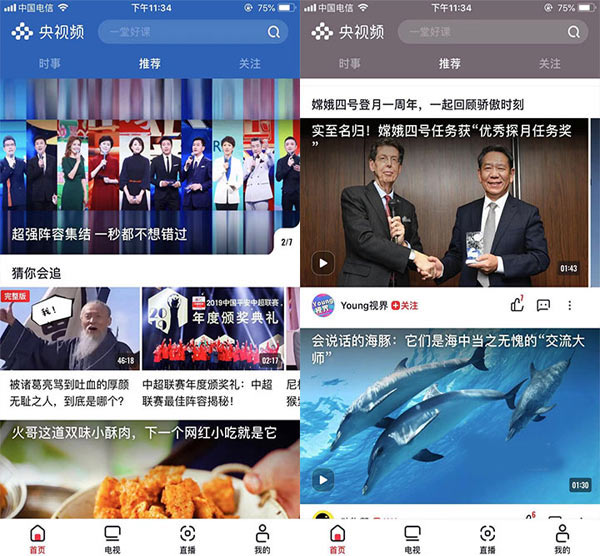
At the same time, the homepage recommendations will intelligently push content based on your interests and preferences, covering information, culture, entertainment and other fields. From current political interpretations to humanistic stories to relaxing entertainment updates, you can always find sections that will impress you. CCTV positions itself as a "high-quality video social media". Just from the columns and content recommended on the homepage, we can see that the quality of its content is always online. It not only maintains the authority of a national platform, but also is close to users for viewing.
2. Free ad-free 4K content, HD live TV
The most "conscientious" highlight of CCTV is that it provides free high-definition live broadcasts - the program source covers all channels of CCTV and many local satellite TVs across the country. You can watch it directly when you open it. There is no advertising interference in the whole process and no additional payment is required.
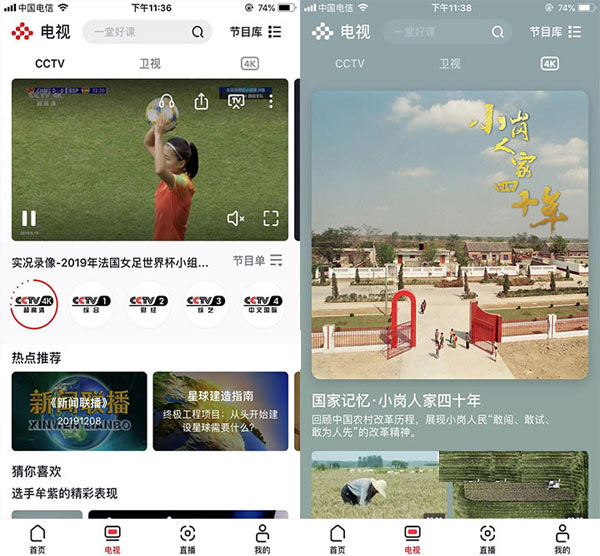
In terms of high-definition content, CCTV has also set up a special 4K area, which includes classic CCTV documentaries such as "Aerial Photography of China" and "If National Treasures Could Talk". The ultra-high-definition picture quality can clearly present every detail in the picture, making the natural scenery and cultural relic textures seem to be right in front of you.
In terms of picture quality, both CCTV channels and local satellite TV are presented in high-definition standards. Compared with similar apps, the picture clarity and smoothness have obvious advantages. In actual use, there is almost no delay or lag in playback; more considerately, all live TV broadcasts support the replay function. Missed news, dramas or variety shows can be rewatched at any time, giving a full experience.

In addition, the playback interface supports one-click screencasting, and can also achieve 4K quality screencasting. Even if there is no IPTV installed at home, as long as your mobile phone and TV are connected to the same network, you can easily enjoy the live broadcast on the big screen by turning on CCTV. This function is particularly practical for home users. It is convenient and worry-free to use. It must be liked!
How to watch TV program replays on CCTV?
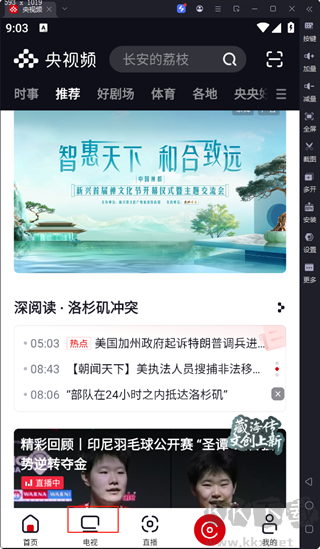
After opening the CCTV APP, click the [TV] option on the bottom navigation bar to enter the live broadcast and playback center that gathers all CCTV channels. Here you can find the content resources of all TV channels.
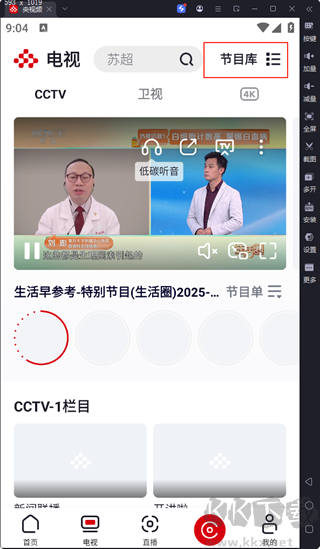
After entering the TV page, select the [Program Library] button in the upper right corner of the screen. The complete past program content of each channel is summarized here, making it easy to find historical columns.
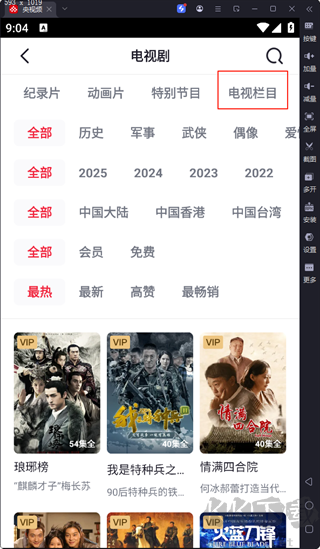
At the top of the program library page, click the [TV Column] classification label to quickly filter out the playback resources of various TV columns and accurately locate the type of content you want to watch.
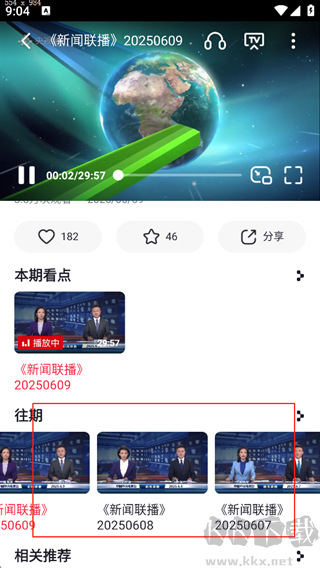
Next, browse the list or search directly to find the target program. Click on the program cover to start playback immediately. There are no advertisements in the whole process, and it also supports high-definition picture quality to watch as you like, so you can easily relive the excitement you missed.
Frequently Asked Questions about CCTV Computer Version
How to watch and replay CCTV
1. Open the CCTV app and use the search function to locate the video you want to watch.Satellite TVprogram orLive broadcastcontent. Taking TV content as an example, users need to click the [TV] option for further operations.
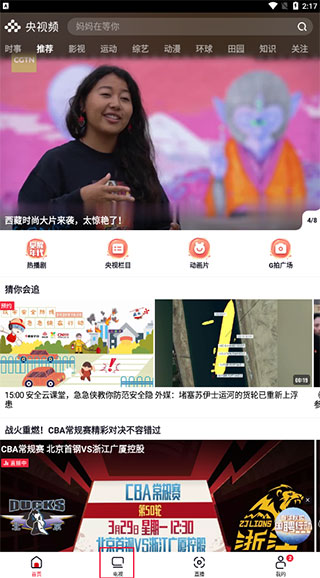
2. Subsequently, the user can slide the interface left and right to browse CCTV channels, or click the option above to switch to the [Satellite TV] channel. Click the [Program List] button to view all program schedules for the currently selected channel.
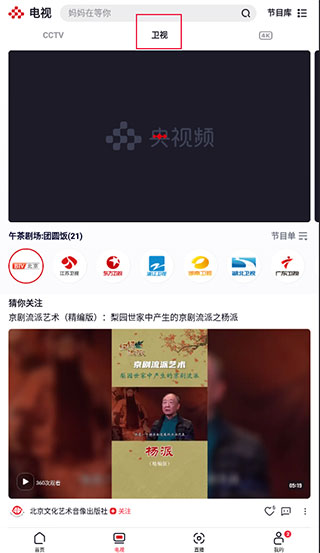
3. In the program list, users need to select the date they want to view the playback, and further locate the time point they want to watch back. After confirming that it is correct, click the [Replay] option to start watching the playback content of the selected program.
Installation steps
Special note: The installation package provided by Huajun Software Park contains Android emulator and softwareAPK file, the computer version needs to install the emulator first, and then install the APK file.
1. First download the installation package from Huajun Software Park. The software package contains an emulator exe installation program and an APK file and unzip them. First click on the exe program to install the emulator.
2. Double-click the "Tencent Mobile Game Assistant.exe" file to enter the installation interface. Users can click "Install" to select the system's default installation address for installation, or click "Custom Installation" to select the installation path. Custom installation is recommended here.
3. Wait for the Tencent Mobile Game Assistant emulator to be installed, and then click "Start Now" to open the emulator.
4. Enter the main interface of the simulator, click the icon in the upper right corner and select the "Local APK Installation" button.
5. In the pop-up window, click the decompressed APK file, and then click Open.
6. Afterwards, the software will enter the installation process. You need to wait for a moment. After the software installation is completed, it will appear in my software list. Click the icon and double-click to open it.






CCTV PC version update log:
1. Su Chao Village is in full swing! Stay tuned to CCTV and let us look forward to it together.
2. Fix some known issues.
Huajun editor recommends:
The editor of CCTV personally tested this software and found that the various functions are very simple and easy to operate. Even a new user like me can quickly master it. I really like it! This site also has similar software .NET, Batch Butler, and Cloud Machine Manager, which we recommend you download!
Version: 3.2.0.25926 | Update time: 2025-11-20
Similar recommendations






Latest updates


CCTV official website online viewing - CCTV web version official website online viewing entrance
How to cancel the account in Kuai Technology? -How to cancel your account in Kuai Technology
How to submit feedback on Kuai Technology? -How to submit feedback on Kuai Technology
How to send a private message to Toutiao today? -How to send private messages to Toutiao today
How to change Toutiao password? -How to change password in Toutiao
How to set the font for Toutiao today? -How to set font in Toutiao
How to register for Toutiao? -How to register for Toutiao
How does Toutiao publish news? -How to publish news in Toutiao today
How to find the cover of Toutiao today? -How to find the cover of Toutiao today
CCTV comments
-
1st floor Huajun netizen 2024-07-06 09:52:07I have been looking for CCTV for a long time and finally found it here!
-
2nd floor Huajun netizen 2024-07-13 02:57:14I couldn’t find CCTV anywhere else, but luckily it’s available here.
-
3rd floor Huajun netizen 2024-07-18 00:47:27A friend recommended me to come here to download CCTV. The website also carefully informed the installation method. Thank you very much to the editor.
Recommended products





- Diablo game tool collection
- Group purchasing software collection area
- p2p seed search artifact download-P2P seed search artifact special topic
- adobe software encyclopedia - adobe full range of software downloads - adobe software downloads
- Safe Internet Encyclopedia
- Browser PC version download-browser download collection
- Diablo 3 game collection
- Anxin Quote Software
- Which Key Wizard software is better? Key Wizard software collection




