
-
Crazy question solving
- Size: 40.7M
- Language: Simplified Chinese
- Category: Education and teaching
- System: win7 and above







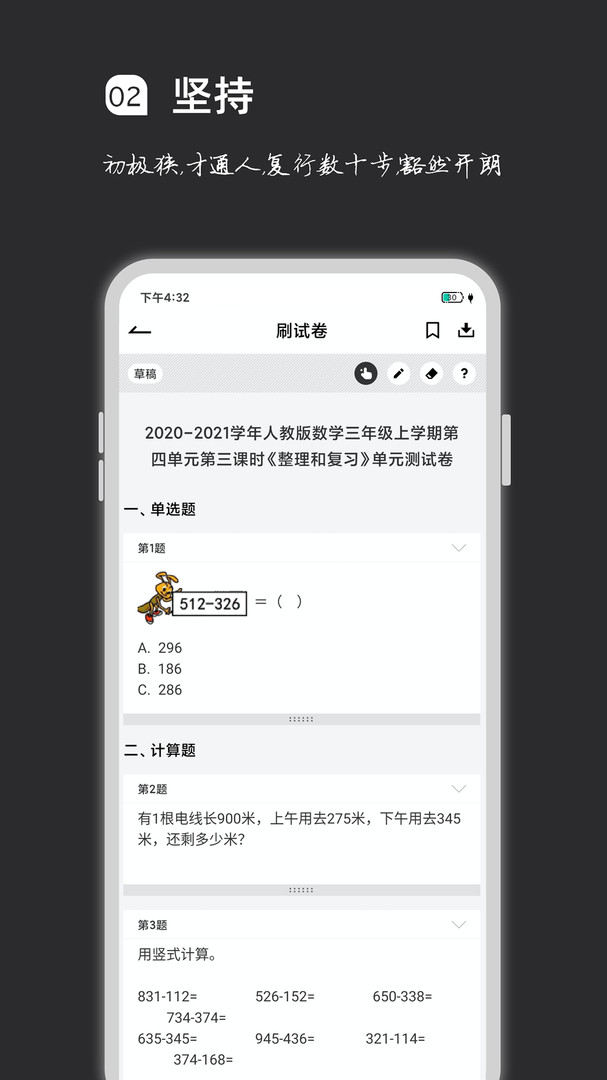
Crazy question solvingSoftware features
1. Question bank coverage for all stages
Multi-disciplinary support: Covers topics in Chinese, mathematics, English, physics, chemistry, biology, politics, history, geography and other subjects, meeting the preparation needs of primary school, junior high school, postgraduate entrance examination, and public entrance examination.
Rich question types: Provide multiple choice questions, true-false questions, multiple-choice questions, fill-in-the-blank questions, short-answer questions and other question types to adapt to different examination requirements.
Region and year filtering: Supports filtering test papers by region (such as Beijing, Shanghai) and year (such as the 2025 college entrance examination questions) to accurately locate target questions.
2. Personalized learning tools
Chapter practice: Freely select textbook chapters, retain practice progress, and facilitate targeted review.
Classification reinforcement: Classify question types (such as multiple-choice questions and judgment questions) for training to strengthen the mastery of special knowledge.
Random question selection: The system randomly generates test papers to avoid fixed question order and improve practice flexibility.
AI analysis and inferences: The VIP function provides AI analysis of questions and recommends similar question types to deepen understanding.
3. Intelligent question management
Automatic recording of wrong questions: The system automatically records wrong questions and generates a wrong question book.
Second brushing of wrong questions: Supports re-practicing wrong questions. Once you have mastered the questions, you can set it to automatically move to the wrong question book to avoid repeated practice.
Wrong question statistics: Analyze the type and frequency of wrong questions to help users locate weak links.
4. Offline and multi-device support
Offline practice: VIP users can cache 3 test papers every day and can practice even when there is no network.
Multi-device management: supports cross-device login on mobile phones, tablets, and computers, and real-time synchronization of learning progress.
Handwriting function: Offline test papers support handwriting annotation, simulating the real answering experience.
5. Community interaction and sharing
Note publishing: Users can upload study notes and share problem-solving ideas and summary of knowledge points.
Follow and interact: Follow other users, like and comment on their notes to form a learning community.
Medal system: Obtain medals by inviting friends or purchasing, which can be used to download test papers or light up social business cards.

Crazy question solvingSoftware function
1. Review questions and practice
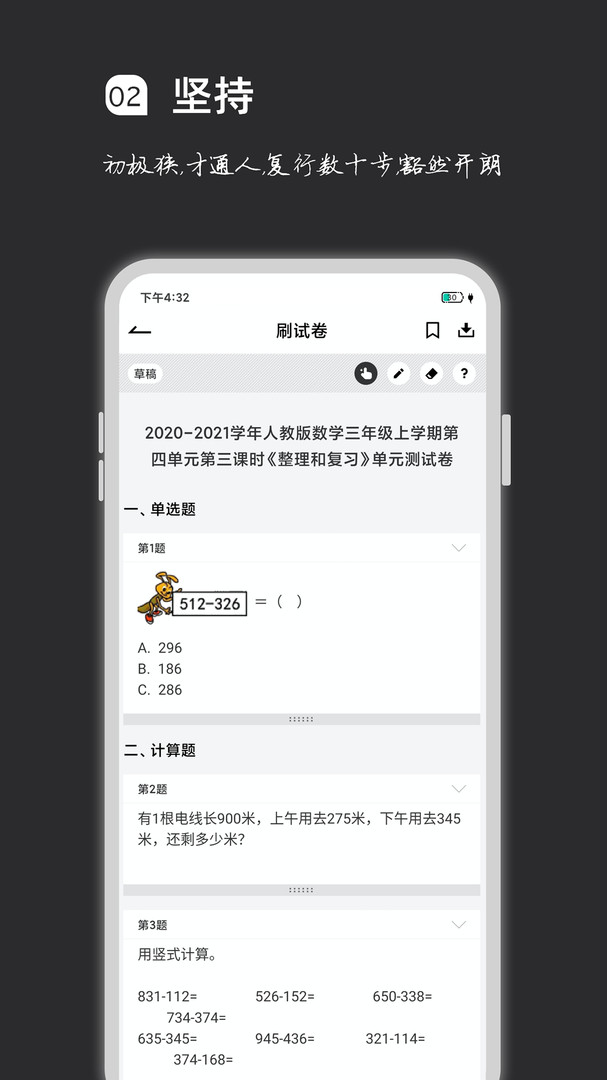
Online practice: Practice questions anytime, anywhere, and support filtering by subject, question type, region, and year.
Mock exams: Provide past papers and mock exam papers, timed and scored, to simulate the real exam environment.
Special exercises: Make special breakthroughs for weak links, such as "the final question of college entrance examination mathematics".
2. Learning Management and Statistics
Learning record: Record the duration, accuracy rate, and incorrect questions of each exercise, and generate a learning report.
Progress tracking: Displays the completion level of chapter exercises to help users plan their study plans.
Performance analysis: Compare historical performance and analyze the reasons for progress and regression.
3. VIP privileges
Offline practice: cache 3 test papers every day, support practice when there is no network.
AI analysis: AI analysis is provided for questions to help understand problem-solving ideas.
Draw inferences from one example: Recommend similar question types to deepen the mastery of knowledge points.
Multi-device management: supports cross-device synchronization and seamless learning progress.
4. Community and resource sharing
Note sharing: Publish study notes and exchange experiences with other users.
Follow and discuss: Pay attention to high-quality users, participate in topic discussions, and solve learning problems.
Resource download: Download selected test papers or notes through medals to improve preparation efficiency.
FAQ
1. VIP and payment
VIP rights: including offline question writing, AI analysis, automatic removal of wrong questions, multi-device management, etc.
Payment method: WeChat, Alipay and other payment methods are supported. The fees are clear and there are no hidden charges.
Refund policy: Refunds are generally not supported after the purchase of virtual goods. It is recommended to consume with caution.
2. Equipment and Compatibility
Equipment Adaptation: Mid-to-high-end equipment can run smoothly. For low-end equipment, it is recommended to lower the image quality or turn off special effects.
Version update: Make sure the software is the latest version to avoid functional abnormalities caused by out-of-date versions.
Network optimization: When latency is high, it is recommended to switch networks or use the VIP offline function.
Installation steps
Special note: The installation package provided by Huajun Software Park contains Android emulator and softwareAPK file, the computer version needs to install the emulator first, and then install the APK file.
1. First download the installation package from Huajun Software Park. The software package contains an emulator exe installation program and an APK file and unzip them. First click on the exe program to install the emulator.

2. Double-click the "Tencent Mobile Game Assistant.exe" file to enter the installation interface. Users can click "Install" to select the system's default installation address for installation, or click "Custom Installation" to select the installation path. Custom installation is recommended here.

3. Wait for the Tencent Mobile Game Assistant emulator to be installed, and then click "Start Now" to open the emulator.

4. Enter the main interface of the simulator, click the icon in the upper right corner and select the "Local APK Installation" button.

5. In the pop-up window, click the decompressed APK file, and then click Open.

6. Afterwards, the software will enter the installation process. You need to wait for a moment. After the software installation is completed, it will appear in my software list. Click the icon and double-click to open it.

Recommended software similar to Crazy Question Brush
1.Learn plus
Xueqi plus app is a comprehensive teaching service platform that truly realizes the Internetization of education. There are various good books and topic methods on the platform. Users can find what they want on it. It is a teaching application that integrates learning, teaching, management, and service. It is seamlessly connected with the PC-side teaching and academic management system to meet the mobile teaching and management needs of higher education institutions to the greatest extent.
Download address:http://softwaredownload4.com/soft/10072044.htm
2.Youdao Premium Course APP
The official version of Youdao Premium Class APP, formerly known as Youdao Academy, is an online classroom application produced by NetEase Youdao. Youdao Premium Class APP selects good courses for you, including thousands of premium courses by super famous teachers such as CET-4 and CET-6, postgraduate entrance examination, accounting, teacher qualification certificate, TOEFL, IELTS, GRE, etc., and online tutoring by famous teachers, aiming to provide users with the best learning experience.
Download address:http://softwaredownload4.com/soft/654512.htm
Crazy question solvingChange log
1. Fixed BUG, the new version has a better experience
2. Some pages have been changed
Huajun editor recommends:
After many updates and optimizations, the computer version of Crazy Question Brush has become more user-friendly and simpler to operate. The editor of Huajun Software Park personally tested it and recommends it to everyone to download. Interested friends can also download Homework Help 2021, Seewo Academy, and China Education News.
Version: v2.0.8 latest computer version | Update time: 2025-10-23
Similar recommendations





Latest updates




How to check the privacy policy of Movie Paradise? -How to view the privacy policy of Movie Paradise
How to give feedback on Movie Paradise? -How to give feedback to Movie Paradise
How to give feedback on Movie Paradise? -How to give feedback to Movie Paradise
How to check the user agreement of Movie Paradise? -How to view the user agreement in Movie Paradise
How to clear cache of Kuai Technology? -Quatech’s method of clearing cache
How to check the list style in Kuai Technology? -Quick Technology’s method of viewing list styles
Crazy question review
-
1st floor Huajun netizen 2023-02-07 07:19:31The computer version of Crazy Question Brush is very easy to use. Now you can also run the Android app on your computer, which is really convenient.
-
2nd floor Huajun netizen 2023-02-12 10:36:25I can’t find the computer version of Crazy Question Grinding anywhere else, but luckily it’s available here.
-
3rd floor Huajun netizen 2023-02-01 03:16:20A friend recommended that I come here to download the computer version of Crazy Question Brush. The website also carefully informed the installation method. Thank you very much to the editor.
Recommended products
-

Beijing Primary and Secondary School Students Plant Cultivation Competition Computer Version
-
Beijing Primary and Secondary School Students Plant Cultivation Competition Computer Version
-

Computer version of Confidential View
-
Computer version of Confidential View
-
Computer version of Confidential View
-

Computer version of Confidential View
-
Computer version of Confidential View
-
Computer version of Confidential View
-

Zhixue.com Teacher Terminal
-
Zhixue.com Teacher Terminal
- Diablo game tool collection
- Group purchasing software collection area
- p2p seed search artifact download-P2P seed search artifact special topic
- adobe software encyclopedia - adobe full range of software downloads - adobe software downloads
- Safe Internet Encyclopedia
- Browser PC version download-browser download collection
- Diablo 3 game collection
- Anxin Quote Software
- Which Key Wizard software is better? Key Wizard software collection




