
-
CADSee Green Edition
- Size: 19.62M
- Language: Simplified Chinese
- Category: Image management
- System: WinAll







CADSee green versionIt is a powerful 3D drawing production and viewing tool. CADSee green version provides common image files (psd, bmp, gif, png, jpg) AutoCAD DWG/DXF files (supported version is R14-2018) and PDF files for quick browsing and printing without the AutoCAD environment.

CADSee green versionSoftware function
1.Support drawing file management
The drawing viewing software provides a management interface similar to Windows Explorer. The CADSee green version enables operations such as copying, cutting, pasting, deleting, and renaming drawing files and folders; drawing files can be displayed in thumbnail mode and supports the definition of thumbnail size; the software also provides recently browsed files and folders to facilitate quick opening of historical files; the software provides a folder collection function to enable quick access to frequently used folders.
2. Support browsing drawings and picture format files
The software provides browsing support for drawing files (DwgDwfDxf), picture files (PsdBmpGifPngJpgTif) and PDF files; it provides a built-in drawing file browser to realize drawing panning, full screen, zoom and other functions. The mouse operation mode is similar to AutoCAD;
3.Support simple editing of drawings
The software provides simple editing functions for DWG files. You can move and delete existing entities; you can modify the color and content of text entities; you can add common entities such as single lines, multi-lines, circles, and text.
4. Support drawing full text search function
The software provides full-text search function for DWG files. You can quickly and fuzzy search whether all DWG drawing files in a folder contain keywords; you can also search for block content.
5. Support batch printing of drawings
The software provides a drawing printing function similar to AutoCAD, which can set printing selection, paper settings, rotation direction, printing ratio and other parameters; it can be previewed during the printing process, and provides two printing modes: fine printing and fast printing; for drawings with multiple frames in a file, the software provides a batch printing function to achieve one-time printing of multiple frames and improve printing efficiency. This function is only
6. Support batch conversion of drawing formats
The software provides the function of batch converting DWG drawing files to other format files. CADSee Green Edition includes the function of converting CAD drawing versions, converting drawings to image formats, DWF and PDF files;
7.Support touch screen and Win8 tablet
Under Win7/Win8 system, it supports gesture support for touch displays, such as pan, zoom, rotation, etc. It also supports various gesture operations under Win8 tablet.
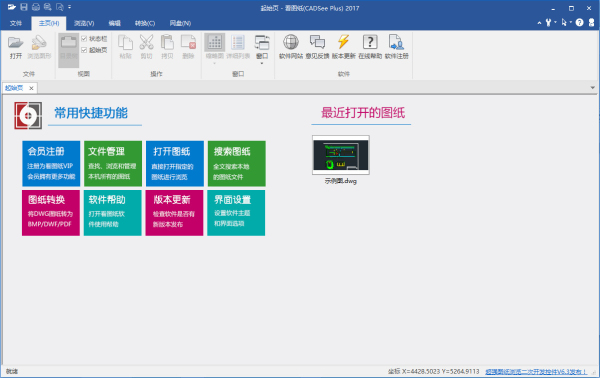
CADSee green versionHow to use the software
1. How to use drawing viewing (DWG file viewer)?
1. Open the DWG file viewer, click [Open Drawing], and select the drawing you want to see.
2. How to set up print settings when viewing drawings (DWG file viewer)?
1) Printing range: Select [Window]->[Open Window];
2) Printing scale: Check [Full of drawings];
3) Print style sheet: select acad.ctb format
CADSee green versionSoftware update log
1: Optimized performance
2: We are serious about solving bug problems
Huajun editor recommends:
CADSee green version software feels really good! The editor specially tested it for this purpose, and it is really great to use. AutoCad 2020, .NET, Batch Butler, etc. are all very good software tested by the editor. Come and choose the one that suits you!
Version: v8.3.1 | Update time: 2024-12-30
Similar recommendations






Latest updates


CADSee Green Edition Review
-
1st floor Huajun netizen 2022-10-17 15:09:30CADSee green version software is very easy to use, downloads quickly and is very convenient!
-
2nd floor Huajun netizen 2022-10-03 01:14:12CADSee Green Edition is awesome! 100 million likes! ! !
-
3rd floor Huajun netizen 2022-10-04 17:57:25The overall feeling of CADSee Green Edition is good and I am quite satisfied with it. The installation and operation are very smooth! Followed the installation step-by-step instructions and it went very smoothly!
Recommended products
-

Contenta CR2 Converter
-

Alike duplicate picture finding software
-

Taobao baby picture batch downloader
-

Super Gallery Management Software
-

Yida video surveillance recording system software
-

Super Gallery Management Software
-

Bear Clan Toolpath Viewer
-

Universal picture format converter
-

Luban calculation
-

Gallery Assistant
- Diablo game tool collection
- Group purchasing software collection area
- p2p seed search artifact download-P2P seed search artifact special topic
- adobe software encyclopedia - adobe full range of software downloads - adobe software downloads
- Safe Internet Encyclopedia
- Browser PC version download-browser download collection
- Diablo 3 game collection
- Anxin Quote Software
- Which Key Wizard software is better? Key Wizard software collection




