
-
Business trip application form
- Size: 0.01M
- Language: Simplified Chinese
- Category: Personnel table
- System: WinAll






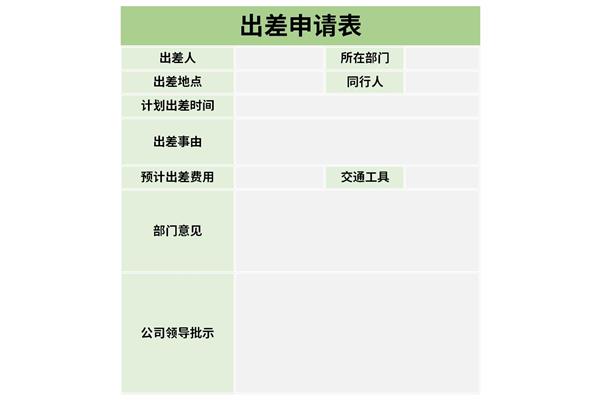
Business trip application formIt refers to the form filled out by staff when they are sent out for official business, or when they need to go out for official business to apply to relevant departments. This is a set of business trip application form downloads that have been carefully screened by Huajun Software Park. The template format is XLSX; after downloading the business trip application form Excel for free through Huajun Software Park, you can change the content and style of the template by yourself!
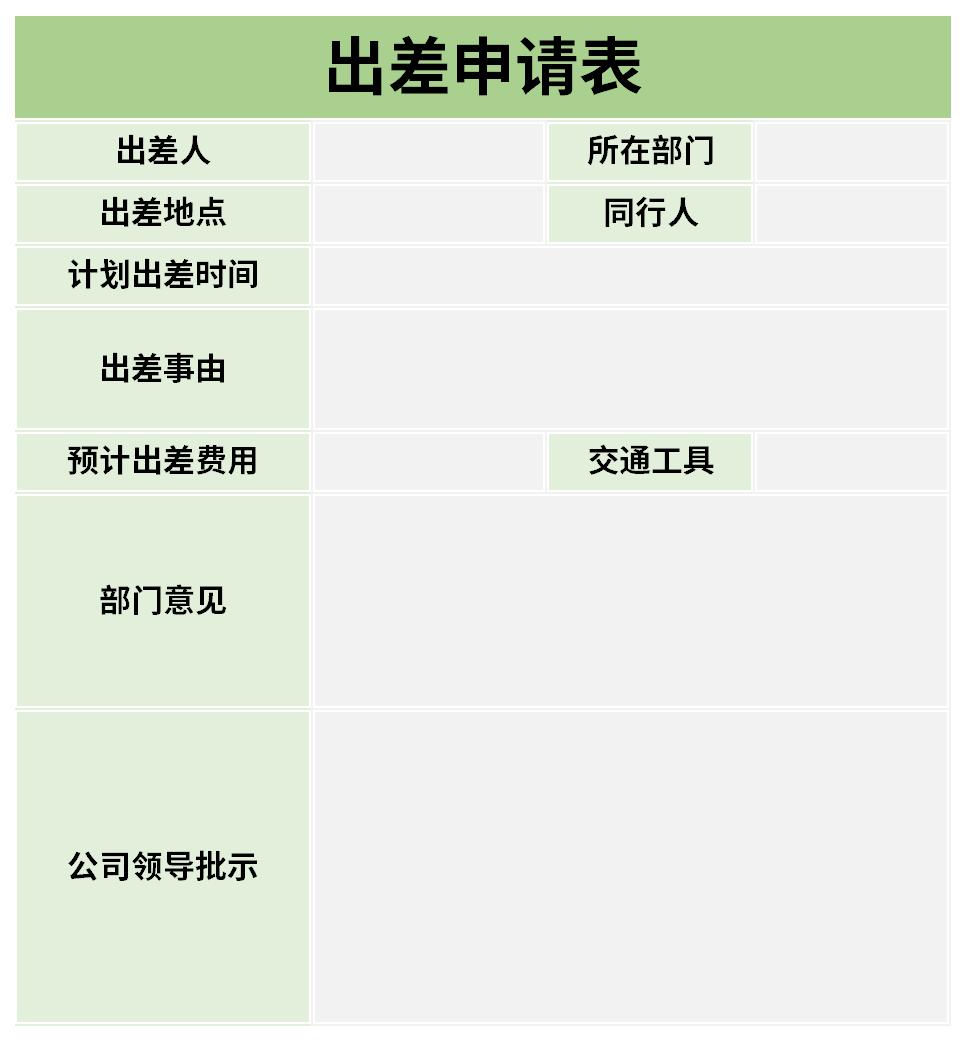
Tips for using business trip application form
Business trip application formPreparation of:
1. Travelers fill out the travel expense reimbursement form--reviewed by the immediate superior, approved by the deputy dean in charge, reviewed by the financial staff--cashier settlement and payment. Each leader in charge shall be fully responsible for the authenticity and reasonableness of travel expense reimbursement.
2. Financial personnel, auditors, and fund management personnel shall review and be responsible for reimbursement procedures, budget limits, bill legality, authenticity, and business trip standards in accordance with regulations.
General Tips for Business Travel Application Form
1: Forced line breaks within cells
By pressing alt+Enter after a certain character in a cell, you can force the cursor to the next line.
2: Automatic line wrapping
After typing the text in the cell, find the "Automatically wrap" button on the toolbar and you can freely switch the text between wrapping and not wrapping.
3: Hide the chapter list
Select the first line, hold down [shift+F] to open the "Find and Replace" dialog box, "Remarks to find all, hold down shift+A to select all, then close the dialog box, hold down [ctri+0] to hide
4: Quickly select specific columns
Select the table area, click the "Create from selected content" dialog box under the [Formula] tab, select "First Row", after the settings are completed, open the name box in the upper left corner, click the corresponding list to jump to the specified column.
Two-column name verification
If you want to check whether the name in Table 2 appears in Table 1, a formula can be used to do it immediately.
=IF(COUNTIF(A:A,C2),"Yes","No")
Recommended by the editor of Huajun Software Park
The business trip application form is a very practical form, and most of the forms are for general purposes. If you happen to need to download the Excel form of the business trip application form, please download it quickly.Procurement project acceptance form,Holiday employee destination statistics tableIt is also a good software. Welcome to click to download and experience it!
Version: Free version | Update time: 2024-10-31
Similar recommendations





Latest updates
Business trip application form comments
-
1st floor Huajun netizen 2021-08-14 18:21:45Very practical business trip application form, just the template I need
-
2nd floor Huajun netizen 2022-02-24 18:20:44It’s not easy to find a free business trip application form template
-
3rd floor Huajun netizen 2021-10-16 12:24:44Free download of business trip application form, good experience
Recommended products
-

Factory performance appraisal form
-

Electrician Performance Appraisal Form
-

Chef performance appraisal form
-

Kitchen performance appraisal form
-

Cashier performance appraisal form
-

Programmer performance appraisal form
-

Workshop performance appraisal form
-

Supermarket employee performance appraisal form
-

Product manager performance appraisal form
-

Test Engineer Performance Appraisal Form
- Diablo game tool collection
- Group purchasing software collection area
- p2p seed search artifact download-P2P seed search artifact special topic
- adobe software encyclopedia - adobe full range of software downloads - adobe software downloads
- Safe Internet Encyclopedia
- Browser PC version download-browser download collection
- Diablo 3 game collection
- Anxin Quote Software
- Which Key Wizard software is better? Key Wizard software collection




