How to set a personalized signature on Zoom-How to set a personalized signature on Zoom
Time: 2022-08-10Source: Huajun Software TutorialAuthor: Ai Xiaomo
Friends, do you know how to set up a personalized signature in Zoom? Today I will explain how to set up a personalized signature in Zoom. If you are interested, come and take a look with me. I hope it can help you.
Step 1: On the main page, click [Personal Account] in the upper right corner.
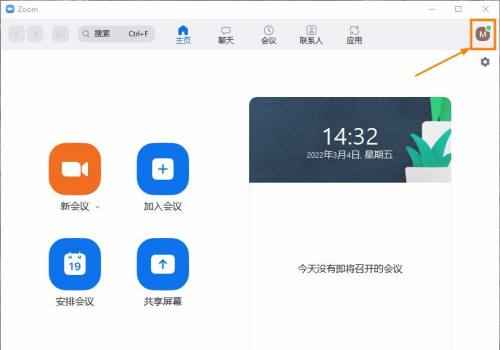
Step 2: In the account list, click [Set Personalized Signature].

Step 3: In the personalized signature dialog box, enter [Signature Content] and click [Save].

The above is the entire content of how to set up a personalized signature in Zoom that the editor has brought to you. I hope it can help you.
Popular recommendations
-
FeiQ
Version: 3.0.0.2 latest versionSize: 17.44MB
, is a free instant tool for downloading. The Feiqiu chat tool suitable for LAN also has the basic, file sharing, and other functions supported by QQ, only...
-
Enterprise WeChat
Version: 5.0.0.8002Size: 532.80 MB
WeChat windows platform chat OA enterprise WeChat software FAQs
The administrator logs in to the management background [Application Management-Punch-Clock-Punch-in and Off-duty-Settings...
-
Enterprise WeChat
Version: 5.0.0.8002Size: 526.67 MB
The PC version of WeChat Enterprise is a social networking tool created by Tencent for corporate office use. It has a similar concept to DingTalk. Enterprise WeChat integrates announcements, exams...
-
Enterprise WeChat
Version: 5.0.0.8002Size: 532.80 MB
The PC version of Enterprise WeChat is a professional office management tool specially created by Tencent for enterprises. Enterprise WeChat interoperates with WeChat messages, mini programs, WeChat payment, etc., providing...
-
Enterprise WeChat
Version: 5.0.0.8002Size: 526.67 MB
Features of PC version of Attendance Enterprise WeChat software
Enterprise-level security certification: The first domestic enterprise office product to pass the SOC2Type2 audit and obtain bank-level encryption...