Kingsoft wps tutorial on merging documents in different formats
Time: 2024-05-11Source: Huajun InformationAuthor:
Kingsoft wpsIt is a very good office software. we often useWPSLet's process some documents, but we don't know how to handle document merging. Then,Kingsoft WPSHow to merge documents in different formats? Today, the editor will introduce to youKingsoft wpsTutorial on merging documents in different formats, friends in need come and watch!
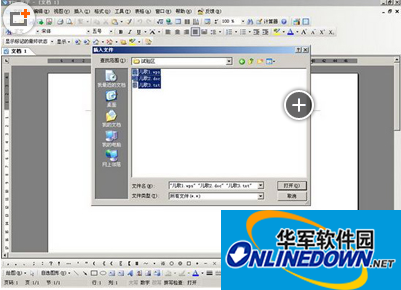
1. StartWPS text, of course, first you need to determine how many articles you want to merge and put them in a directory to facilitate subsequent operations.
2. Click "Insert" "File", then select the directory where you want to merge the documents in Insert file, and change the file type to All files.
3. Select the documents you want to merge and click to open.
The above is what the editor said aboutHow to merge documents in different formats with Kingsoft WPSI hope it will be helpful to everyone. For more exciting tutorials, please pay attention to Huajun Software Park.
Popular recommendations
-
-
iLovePDF
Version: 2024 latest versionSize: 951.00 KB
The latest version of iLovePDF is a very reliable and excellent PDF file processing tool. The latest version of iLovePDF has a simple and intuitive interface that can help users...
-
HiFormat PDF Converter
Version: 3.6.200.529Size: 1.32 MB
HiFormat PDF Converter is a professional PDF file conversion software. HiFormat PDF Converter supports PDF, Word, PPT, Excel, pictures and other files...
-
deepseek application computer version
Version: 1.0.12Size: 8.78 MB
DeepSeek artificial intelligence retrieval data analysis optimization learning
Intelligent search: Use natural language processing technology to understand user queries and provide accurate search results...
-
WPS Office
Version: 12.1.0.20305Size: 248MB
As an enterprise-level solution, WPS365 has served 17,000+ government and enterprise customers (including 97 state-owned enterprises and 135 Fortune 500 companies). Q1 revenue in 2025 will be the same...