Friends, do you know how to install the Thunder Lite version? Today I will explain how to install the Thunder Lite version. If you are interested, come and take a look with me. I hope it can help you.
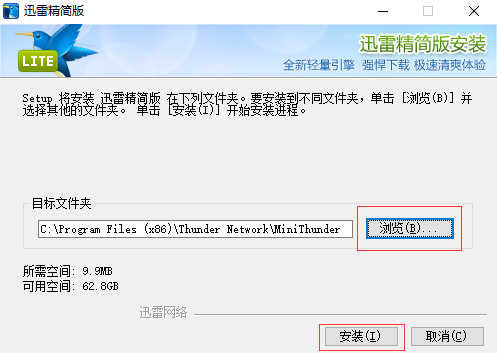
Step 1: First, we download the Thunder Lite installation package from Huajun Software Park, and double-click the file with the left mouse button to enter the installation program. Click the "Browse" button to select the installation directory of Thunder Lite. It is not recommended to install on the C drive. If there are too many files on the C drive, it will affect the running speed of the computer. After selecting, click "Install" (as shown in the picture).
Step 3: The installation of Thunder Lite takes about 3 minutes, please wait patiently (as shown in the picture).

Step 3: After the installation is completed, it will automatically jump to the installation success interface. If you check the "Enable multi-browser support" option, an additional "Use Thunder Lite version to download" option will appear when you right-click while browsing the web page, making downloading more convenient. After completing the selection, just click the "Close" button (as shown in the picture).

The above is the entire content of how to install the Thunder Lite version brought to you by the editor. I hope it can help you.