
-
Sichuan cloud marking computer version
- Size: 22M
- Language: Simplified Chinese
- Category: Education and teaching
- System: Win All
- Manufacturer:Jilin Huahan Cloud Data Analysis Co., Ltd.






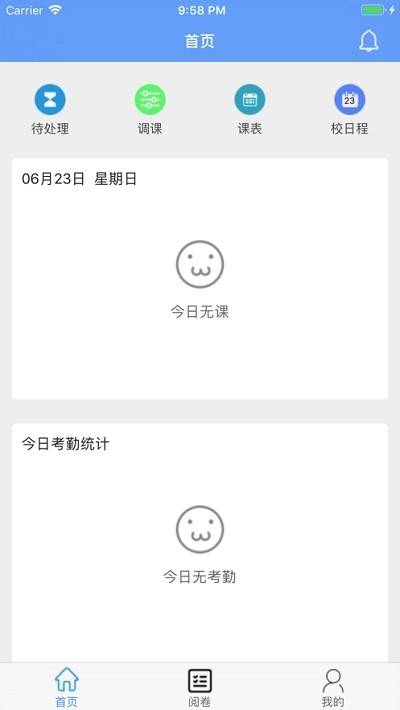
Sichuan Cloud Marking PC version is a high-quality online marking software for teachers. Teachers can upload relevant test question answers to the platform, and subjective questions can upload keyword scores. The Sichuan Cloud Marking Platform will intelligently score students' test papers. It is very convenient, helping teachers reduce their burden and at the same time improve the efficiency of marking!

Sichuan cloud markingFunction introduction
1. Easily judge papers online at any time, supporting a variety of paper judgment methods
2. Real-time recording of the teacher’s marking progress. At the same time, the overall marking progress can be viewed, which is suitable for follow-up examinations.
3. Support various marking methods for students' examination papers, and support input text comments on the examination papers.
4. It is suitable for personal collection of excellent test papers, report question papers, change scores at any time, check answers, and query the original test papers.
5. Applicable inquiry class collective report, examination paper evaluation report, student report
Sichuan cloud markingSoftware features
1. Low cost, low requirements for answer card paper type;
2. Easy to operate, the system functions are exquisite and the setting is flexible;
3. Subjective questions are fully automatically marked, and subjective questions are marked with high efficiency;
4. High security, data security encryption technology is used;
5. Set up a variety of scoring methods to make the marking more fair and just;
6. Conveniently converted into statistical information, accurate and multi-dimensional analysis, the data comes from more scientific research.
Sichuan cloud markingSoftware description
1. Comprehensive analysis and recording of talents
Score tables, exclusive test score reports, and test paper analysis are converted into learning and training archives, and visual data charts allow parents to grasp the background of test score creation
2. Accurate diagnosis and reasonable and specific guidance
精准定位薄弱点、什么知识要点必须补课,什么工作能力必须训炼,出示人性化具体指导,让学习培训更高效率
3. Interesting role, home-school connection
The Magic Box makes learning more interesting. "Interactive communication" connects home and school, communicates and shares, and allows teachers and parents to work together to promote students' growth.
4. Select and use extracts to quickly increase points
Exam paper folder: It’s hard for my mother not to worry about me losing my exam paper; Wrong question set: The wrong question set is a master of learning. Weak point training: promote training and overcome weak points! High-scoring composition: let excellent compositions get high scores
FAQ
Forgot password
Solution: Click "Forgot Password" on the computer login interface, enter your mobile phone number to obtain the verification code, and then reset your password.
Account is invalid or frozen
Invalid account: Contact the class teacher to confirm whether the candidate number is correct, or check whether the "Teacher Portal" was selected by mistake.
Account freezing: Usually the protection mechanism is triggered due to five consecutive incorrect passwords, and you need to go to the local admissions office with your ID card to unfreeze the account.
Verification code not received
Solution: Check the mobile phone signal or SMS interception settings, wait for 1 minute and then resend to avoid temporary ban caused by frequent clicks. If you do not receive it within 10 minutes, you can submit a work order through the "Customer Service Feedback" channel.
Installation steps
Special note: The installation package provided by Huajun Software Park contains Android emulator and softwareAPK file, the computer version needs to install the emulator first, and then install the APK file.
1. First download the installation package from Huajun Software Park. The software package contains an emulator exe installation program and an APK file and unzip them. First click on the exe program to install the emulator.

2. Double-click the "Tencent Mobile Game Assistant.exe" file to enter the installation interface. Users can click "Install" to select the system's default installation address for installation, or click "Custom Installation" to select the installation path. Custom installation is recommended here.

3. Wait for the Tencent Mobile Game Assistant emulator to be installed, and then click "Start Now" to open the emulator.

4. Enter the main interface of the simulator, click the icon in the upper right corner and select the "Local APK Installation" button.

5. In the pop-up window, click the decompressed APK file, and then click Open.

6. Afterwards, the software will enter the installation process. You need to wait for a moment. After the software installation is completed, it will appear in my software list. Click the icon and double-click to open it.

Sichuan Cloud Marking Update Log
1.Fix several bugs;
2. Optimize detailed issues;
Huajun editor recommends:
The editor personally tested the computer version of Sichuan Cloud Examination Software. The various functions are very simple and easy to operate. Even a new user like the editor can quickly master it. I greatly appreciate it! This site also has similar software Homework Helper 2021, Seewo Academy, and Cloud Machine Manager, which we recommend you download!
Version: 3.5.1 | Update time: 2025-12-05
Similar recommendations





Latest updates




How to update the address book to Maimai? -How to update address book from Maimai to Maimai
How to become a member of Maimai? -How to activate membership in Maimai
Use deepseek online www.deepseek.com _deepseek web version entrance
Cut the Rope Together 2 online play - Cut the Rope Together 2 web version entrance
Listen to soda music online www.qishui.com _Soda music web version entrance
Doubao online use www.doubao.com _Doubao web version login entrance
How to check for updates in Movie Paradise? -How to check for updates in Movie Paradise
How do I view my collection in Movie Paradise? -How to view collections in Movie Paradise
How to cancel the account in Movie Paradise? -How to cancel your account in Movie Paradise
Comments on the computer version of Sichuan Cloud Examination
Recommended products
-

Beijing Primary and Secondary School Students Plant Cultivation Competition Computer Version
-
Beijing Primary and Secondary School Students Plant Cultivation Competition Computer Version
-

Computer version of Confidential View
-
Computer version of Confidential View
-
Computer version of Confidential View
-

Computer version of Confidential View
-
Computer version of Confidential View
-
Computer version of Confidential View
-

Zhixue.com Teacher Terminal
-
Zhixue.com Teacher Terminal
- Diablo game tool collection
- Group purchasing software collection area
- p2p seed search artifact download-P2P seed search artifact special topic
- adobe software encyclopedia - adobe full range of software downloads - adobe software downloads
- Safe Internet Encyclopedia
- Browser PC version download-browser download collection
- Diablo 3 game collection
- Anxin Quote Software
- Which Key Wizard software is better? Key Wizard software collection




