
-
Weibo International Version
- Size: 65.73M
- Language: Simplified Chinese
- Category: Life services
- System: Android
- Manufacturer:Beijing Weimeng Chuangke Network Technology Co., Ltd.

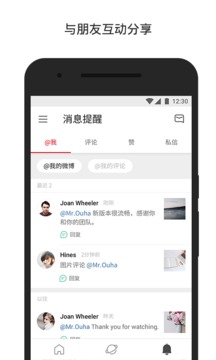
WeiboInternational version appIt is a new streamlined international version officially launched by Weibo. The interface UI is simple and easy, and the installation package is compact and compact. Compared with the official client that is bloated to dozens of megabytes, it is much simpler and more capable, and there is nothing strange about it.Live broadcastNo matter how many steps I take every day to seize the treasure, I will not buy movie tickets on my behalf, and there will be no lingering ghost.AdvertisementInfest and let the whole world hear your voice.

Weibo International VersionSoftware function
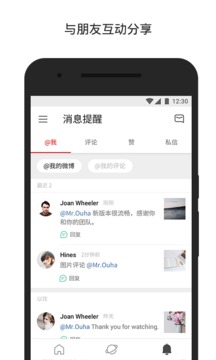
-New design: international design, multi-language support, Weibo translation function
-Basic function: brushWeibo, watch, like, comment on pictures and other functions
-Popular Weibo: popular searches, popular Weibo, popular, latest news
-More sharing: Weibo, WeChat,QQWait
Weibo International VersionSoftware Highlights
Create simple and easy internationalizationSinaWeibo client.
Weibo, discover new things anytime, anywhere!
Weibo allows you to appreciate every wonderful moment in the world.
了解每一个幕后故事。 Share what you have to say and let the world hear your voice.

How to post on Weibo in the international version of Weibo
Enter the publishing interface: Open the Weibo International APP, click the “+” sign in the middle at the bottom, and select “Write Weibo”.
Edit content: Enter text, click the "Picture" or "Video" button below to upload material (up to 9 pictures or 15 minutes of video), and supports inserting topics, expressions, etc.
Publishing settings: Click "Public" to adjust the visibility range (such as "Visible to everyone"), or set "scheduled publishing".
Complete publishing: After confirming it is correct, click "Send" in the upper right corner, and the content will be synchronized to your personal homepage and follower information stream.
How to cancel your account on Weibo International Version
Enter settings: Click "Me" on the right side of the bottom menu bar → "≡" in the upper left corner → select "Settings".
Account security: Select "Account and Security" → "Weibo Security Center" → "Other Account Issues" in the settings.
Logout process: Click "How to log out Weibo account", read the prompts, enter the verification code or perform identity verification, and submit the cancellation application (the operation is irreversible).
How to read foreign Weibo in the international version of Weibo
Follow international users: Enter English keywords (such as "@NASA" "#Travel") in the search bar, or browse through the "Explore" pageInternationalHot tags.
Switch the hot search list: Click "Hot" at the top of the homepage → select "International Hot Search" to view global trending topics.
Translation function: Long press the foreign Weibo content and select "Translate" to support translation in 12 languages including Chinese, English, Chinese and Japanese.
How to join a group on the international version of Weibo
Find a group: Click "Message" at the bottom → "Discover Group" in the upper left corner, enter the group name or group number to search.
Apply to join: After finding the target group, click "Join Group" and wait for approval by the administrator.
Note: The international version group function is weak, it is recommended to participate in interest community discussions through the "super topic" (click the "globe" icon at the bottom).
How to turn off the watermark on the international version of Weibo
Enter privacy settings: Click "≡" in the upper left corner → "Settings" → "Privacy Settings".
Turn off watermark: in "PrivacyFind "Picture Watermark" in Settings, select "Don't show" and save.
How to view people following on the international version of Weibo
Enter the follow list: click "≡" in the upper left corner → "Personal Homepage" → "Follow" at the top to view all following users.
Filter categories: Click the drop-down menu on the right of "Follow All" and browse by categories such as "Special Attention" and "Group".
How to read editing records on the international version of Weibo
Enter the Weibo details page: Find the Weibo with the "Edited" logo and click "..." in the upper right corner.
View history: Select "View editing record" to browse the original content and the time and modification point of each modification.
Weibo International Version Update Log
1. Sweep the bug out and carry it out to the end
2. The most stable version ever
Huajun editor recommends:
This site has also prepared a variety of related software for you, such as Yicun, Dumpling Cloud Game, .NET, etc. You need to go to the editor of Huajun Software Park to satisfy you!
Version: v6.2.7 latest version | Update time: 2025-10-23
Similar recommendations






Latest updates





How to cancel the account in Kuai Technology? -How to cancel your account in Kuai Technology
How to submit feedback on Kuai Technology? -How to submit feedback on Kuai Technology
How to send a private message to Toutiao today? -How to send private messages to Toutiao today
How to change Toutiao password? -How to change password in Toutiao
How to set the font for Toutiao today? -How to set font in Toutiao
How to register for Toutiao? -How to register for Toutiao
How does Toutiao publish news? -How to publish news in Toutiao today
How to find the cover of Toutiao today? -How to find the cover of Toutiao today
Weibo International Version Comments
-
1st floor Huajun netizen 2022-10-23 10:11:24The international version of Weibo has been installed and is indeed the latest version.
-
2nd floor Huajun netizen 2022-10-25 15:47:56After downloading the international version of Weibo, you can also use it on Android tablets, which is very good!
-
3rd floor Huajun netizen 2022-11-09 03:24:24It’s a super good platform and it’s very convenient to download the international version of Weibo!
Recommended products










- Diablo game tool collection
- Group purchasing software collection area
- p2p seed search artifact download-P2P seed search artifact special topic
- adobe software encyclopedia - adobe full range of software downloads - adobe software downloads
- Safe Internet Encyclopedia
- Browser PC version download-browser download collection
- Diablo 3 game collection
- Anxin Quote Software
- Which Key Wizard software is better? Key Wizard software collection




