
-
Foreign trade customer follow-up form
- Size: 0.01M
- Language: Simplified Chinese
- Category: Marketing Management
- System: WinAll






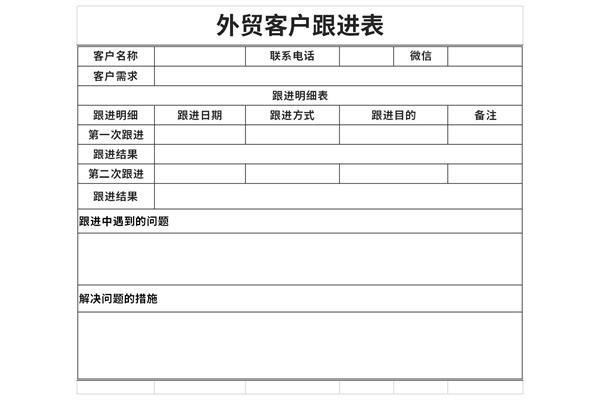
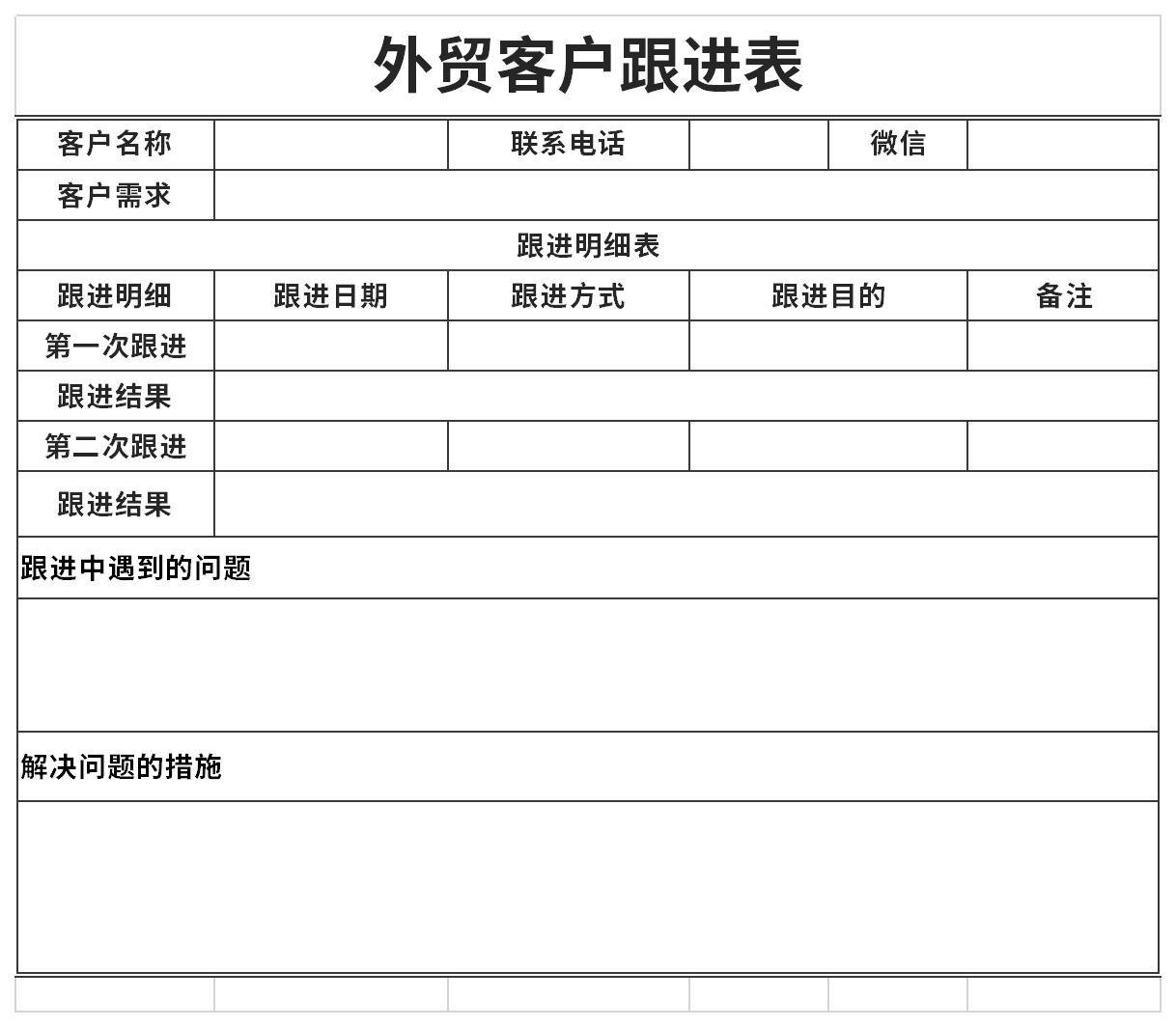
List of contents of foreign trade customer follow-up form:
Customer profile analysis (Profiling) includes customer levels, risks, hobbies, habits, etc.;
Customer loyalty analysis (Persistency) refers to the customer's loyalty, persistence, changes, etc. to a certain product or business organization;
Customer profit analysis (Profitability) refers to the marginal profit, total profit, net profit, etc. of products consumed by different customers;
Customer performance analysis (Performance) refers to the sales of products consumed by different customers based on categories, channels, sales locations and other indicators;
Customer future analysis (Prospecting) includes future development trends in the number of customers, categories, etc., and methods to win customers, etc.;
Customer product analysis (Product) includes product design, relevance, supply chain, etc.;
Customer promotion analysis (Promotion) includes the management of advertising, publicity and other promotional activities.
1: Double-click to quickly apply functions
There is no need to type the same function one by one. When you have set the function for the cells in the first row, just move the cursor to the lower right corner of the cell, wait until it turns into a small plus sign, double-click, and the formula will be applied to all the remaining cells in the column.
Isn’t this much easier than dragging with the mouse?!
2: Quickly add or delete a column
For those of you who have to deal with Excel all day long, this trick may save you a little time. When you want to quickly insert a column, type Ctrl + Shift + '=' (Shift + '=' is actually the + sign) to insert a column to the left of the column you selected, and Ctrl + '-' (minus sign) to delete the column you selected.
Foreign trade customer follow-up formIt is a free Excel template, download it if you need it! Huajun Software Park provides high-quality Excel template downloads.List of qualified seed inspectors for annual assessment,Annual National Scholarship Student List Registration FormDownload to get the source file, which you can edit, modify and replace. Download the foreign trade customer follow-up form and go to Huajun Software Park.
Version: Free version | Update time: 2024-10-31
Similar recommendations



Latest updates
Foreign trade customer follow-up form comments
-
1st floor Huajun netizen 2022-03-02 16:18:46It’s not easy to find free foreign trade customer follow-up form templates
-
2nd floor Huajun netizen 2021-07-02 03:24:04Free download of foreign trade customer follow-up form, good experience
-
3rd floor Huajun netizen 2021-06-17 12:58:58General template for foreign trade customer follow-up form, very practical
Recommended products
-

Business plan for college students
-

College student innovation and entrepreneurship project plan
-

Innovation and Entrepreneurship Plan for College Students
-

Business plan template for college students
-

Business plan
-

Business plan template
-

Entrepreneurship project plan
-

Entrepreneurship business plan
-

Entrepreneurship project business plan
-

Innovation and Entrepreneurship Project Plan
- Diablo game tool collection
- Group purchasing software collection area
- p2p seed search artifact download-P2P seed search artifact special topic
- adobe software encyclopedia - adobe full range of software downloads - adobe software downloads
- Safe Internet Encyclopedia
- Browser PC version download-browser download collection
- Diablo 3 game collection
- Anxin Quote Software
- Which Key Wizard software is better? Key Wizard software collection




