
-
Xiaoetong
- Size: 178.7M
- Language: Simplified Chinese
- Category: Video playback
- System: winall
- Manufacturer:Shenzhen Xiaoetong Technology Co., Ltd.







Xiaoetong Live AssistantThe computer version is a compact and practical live broadcast software specially designed for online teaching. The computer version of Xiaoetong Live Assistant also has rich knowledge content and various promotion and marketing tools. The computer version of Xiaoetong Live Assistant allows users to learn knowledge easily. The software is an exclusive tool provided for users who use the live video function of [Xiaoetong]. The software can solve various problems that arise in online teaching. There are internal accounts on which online teaching, academic exchanges, student retention, online school promotion, and interaction can be carried out. Huajun Software Park provides you withXiaoetong Live AssistantDownload the official version and the latest version. Friends in need come to Huajun Software Park to download and experience it!

Xiaoetong Live AssistantSoftware introduction
"Xiaoetong Live Assistant" is an exclusive tool provided for users who use the "Xiaoetong" video live broadcast function.
Live broadcast guests can use the Android version of Xiaoetong Live Assistant to conduct live video broadcasts.
When your account is set as a guest in the live broadcast room, you can conduct the corresponding live broadcast in the Xiaoetong Live Assistant app.
This Android version of Xiaoetong Live Assistant cannot set live broadcast guests and needs to be operated in the background of [Xiaoetong] computer.

Xiaoetong Live AssistantSoftware features
Content display
Including audio, video, graphics, live broadcast, Q&A, community and other presentation forms.
Marketing promotion
Including promoters, invitation cards, coupons and other functions.
User management
Including viewing store visiting users, managing activation records, sending messages, etc.
Data analysis
Monitor store operation results in real time with an intuitive view.

Xiaoetong Live AssistantSoftware Highlights
Community operation
The small community, activities, Q&A, and homework book functions included in community operations.
High-end customized services
Open API interfaces, as well as customized APPs, mini programs and other services.
Institutions settled in
入住机构覆盖自媒体、传统媒体、出版社、教育机构等领域的头部客户,包含吴晓波频道、十点读书、环球教育、新东方留学课堂、好未来家庭教育中心、张德芬空间、沪江日语、有道考神、英语流利说、英孚随身小课堂、文都教育等

FAQ
How do Xiaoetong students submit homework and how do teachers comment?
1. Students submit homework via mobile phone
Step 1: Find the assignment entrance and find the corresponding assignment through the [Course Details] → [Course Interaction] → [Assignment] column
① Entrance to course details page

②Personal center entrance, through [Personal Center] → [Learning Tools] → [Homework]
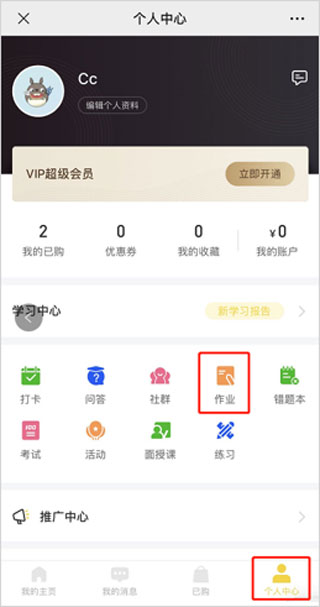
③Find the assignment list of the purchased course in [My Assignments]
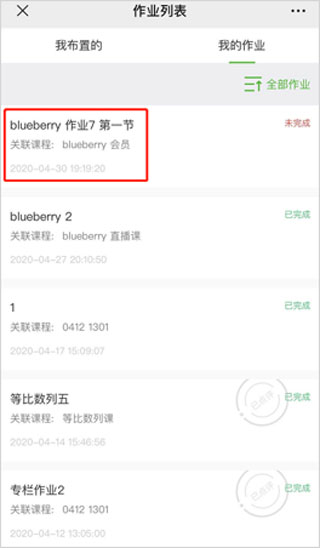
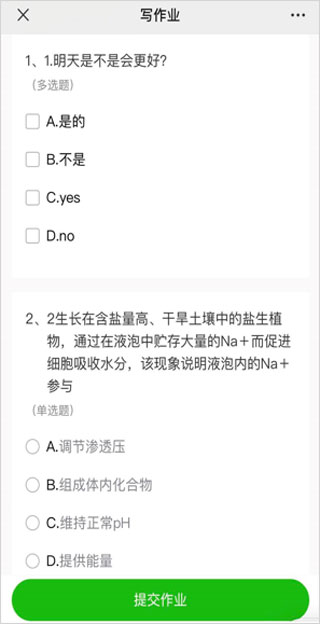
Step 2: Click the assignment to enter the details page, click the [Write Assignment] button to start answering the assignment, and after finishing the answer, click the [Submit Assignment] button to complete the assignment.

Instructions for answering questions: Students for objective questions will answer by clicking on the options, and students for subjective questions will answer by text (up to 1024 characters), pictures (up to 9 pictures), and voice (60 seconds per item, maximum 5 items).
2. Homework review/public display
After a student submits an assignment, only the teacher/teaching assistant/student can see the submitted assignment. The teacher and teaching assistant can select [Public Display]. After public display, the student's assignment will be visible to other students who have purchased the course. Teachers and teaching assistants can comment on homework with text, pictures, and voice.

How to change the name of Xiaoetong?
After downloading, installing and opening the Xiaoetong app on this page, click [My] on the homepage.
Enter My and click [Personal Information].
Enter personal information, you can see your avatar and nickname, click [Nickname].
Enter editNickname, enter a name you are satisfied with, and click [Save]. This way the name change was successful.
How to hand in homework on Xiaoetong?
You can enter the homework through the three places in the software: [Course Details], [Personal Center], and [Assignment]

Installation steps
Special note: The installation package provided by Huajun Software Park contains Android emulator and softwareAPK file, the computer version needs to install the emulator first, and then install the APK file.
1. First download the installation package from Huajun Software Park. The software package contains an emulator exe installation program and an APK file and unzip them. First click on the exe program to install the emulator.

2. Double-click the "Tencent Mobile Game Assistant.exe" file to enter the installation interface. Users can click "Install" to select the system's default installation address for installation, or click "Custom Installation" to select the installation path. Custom installation is recommended here.

3. Wait for the Tencent Mobile Game Assistant emulator to be installed, and then click "Start Now" to open the emulator.

4. Enter the main interface of the simulator, click the icon in the upper right corner and select the "Local APK Installation" button.

5. In the pop-up window, click the decompressed APK file, and then click Open.

6. Afterwards, the software will enter the installation process. You need to wait for a moment. After the software installation is completed, it will appear in my software list. Click the icon and double-click to open it.

Xiaoetong Live Assistant update log:
1: Optimized performance
2: We are serious about solving bug problems
Huajun editor recommends:
Xiaoetong Live Assistant is one of the best software in the industry. I believe many friends will have used it. If you don’t use it anymore, you will be OUT. This site has also prepared for you 360 Movies and TV Series 2021, China Education News, and Batch Little Butler
Version: 5.19.0 | Update time: 2025-11-26
Similar recommendations






Latest updates


How to check birthday on Xiaoetong? -How to check your birthday on Xiaoetong
How to check the address on Xiaoetong? -How to check the address on Xiaoetong
How to check the company on Xiaoetong? -How to check the company through Xiaoetong
How to check jobs on Xiaoetong? -How to check positions on Xiaoetong
How to check the nickname on Xiaoetong? -How to view nicknames on Xiaoetong
How to find out about us on Xiaoetong? -How to find out about us through Xiaoetong
How to check real name on Xiaoetong? -How to check your real name on Xiaoetong
How to check the version number of Xiaoetong? -How to check the version number on Xiaoetong
How to check mobile phone number on Xiaoetong? -How to check your mobile phone number on Xiaoetong
How to open the help center of Xiaoetong? -How to open the help center on Xiaoetong
Xiaoetong review
-
1st floor Huajun netizen 2022-02-22 09:58:33Xiaoetong Live Assistant can be downloaded for free from Huajun. It can be used immediately after downloading, and it is well received.
-
2nd floor Huajun netizen 2022-01-05 11:23:12A friend recommended that I come here to download Xiaoetong Live Assistant. The installation method is also carefully informed on the webpage. Thank you very much to the editor.
-
3rd floor Huajun netizen 2021-12-29 12:13:47I really like Xiaoetong Live Assistant and recommend everyone to try it.
Recommended products





- Diablo game tool collection
- Group purchasing software collection area
- p2p seed search artifact download-P2P seed search artifact special topic
- adobe software encyclopedia - adobe full range of software downloads - adobe software downloads
- Safe Internet Encyclopedia
- Browser PC version download-browser download collection
- Diablo 3 game collection
- Anxin Quote Software
- Which Key Wizard software is better? Key Wizard software collection




