How to check scores on XueTong? -Learn how to check your scores
Time: 2025-10-28Source:Author: Qingchen
Xuexuetong is a professional and reliable online education platform, so how to check results on Xuexuetong? Learn how to check your scores? Let the editor give you the answer below!

How to check scores on XueTong?
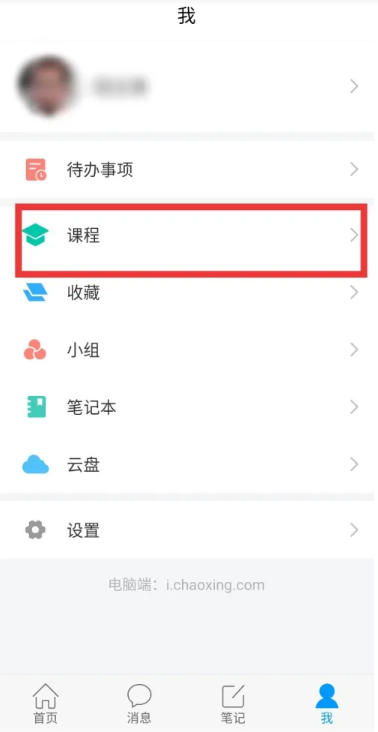
1. Open the Xuedutong APP, click [My] → [Courses] at the bottom, and find the course you want to query.
2. On the course details page, find the [Assignments/Exams] option.
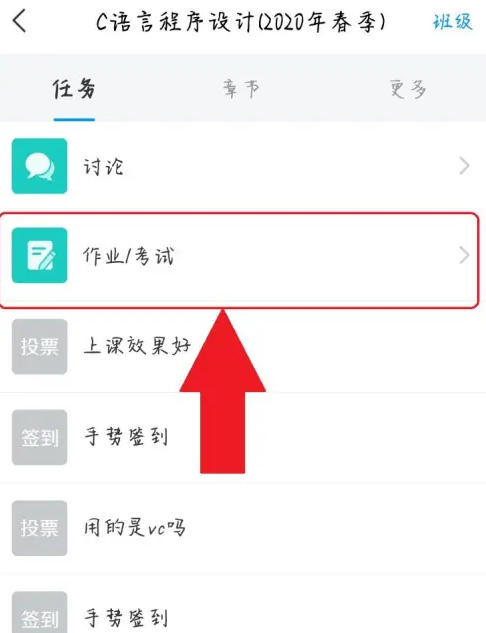
3. Then click [Exam] to view the exam results.

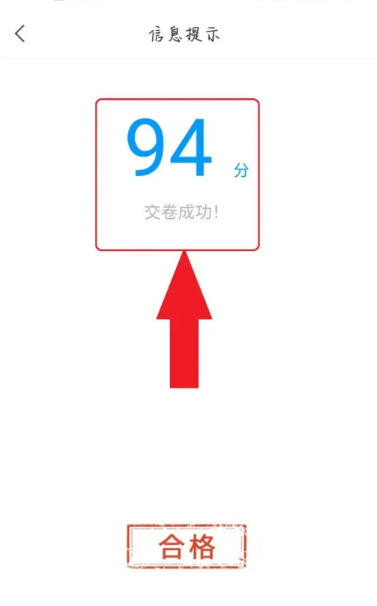
4. You can see the results.
The above is what the editor of Huajun has compiled for you. How to check your grades on StudyPass? Learn how to check your scores. I hope it can help you.
Popular recommendations
-
children's painting xiuxiu
Version: 4.6Size: 61.4 MB
Children's Painting Xiuxiu is a storage, sharing and communication platform focusing on children's paintings. It was officially launched on June 1, 2016 and supports iOS and Android systems. The soft...
-
Xieryun Academy
Version: 3.9.7Size: 65.4 MB
The Xieryun Academy app is an online learning software that contains learning courses for various professional disciplines, as well as various materials, including environmental monitoring,
Business...
-
Super class schedule
Version: 9.9.42Size: 81.0 MB
Super Class Timetable App - a smart class timetable tool software used by college students. It is directly connected to the educational administration system of colleges and universities. It can import your class timetable directly to your mobile phone...
-
Xinhua Smart Campus
Version: 5.1.1Size: 44.6 MB
Xinhua Smart Campus App is an online education platform suitable for students of all ages. Here you can learn through online videos and teachers...
-
U campus
Version: 3.0.1.3Size: 94.81 MB
It is a professional comprehensive learning software video online learning U campus U campus software introduction
It is an online learning platform under FLTRP Unipus, which provides high...