
-
Xinhua Smart Campus
- Size: 44.6M
- Language: Simplified Chinese
- Category: study education
- System: Android
- Manufacturer:Beijing Langjie Technology Co., Ltd.
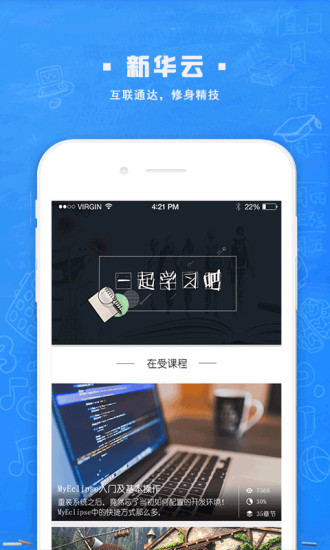
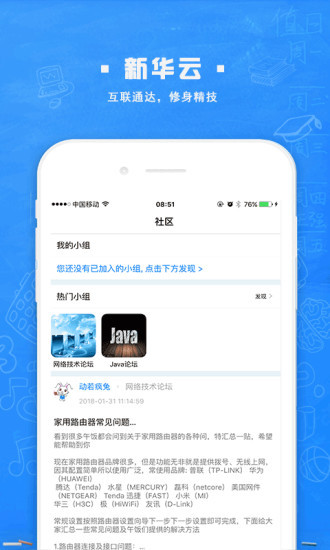
Xinhua Smart Campus app is an online education platform suitable for students of all ages. Here you can learn and interact with teachers through online videos, and ask questions and answer questions to teachers. You can also use this software to query personal courses, campus card management, borrowed books and other information, giving you a wonderful campus and learning experience.
Xinhua Smart Campus Software Functions
Integration of teaching and management
Student terminal: supports real-time query of scores, dynamic tracking of attendance, and one-click retrieval of class schedules, so students can keep track of their learning progress at any time.
Teacher's side: Provides online homework assignments, instant notification release, and learning progress tracking functions, allowing teachers to efficiently manage class affairs.
Academic affairs side: realize intelligent arrangement of courses, accurate teacher arrangement, student course selection management, and optimize the allocation of teaching resources.
Optimization of interactive learning scenarios
Video learning and course live broadcast: Build a virtual classroom to break through the limitations of time and space. Students can watch live courses and participate in real-time discussions.
One-on-one Q&A: Connect with teachers from famous schools across the country to provide personalized tutoring and solve learning problems.
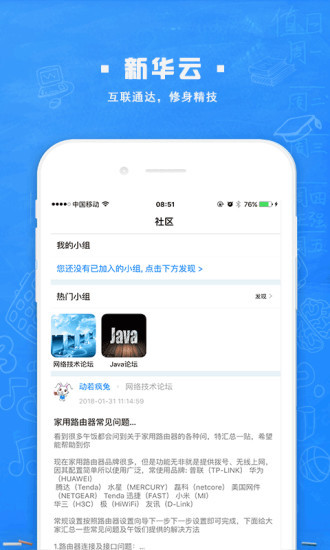
Learning community: Built-in communication module, students can share learning experiences, discuss interesting campus events, and form a mutual-help learning atmosphere.
Home-school collaboration becomes more efficient
Parent terminal function: Parents can bind their accounts to view their children's performance at school, including canteen consumption, library borrowing records, etc., and keep track of the latest developments in real time.
Campus dynamic push: Instantly push notifications, announcements, and event information, build transparent communication channels, and enhance home-school connections.
Leave approval process: After a student submits a leave application, the class teacher, parents, and school district leaders will review and approve the application in turn, and the process is standardized.
Smart service upgrade
Campus card: Integrate functions such as canteen, library, access control, etc. to realize "one card travel" and simplify campus life.
Life service integration: Provides convenient functions such as bus inquiry, express delivery tracking, and phone recharge to optimize daily experience.
Multi-terminal seamless connection: supports synchronous operation on mobile phones, tablets, and computers. The interface is simple and you can get started without training.
Data visualization analysis
Teaching effectiveness presentation: Visually display student performance, attendance and other data in the form of charts to assist teachers in adjusting teaching strategies.
Basis for resource allocation: Provide scientific reference for schools to formulate teaching plans, optimize resource allocation, and improve management accuracy.
Highlights of Xinhua Smart Campus Software
One-stop service: The homepage covers school news, homework reminders and class announcements to ensure that users can obtain important information in a timely manner.
Comprehensive inquiry: Users can inquire about courses, grades, campus card consumption and book borrowing, and fully understand the dynamics of study and life.
Personalized learning: supports a variety of learning scenarios, and users can flexibly arrange learning according to their own time and location.
AI technology empowerment: It integrates multiple AI technologies such as voice interaction, text recognition, face recognition, human body recognition, and AR to empower teaching products and create a more intelligent human-computer interaction experience.
Features of Xinhua Smart Campus Software
Improve management efficiency: realize intelligent and convenient school management through information technology.
Promote communication between home and school: open up communication channels between home and school and build an efficient bridge between students, parents and teachers.
Optimize the learning experience: Provide rich learning resources and interactive functions to make learning more convenient and efficient.
FAQ
Function not working properly
Problem description: Some functions (such as all-in-one card payment codes, schedule viewing, class schedule viewing, etc.) cannot be used normally.
Solution: Check that the feature has been activated or configured correctly. If the problem persists, you can contact the campus information department or technical support team for help.
Information is not updated in time
Problem description: Personal information, course information, etc. are not updated in time, causing the displayed information to be inconsistent with the actual situation.
Solution: Update personal information and course information in the smart campus system in a timely manner. If you encounter an update failure, you can contact the relevant department or technical support team for processing.
Xinhua Smart Campus Update Log
1: Optimized performance
2: We are serious about solving bug problems
Huajun editor recommends:
Xinhua Smart Campus, word-of-mouth software, is guaranteed to solve all your problems! The editor highly recommends! This site also has similar software such as homework help live classes, dumpling cloud games, and cloud machine housekeeper. If you are interested, you can download it!
Version: 5.1.1 | Update time: 2025-12-05
Similar recommendations





Latest updates





How to back up the Flash Wizard - How to back up the Flash Wizard
How to clear the cache of Movie Paradise? -How to clear the cache of Movie Paradise
How to check the privacy policy of Movie Paradise? -How to view the privacy policy of Movie Paradise
How to give feedback on Movie Paradise? -How to give feedback to Movie Paradise
How to give feedback on Movie Paradise? -How to give feedback to Movie Paradise
How to check the user agreement of Movie Paradise? -How to view the user agreement in Movie Paradise
Xinhua Smart Campus Review
Recommended products









- Diablo game tool collection
- Group purchasing software collection area
- p2p seed search artifact download-P2P seed search artifact special topic
- adobe software encyclopedia - adobe full range of software downloads - adobe software downloads
- Safe Internet Encyclopedia
- Browser PC version download-browser download collection
- Diablo 3 game collection
- Anxin Quote Software
- Which Key Wizard software is better? Key Wizard software collection




