Realtek High Definition Audio Manager is an audio driver management tool developed by Realtek, specially designed for hardware devices integrating its sound card chip. Its core features include audio output configuration (such as speakers, headphones), microphone input optimization, sound effect enhancement (such as virtual surround sound, equalizer adjustment), and multi-device audio stream management. Users can intuitively adjust audio parameters through the graphical interface to meet the needs of different scenarios such as games, audio and video, and voice calls. Next, let the editor of Huajun explain to you about Realtek How to set up headphones in HD Audio Manager!
first step
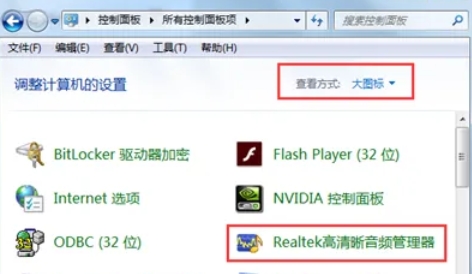
Click the "Start" button in the lower left corner, search for "Control Panel" and click to enter.
Step 2
Find "Realtek High Definition Audio Manager" in the control panel (if it is not displayed, try right-clicking the volume icon in the lower right corner of the taskbar and selecting "Sound Manager" or "Audio Device Settings").
Step 3
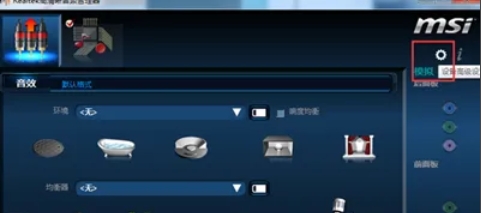
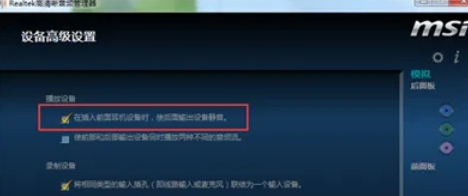
Click the "Settings" icon (gear shape) in the upper right corner. Enter the "Advanced Settings" page and find the option: "Mute the rear output device when the front headphone device is plugged in"
Step 4
Uncheck (remove √) and click "OK" to save.
Step 5
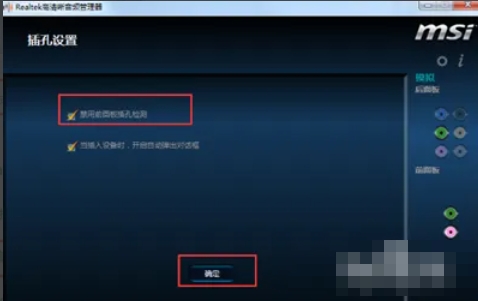
Click the "wrench" icon (tool icon) in the lower right corner. "Disable Outlet Detection" In "Panel Settings", check, "Disable Outlet Detection"

Step 6
Click "OK" to save.
The above is how the editor of Huajun compiled for you how to set up headphones in the Realtek HD Audio Manager. I hope it can help you!