How to unlink QQ accounts - How to unlink QQ accounts
Time: 2024-05-11Source: InternetAuthor: Shaobing
How to unlink QQ accounts? Many people don’t know how to unlink QQ. Let’s take a look with the editor.
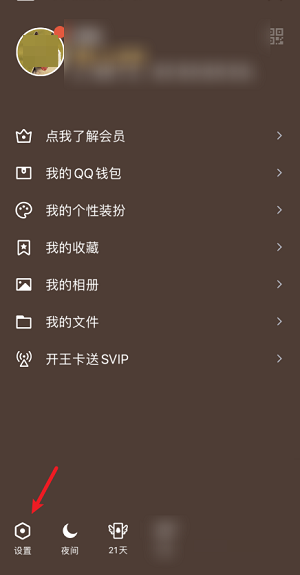
The first step is to click Settings
We open Tencent QQ software, then we click on the avatar in the upper left corner, and then click on settings below.
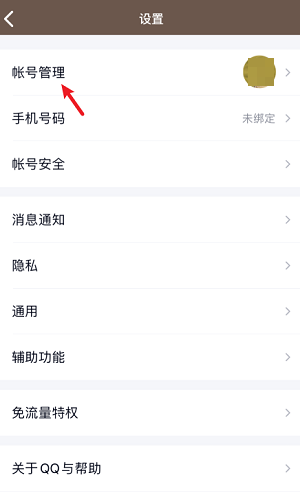
In the second step, click Account Management
After we enter the settings, we click on the account management function, as shown in the picture.
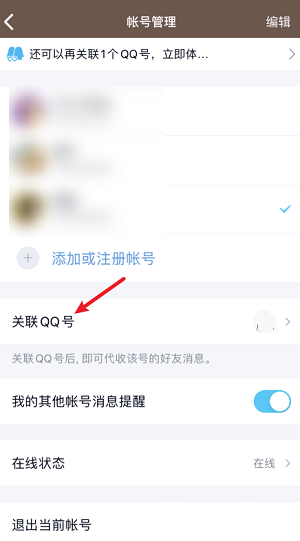
The third step, click to associate QQ
After we enter account management, we click on the associated QQ function below.
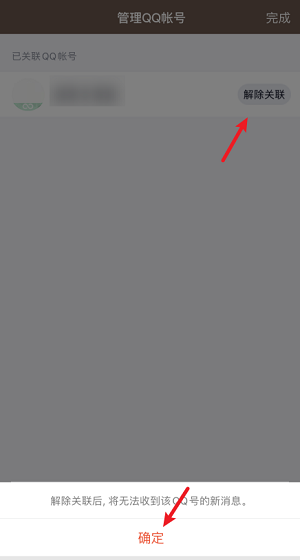
Step 4: Cancel the association
After we enter the page associated with QQ, we click on Management in the upper right corner and cancel the association.
The above is the specific method of unlinking QQ accounts. I hope it can help everyone.
Popular recommendations
-
Tencent QQ
Version: 9.9.25Size: 258 MB
Tencent QQ is a national instant messaging and social platform launched by Tencent. Since its launch in 1999, it has evolved from a basic instant chat tool to a text...
-
Tencent QQ
Version: 9.9.25Size: 266.47 MB
Tencent QQ is a national instant messaging and social platform launched by Tencent. It has continuously served hundreds of millions of users since its launch in 1999. It uses instant messaging, voice...
-
Tencent QQ
Version: 9.9.25Size: 258 MB
Tencent QQ is the core instant messaging and social platform launched by Tencent. Since its launch in 1999, it has become a national-level application. It provides stable and efficient instant messaging...
-
Tencent QQ
Version: 9.9.25Size: 269.21 MB
Tencent QQ is a national-level instant messaging software and social platform launched by Tencent. Since its launch in 1999, it has provided instant text, voice, and video calls as...
-
soft sky community
Version: 0.2.12Size: 82.81 MB
Soft Sky Community Software is a comprehensive platform that integrates resource sharing, community interaction, game downloading and management. As an independent software, it...