How to update the version of Tencent Mobile Game Assistant - How to update the version of Tencent Mobile Game Assistant
Time: 2024-05-11Source: Huajun Software TutorialAuthor: Xiaoyuer
Friends, do you know how to update the version of Tencent Mobile Game Assistant? Today, the editor will explain how to update the version of Tencent Mobile Game Assistant. If you are interested, come and take a look with the editor. I hope it can help everyone.
Step 1: Enter the homepage of Tencent Mobile Game Assistant and click on the three-bar mark in the upper right corner.

Step 2: Then click Check for Updates in the pop-up drop-down option.

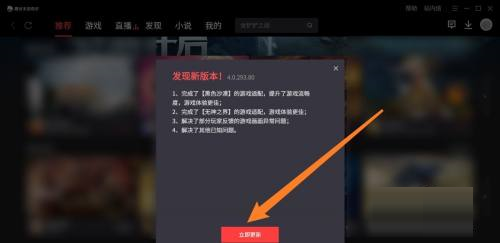
Step 3: Finally, click Update Now in the dialog box.
The above is the entire content of how to update the version of Tencent Mobile Game Assistant brought to you by the editor. I hope it can help you.
Popular recommendations
-
Dynasty Warriors Overlord
Version: Official versionSize: 2.7MB
Dynasty Warriors PC version is an authentically authorized role-playing game with the background of the Three Kingdoms. In the official version of the Dynasty Warriors Warriors game, players can...
-
Snake War
Version: 5.28.6Size: 571.7 MB
The official version of Snake Battle is an online casual game that combines Snake and Ball Battle. In the PC version of Snake Battle, players need to eat...
-
Fairy Tail: The Power Awakens
Version: latest versionSize: 886.9MB
Fairy Tail: The Power Awakens PC version is a fun, classic role-playing game, adapted from the original authorized version of the Fairy Tail animation. Fairy Tail: Force...
-
FC emulator
Version: 2.2.1Size: 17.98 MB
The official version of FC Emulator is a classic game platform specially created for nostalgic players. It reshapes the pure fun of the Famicom era with extreme compatibility and user-friendly design...
-
Marvel Showdown
Version: PC versionSize: 3.5MB
Marvel Showdown PC version is a 3D card strategy game officially authorized by Marvel. The official Marvel Showdown game brings together hundreds of famous Marvel heroes...