How to set rendering acceleration in NetEase MuMu simulator - How to set rendering acceleration
Time: 2024-05-11Source: Huajun Software TutorialAuthor: Qingchen
The first step: Open the NetEase MuMu emulator.
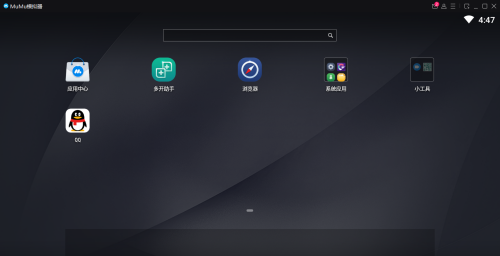
Step 2: After opening the software, click on the menu bar.
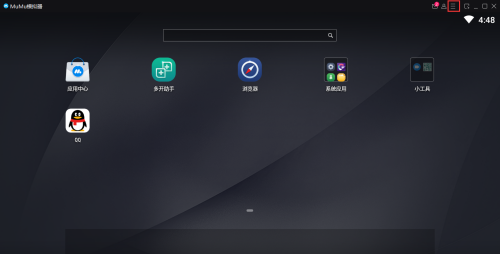
Step 3: After opening the menu bar, click Settings Center.
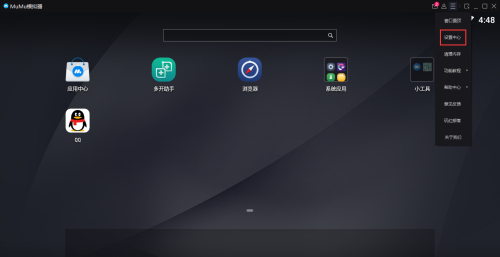
Step 4: Find the advanced settings in the Settings Center.
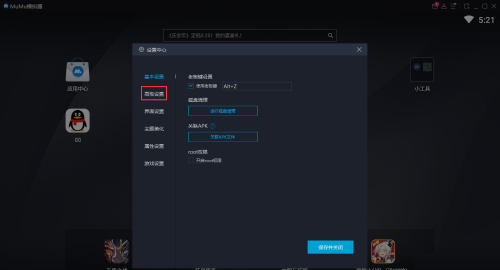
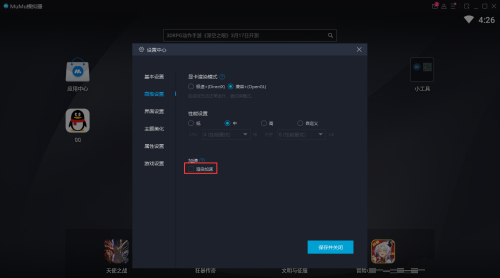
Step 5: Click to turn on rendering acceleration.
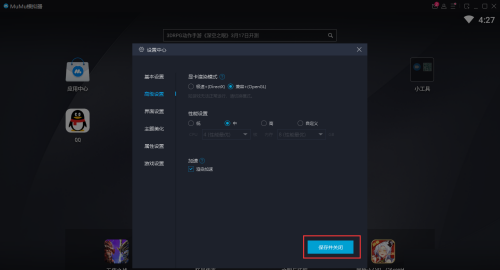
Step 6: After opening, click Save and Close.
The above is the entire content of how to set up rendering acceleration for NetEase MuMu simulator brought to you by the editor. I hope it can help you.
Popular recommendations
-
Dynasty Warriors Overlord
Version: Official versionSize: 2.7MB
Dynasty Warriors PC version is an authentically authorized role-playing game with the background of the Three Kingdoms. In the official version of the Dynasty Warriors Warriors game, players can...
-
Snake War
Version: 5.28.6Size: 571.7 MB
The official version of Snake Battle is an online casual game that combines Snake and Ball Battle. In the PC version of Snake Battle, players need to eat...
-
Fairy Tail: The Power Awakens
Version: latest versionSize: 886.9MB
Fairy Tail: The Power Awakens PC version is a fun, classic role-playing game, adapted from the original authorized version of the Fairy Tail animation. Fairy Tail: Force...
-
FC emulator
Version: 2.2.1Size: 17.98 MB
The official version of FC Emulator is a classic game platform specially created for nostalgic players. It reshapes the pure fun of the Famicom era with extreme compatibility and user-friendly design...
-
Marvel Showdown
Version: PC versionSize: 3.5MB
Marvel Showdown PC version is a 3D card strategy game officially authorized by Marvel. The official Marvel Showdown game brings together hundreds of famous Marvel heroes...