What to do if the WPS document cannot be opened - Solution to the problem that the WPS document cannot be opened
Time: 2022-06-02Source: Huajun Software TutorialAuthor: Qingchen
What should I do if the WPS document cannot be opened? The article brought to you today is the solution to the problem that the WPS document cannot be opened. If you are not sure, let’s learn it with the editor.
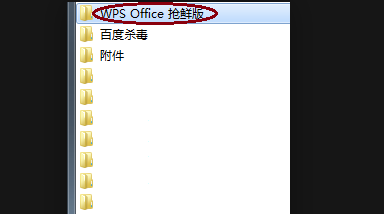
Step 1: Turn on the computer, click to open the start menu bar in the lower left corner, and open the WPS folder.
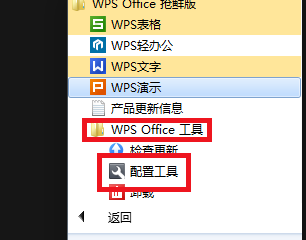
Step 2: Click to open the "Configuration Tool" in the WPS OFFICE tool in the pop-up window.
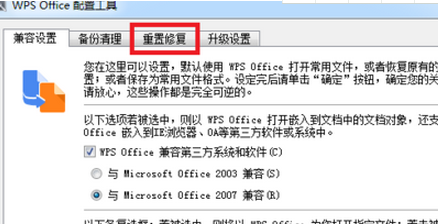
Step 3: In the pop-up window, click to open "Reset Repair" in Advanced.
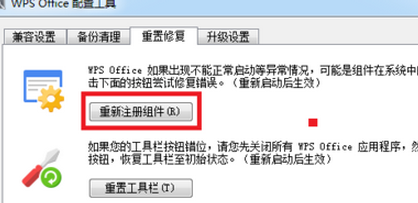
Step 4: Click and select "Re-register component" in the pop-up window.
The above is all the content that the editor brings to you on what to do if the WPS document cannot be opened. I hope it can help you.
Popular recommendations
-
Zhejiang Zhengding
Version: v2.27.0Size: 368MB
The latest version of Zhejiang Dingding is a very convenient government office software jointly created by Dingding and Zhejiang Province. The Zhejiang Ding app is mainly provided to government office personnel at all levels...
-
-
Hero Excel set wizard
Version: 1.007Size: 5MB
Hero Excel Template Wizard is a truly usable template printing software that can fill templates with Excel data and perform batch printing. Can be customized...
-
Quotation software
Version: 1.1 official versionSize: 139MB
Make a quotation, make a quotation form, open a cloud store, cloud quotation, and smart quotation.
Quotation software features
...
-
Enjoy sales XP version
Version: 1.6.2Size: 27.1MB
The official version of Fenxiangxiike XP version is a professional and powerful WinXP-specific mobile office service platform. Fenxiangxiike XP version supports lead management, customer management, business...