How to set shortcut keys for Sogou input method - How to set shortcut keys for Sogou input method
Time: 2024-05-11Source: Huajun Software TutorialAuthor: Xiao Hulu
Recently, some friends have asked the editor how to set shortcut keys for Sogou input method? The following is a method for setting shortcut keys for Sogou input method. Friends in need can come and learn more.
Step 1: First set the system input method to Sogou input method (as shown in the picture).

Step 2: Select the toolbox of Sogou input method (as shown in the picture).
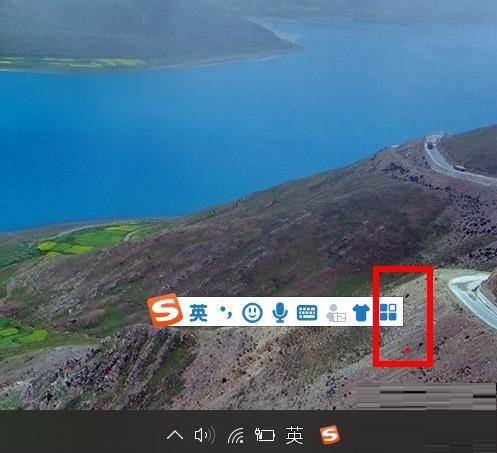
Step 3: Find the property settings of the toolbox (as shown in the figure).
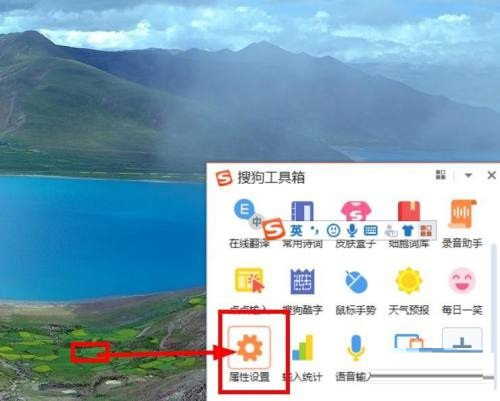
Step 4: Select Advanced on the properties page (as shown in the figure).
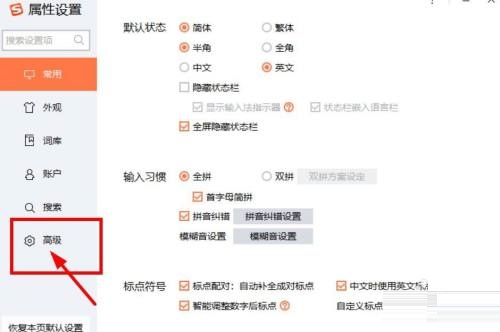
Step 5: Set the shortcut key function (as shown in the picture).

The above is the entire content of how to set shortcut keys for Sogou input method brought to you by the editor. I hope it can help you.
Popular recommendations
-
Sogou input method
Version: 15.11.0.2700Size: 164MB
Sogou Input Method is an efficient, accurate and consistent input method officially developed by Sogou Company. It supports the following systems: Ubuntu (2004/1910/1804/1604), U...
-
Sogou input method
Version: 15.11.0.2700Size: 164MB
Sogou and the ubuntukylin team started to cooperate in the development of "Sogou Input Method Linux Community Edition" in December 2013. After more than ten senior engineers,...
-
WCD
Version: 5.2.0 Beta 8Size: 161KB
Wcd is a program to change directories, WCD project saves time typing time.
-
GoAccess
Version: 0.6Size: 0.14MB
GoAccess0.6 adds a stretchable panel that allows real-time processing of data, regular expression search throughout the panel, and multiple conditions...
-
Drupal
Version: 8.1.2 for LinuxSize: 12260KB
Drupal is a powerful CMS. Its functional design imitates the modular approach of phpnuke, xoops, etc., and its interface imitates the blog mode. This...


