
-
Sogou input method
- Size: 164M
- Language: Simplified Chinese
- Category: application
- System: Linux







Sogou and the Ubuntu Kylin team started to cooperate in the development of "Sogou Input Method Linux Community Edition" in December 2013. After five months of joint research by more than a dozen senior engineers, product managers, and senior testers, version 1.0 was finally officially released on time. This version is based on the open source Little Penguin input method framework, the open source qimpanel panel andSogou input methodEngine development will be provided free of charge to all open source Linux distributions and individual users.
Installation guide:
Ubuntu / Ubuntu Kylin 14.04 LTS version
Just double-click the downloaded deb package to directly install Sogou input method.
Ubuntu 12.04 LTS version
Since the Fcitx version that comes with Ubuntu 12.04 LTS is older, you need to upgrade it through PPA first before you can install the downloaded deb package.
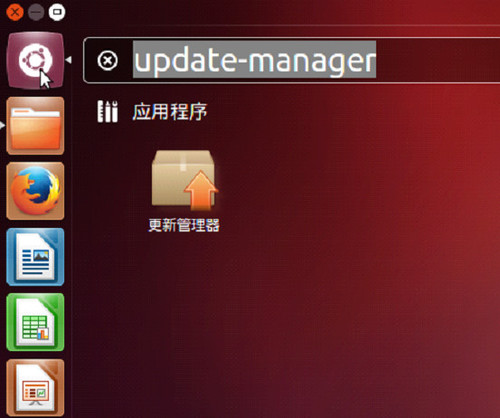
1. Click the icon in the upper left corner to open Dash, enter update-manager, and click Update Manager.
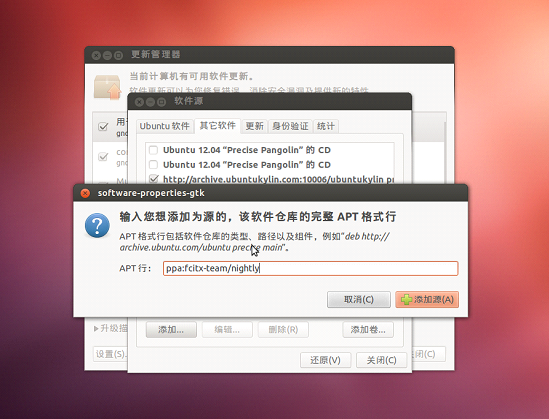
2. In the update manager, select the menu: Edit->Software Source, click the Add... button, enter ppa:fcitx-team/nightly in the pop-up window, and click Add Source.
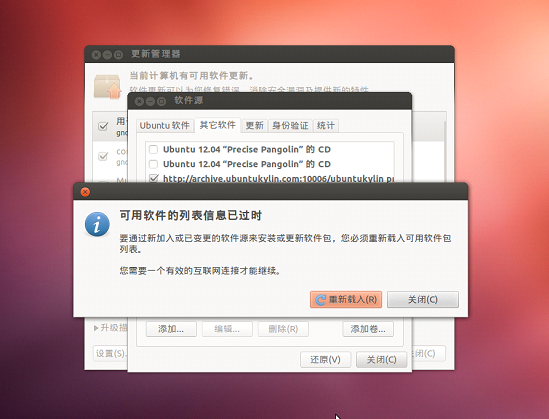
3. Then click Reload.
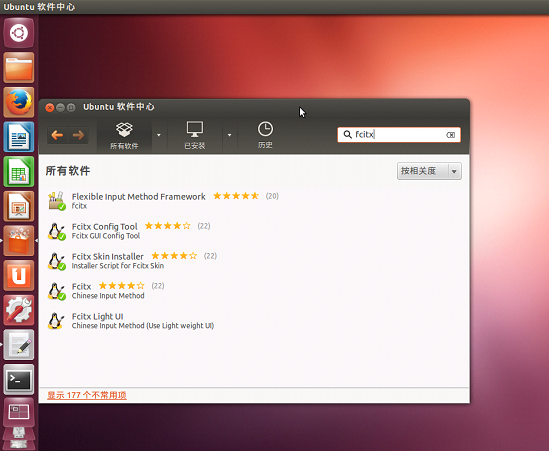
4. Open the Ubuntu Software Center, enter fcitx in the search bar, fcitx will be found, and then follow the general software installation steps aa to install to complete the upgrade.
Sogou input method Linux version update log:
2.1.0.0086
1. Solve the crash problem caused by cell dictionary update.
2. Fixed the problem of probability crash when opening Shuangpin settings.
3. Fixed the problem that some operating systems cannot be updated through the warehouse source.
2.1.0.0082
1. Update Sogou input method to the latest 2016 kernel for the ultimate input experience;
2. Perfectly supports U mode, allowing you to overlap and split words more freely;
3. Added a variety of cool skins to make input more wonderful;
4. Fixed the array out-of-bounds problem when retrieving and deleting words from the cell thesaurus;
5. Fix the crash problem caused by curl timeout waiting;
6. Fixed the problem that the status bar pop-up menu did not disappear normally;
7. Set the switching between input methods including keyboard input status;
8. Optimize the first startup speed of the input method;
9. Fixed the problem of incomplete display of candidate words with emoticons;
10. Fixed the problem of no prompt when installing the cell dictionary after switching users.
Version: 15.11.0.2700 | Update time: 2025-11-28
Similar recommendations




Latest updates





How to add Sogou cool characters to Sogou input method - How to add Sogou cool characters
How to change the position of close/maximize/minimize buttons in Ubuntu program window
Tips for closing pop-up windows using Sogou input method
How to type pinyin with tones using Sogou input method-How to type pinyin with tones
How to turn off the fuzzy sound setting in Sogou input method
Sogou input method review
-
1st floor Huajun netizen 2021-07-06 07:09:04Sogou input method is very useful, thank you! !
-
2nd floor Huajun netizen 2020-11-29 11:29:58The interface design of Sogou input method is easy to use and has rich functions. I highly recommend it!
-
3rd floor Huajun netizen 2022-02-22 13:28:02Sogou input method is not bad, the download is very fast, I give you a good review!
Recommended products



- Diablo game tool collection
- Group purchasing software collection area
- p2p seed search artifact download-P2P seed search artifact special topic
- adobe software encyclopedia - adobe full range of software downloads - adobe software downloads
- Safe Internet Encyclopedia
- Browser PC version download-browser download collection
- Diablo 3 game collection
- Anxin Quote Software
- Which Key Wizard software is better? Key Wizard software collection




