Recently, many netizens have asked the editor about the related operations of building a personal website with xampp. Below, the author specially introduces the method and content of building a personal website with xampp. I believe it will be helpful to everyone.
Open xampp, you can see the control panel as shown in the picture. By default, the apchace and mysql services are not installed, so there will be a red × next to it.
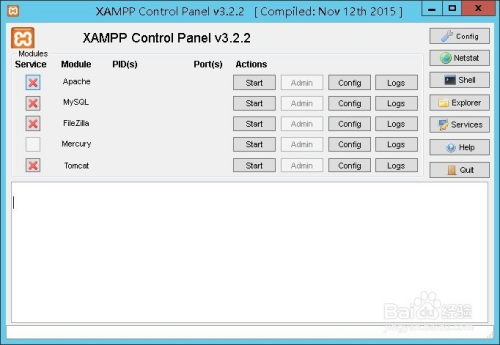
Click the red × next to apache and mysql, a window will pop up, click yes to install the corresponding service

After the service is installed successfully, you will see that the original red × turns into a green √, which proves that the service is successful, then start apche and mysql
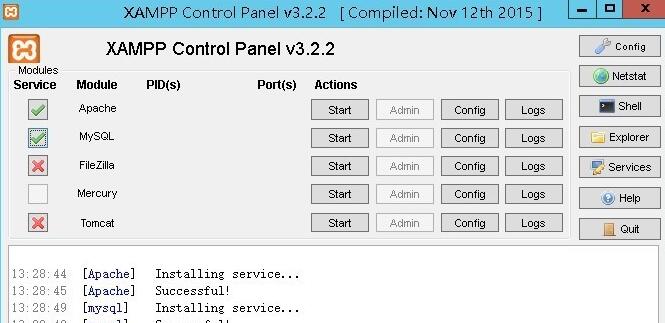
Click start on the right side of apache and mysql to start the corresponding service. If the startup is successful, this screenshot will be displayed. You can see that the corresponding process number and port number will be displayed under pids and port, then the startup is successful.

Click admin on the right side of apache. If it is opened successfully, it proves that your xampp server has been deployed successfully!

So how should I write my own website? Set up on the server? Click on the rightmost toolbar on the panel, find explorer, click to enter the root directory of the xampp installation, and find the htdocs folder. The default website path of the server is the path of this folder. We need to put our website under this path.

Then create a new website folder under the htdocs folder specifically to store our website files.

In order to demonstrate to everyone, the editor created a new index.php file under this file.

Then open the index.php file under the htdocs path, and change the "/dashboard/" selected in the picture to "/website/" or "/website/index.php". If you do not add the following web page, the server will look for the file named index by default.
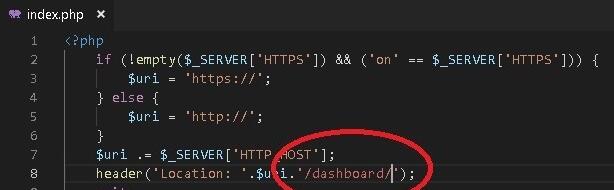
Then open the browser and enter localhost, and then you can jump to the web page we just created.

The above explains the operation process of building a personal website with xampp. I hope friends in need can learn it.