Detailed explanation of the use of designated controllers in 3Ds MAX
Time: 2020-06-30Source: Huajun Software TutorialAuthor: Changshan Paper Farmer
Some novice friends said that they still don’t understand the designated controller in 3Ds MAX. So how to use the designated controller in 3Ds MAX? Below, the editor will share the content of how to use the designated controller of 3Ds MAX. Gamers who need it can learn more.
1. Click the sports panel,

2. Click the location,
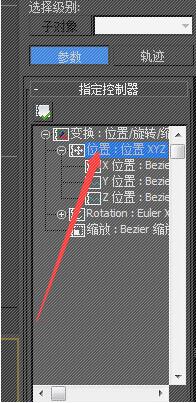
3. Click above the position to customize the small controller icon.
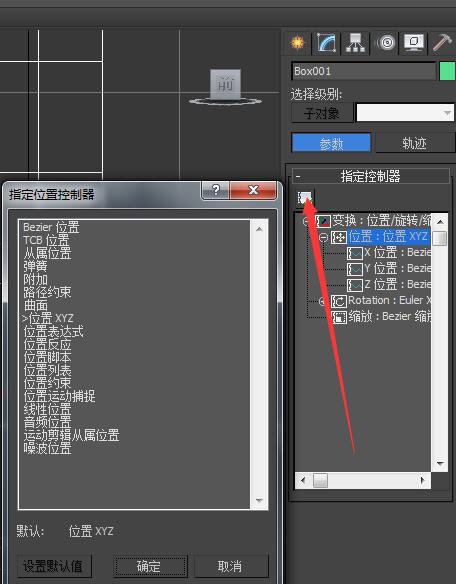
4. Finally, you can modify it.
The above explains the operation process of using the designated controller of 3Ds MAX. I hope friends in need can learn it.
Popular recommendations
-
Zhuanzhuan Master picture format converter
Version: 6.0.5.4Size: 33 MB
The latest version of Zhuanzhuan Master Picture Format Converter is a picture format conversion software. Zhuanzhuan Master Picture Format Converter software can convert PDF and pictures to and from each other. The software...
-
Jinzhou OFD converter
Version: 2.0.7.0Size: 137.4MB
Jinzhou OFD Converter is a tool focused on OFD (OpenFixed-layoutDocument) format conversion and processing, supporting OFD and PDF, pictures, Word...
-
Polar Photo Editing Desktop Version
Version: 6.9.7Size: 273MB
Polar Photo Retouch is a powerful and easy-to-use multi-platform image editing software that provides basic adjustments such as exposure, contrast, white balance, and tone curve...
-
CAD mini drawing
Version: 31.3.0.2Size: 104.76 MB
CAD Mini Drawing Free Edition is a very small, light, simple and easy-to-use CAD drawing tool, the smallest DWG drawing tool, the simplest and fastest CAD drawing...
-
Illustrator CS6
Version: 5.2.0.17Size: 2.04 MB
Illustrator CS6 is the 16th generation of professional vector graphics editing software released by Adobe in 2012. With its performance improvement and interface optimization...