How to set Taobao browser as default browser
Time: 2019-07-22Source: InternetAuthor: Changshan Paper Farmer
Many friends who shop online should be familiar with Taobao Browser. Here are the operating techniques for setting Taobao Browser as the default browser. I hope it will be helpful to you.
1. Open Taobao browser.
2. In the opened browser interface, click the "Tools" command option in the menu bar.
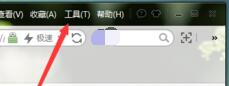
3. In the pop-up tool menu options, click the "Options" command option.
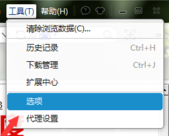
4. After clicking the "Options" command option, the browser "Options" dialog box will pop up.
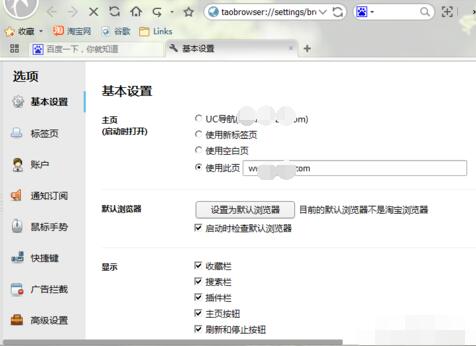
5. In the Options dialog box, select the Basic Settings tab in the left pane.
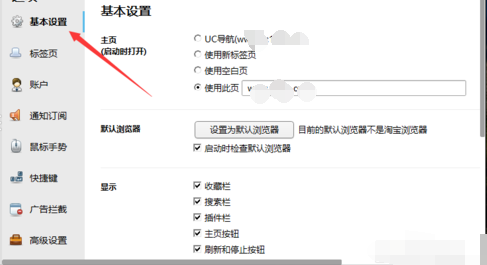
6. In the right pane of the "Basic Settings" tab, find the "Set as default browser" option button in "Default Browser" and click it.

Dear friends, after reading the above exciting content, you all know the operation skills of setting Taobao browser as the default browser!
Popular recommendations
-
UC Browser
Version: 1.1.0.10Size: 165MB
The desktop version is the latest tool with most browser functionality. The official version of UC Browser can support browsing, browsing acceleration, mouse gestures, boss button,...
-
Ovi interactive map
Version: v10.3.8Size: 87.94 MB
Ovi interactive map browser is a powerful map browser. The computer version of Aowei Interactive Map supports Baidu Map, Sogou Map, Google Map...
-
White Shark Browser
Version: 20.25.11.20Size: 85.3MB
The personalized new tab page of White Shark Browser provides real-time weather, calendar, HD wallpapers, to-do reminders, AI assistant, online translation, online...
-
Microsoft Edge browser
Version: 142.0.3595.94Size: 1.56 MB
It is a web browser developed by Microsoft based on open source projects and other open source software. The Microsoft Edge browser adds language recognition to the original...
-
Quark
Version: V4.2.0.418Size: 247 MB
On January 10, 2024, the technology world ushered in exciting news - Quark officially launched the PC version and launched it on the Windows platform. Very...