How to synchronize data in itunes
Time: 2017-08-02Source: Huajun InformationAuthor: Mulinsen
When some friends tried out iPhone or iPad, they had to endure a lot of inconvenience caused by this situation because they did not know how to keep data synchronized between the mobile device and the computer. How to keep the data synchronized between the two? Let the editor tell you now!
1. Connect your phone to the computer, and the computer will automatically open iTunes.
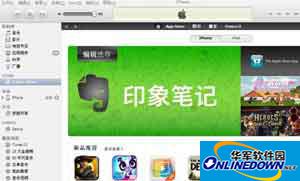
Open iTunes
2. Click the mobile phone icon under the device on the left to enter the summary of the mobile phone.
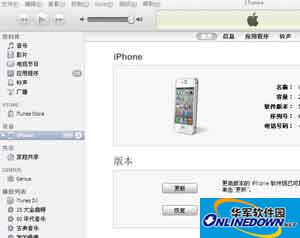
Enter your phone's summary
3. Pull down the scroll bar. In the options, you can see that the check in front of "Open iTunes when this iPhone is connected" is selected, so as long as the phone is connected to the computer, iTunes will automatically be opened for synchronization.
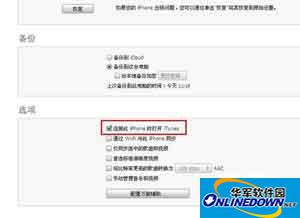
Open iTunes while this iPhone is connected
4. Sometimes when iTunes is connected to the mobile phone, iTunes does not synchronize automatically after downloading a certain software. When you click on the application, you can see that the check in front of the software is not selected.
Popular recommendations
-
Almighty translator
Version: Official versionSize: 3.90 MB
Almighty Translator is a multi-functional translation software that relies on intelligent recognition and intelligent translation technology to realize text translation, picture translation, video translation, audio translation...
-
Kugou Live Companion
Version: 7.68.2.680Size: 307.58 MB
Kugou Live Companion is a music-centered live broadcast tool that deeply integrates Kugou music resources and provides professional-grade audio processing and interactive functions to help...
-
Kugou Live Companion
Version: 7.68.2.680Size: 335.57 MB
Kugou Live Companion Official Edition is a professional live broadcast tool developed by Kugou Music specifically for musicians and anchors. It integrates high-definition audio and video streaming, intelligent sound editing, and multiple settings...
-
Dahua smartpss client
Version: v2.003.0000004.0Size: 123.07 MB
Dahua SmartPSS client is an intelligent network monitoring and management software developed by Zhejiang Dahua Technology Co., Ltd., specially designed for embedded network monitoring...
-
TT voice
Version: 1.4.5.1Size: 163.20 MB
The latest version is a very useful game chat tool. Users of the latest version of TT Voice can directly find their favorite partners in this software, and...