The problem that has troubled many movie fans for a long time will be solved for you today. Watching movies on Xigua Video Player keeps buffering! Xigua Video Player is also a P2P video on demand software that supports streaming technology, so you have to have confidence in it.
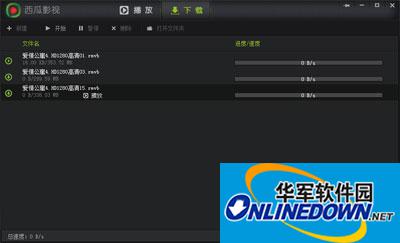
Xigua audio and video player
Solution to the problem that Xigua Video Player cannot watch movies:
The fundamental reason why Xigua Video Player cannot play movies is that there is a problem with the movie source (i.e., the playback address). Due to the impact of the Internet's "online anti-pornography" campaign, some illegal video playback websites or film sources have been banned. Xigua Video Player is no exception and must abide by this rule.
What we can do now is to use Thunder to download the video locally, and then use "Xigua Video Player" to watch it offline.
Of course, when the web page cannot use "Gua Video Player" to watch movies, we can operate as follows: In the "Browser" interface, click "Tools" -> "Internet Options".
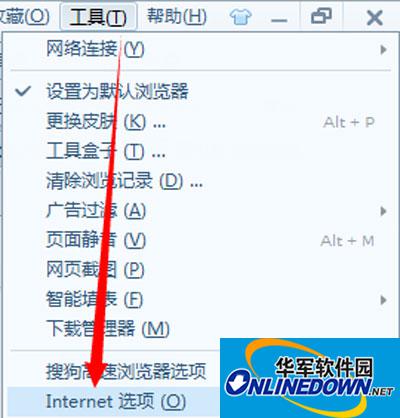
Internet options
In the window that opens, click the "Delete" button.
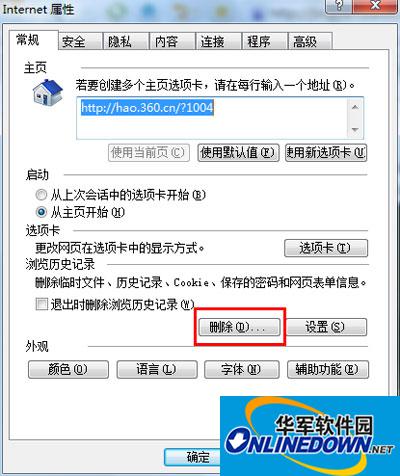
Click the "Delete" button
From the pop-up window, make sure the "Delete Cookies and Site Data" item is checked and click the "Delete" button. Then close the browser and reopen it to try playing the video again.
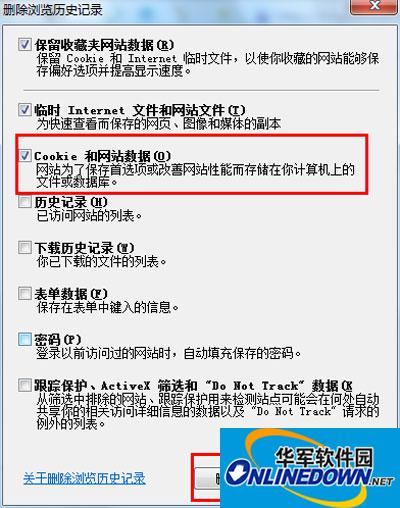
Close the browser and reopen it to try playing the video again