
-
Handheld business APP
- Size: 56.5M
- Language: Simplified Chinese
- Category: business office
- System: ios


Official version of Palm Business APP
The official version of the Handheld Industrial and Commercial APP is a service platform created by the Henan Provincial Administration for Industry and Commerce. The Henan Province Handheld Business and Industry iOS version not only allows you to easily apply for an electronic business license, but you can also check the progress of the business in a timely manner. The Handheld Industrial and Commercial APP also provides various services such as enterprise change information and industrial and commercial review. Huajun Software Park provides download services for the Handheld Industrial and Commercial APP. To download other versions of the Henan Province Handheld Industrial and Commercial APP, please go to Huajun Software Park!

Handheld business APP software functions
Independent name verification:
Autonomous verification function Currently it is only available in Zhengzhou Airport Area, Zhengzhou Free Trade Area, Kaifeng Free Trade Area, and Luoyang Free Trade Area. You can use the self-verified area, select the combination of the company name, fill in the relevant name information and other supplementary information, check for duplication, submit and save, without the need for industrial and commercial personnel to review the name, and you can directly handle the establishment business after the self-verified name is completed.
Name registration:
Select the combination form of the company name, fill in the relevant name information, check for duplication, pass the preliminary screening, submit to the next step, fill in other supplementary information as required by the page instructions, and submit. The submitted business has been submitted for industrial and commercial review. The submitted data will be transferred to the industrial and commercial system, and industrial and commercial personnel will review the submitted name.
Establishment registration:
If the name has been approved and is to be established, and is within the establishment business retention period, you can search for the enterprise to be established in the establishment process, click on the establishment, fill in the page information, electronically sign, upload the required ID photos, submit it to the industrial and commercial system, and the industrial and commercial personnel will review the submitted establishment data;
Name change registration:
Name change registration must be logged in by the enterprise user after establishment to use this function. Enterprise users can first enter a new enterprise name in the name change registration and submit it for review. After approval by the industrial and commercial personnel, they can do the name change business in the change filing.
Change (filing) registration:
Change (filing) registration must be logged in by the enterprise user after establishment to use this function. You can submit a change filing registration application on the page and fill in the changed information items. After submission, industrial and commercial personnel will review the submitted change information.
Liquidation group filing and registration:
Liquidation group registration must be logged in as a corporate user to use this function. You can submit the liquidation group registration information on the page, fill in the liquidation group registration information items, and industrial and commercial personnel will review the submitted information after submission.
Deregistration:
Deregistration must be logged in as an enterprise user to use this function. You can submit the deregistration information on the page and fill in the deregistration information items. After submission, the industrial and commercial personnel will review the submitted information.
Step 8. For those who have forgotten the steps required for industrial and commercial registration, please click on the portal below to go directly to the past popular science of small and micro enterprises (although online processing is supported, the required preparation materials have not been reduced):

Advantages of handheld business APP software
【High efficiency】
apart out to be familiar with the rules of each service process, prioritize customer goals and focus on efficiency.
【Formal processing】
Submit entrustment materials online, sign a contract, charge in different grades, clearly mark the price, and there is no hidden consumption.
【One-on-one service】
We will provide you with an exclusive professional financial and taxation consultant for free to answer all kinds of financial and taxation questions and problems at any time.
【After-sale guarantee】
Standardize the process, check the processing progress anytime and anywhere, compensate for errors, and reduce the price without reducing the quality.
Features of Handheld Business APP Software
Register company information online and upload supporting documents
Provide relevant service guides and legal and regulatory inquiries
You can query enterprise registration information with multiple conditions
Consult with various institutes and bureaus for industrial and commercial expertise
How to use the Palm Business APP
How to register a business license in Henan Palm Industrial and Commercial App
Open the Henan Pocket Business App, register and log in to the home page.

Click on My to enter the homepage, click on the name to make an appointment for review, click on the picture in the upper right corner to enter the company name review.
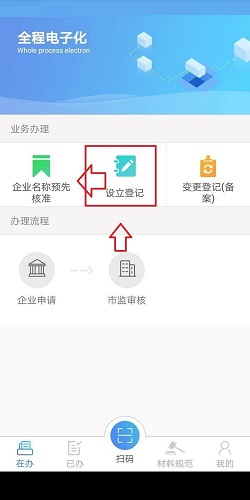

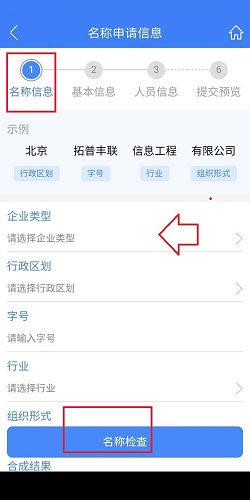
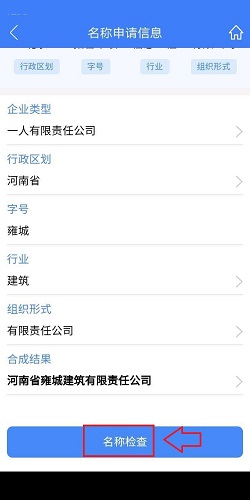
After entering, enter the name information one by one, click Name Check to prevent duplicate names, and then click Next.
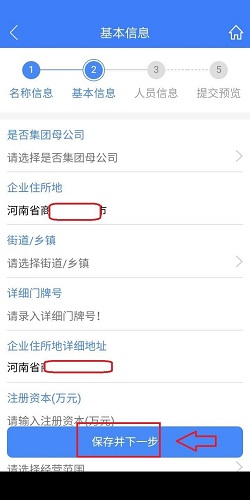
After entering, review the basic information of the registered company, enter the accurate company information that needs to be entered, click to enter, and then click Next.
After entering, click Upload Materials to upload personal materials and personal information.
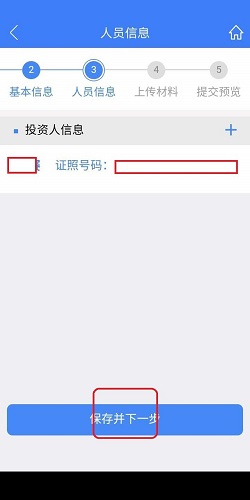
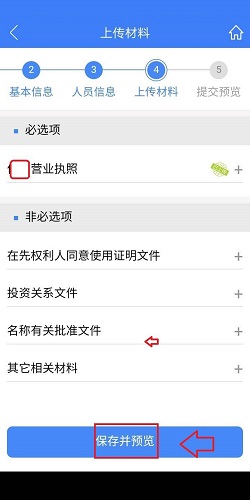
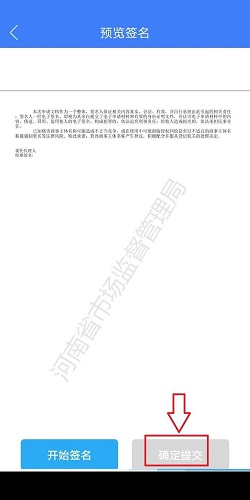
Sign, enter the verification code, check and confirm the entered corporate information and personal information, and click OK to submit.
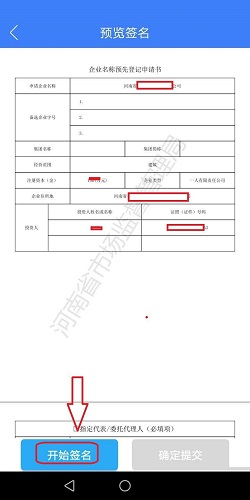
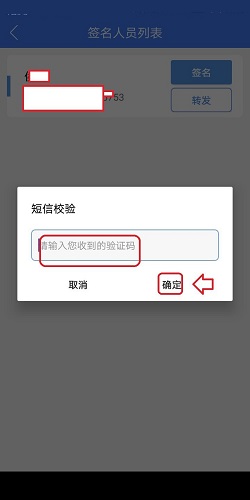
After the name is reviewed, enter the review level, click to enter, enter the company supervisor and other financial information and submit it, the company registration is completed.
Frequently Asked Questions about Handheld Business APP
Question: What happened when the Henan Mobile Business App registration crashed?
Answer: 1. It may be that the software has too many caches and is unable to run properly. It is recommended to try clearing the software cache: Settings - Find "Application Manager" - (All) - Find the software - (Storage) - Clear data (Note: All data of the application will be permanently deleted).
2. If the software can be uninstalled, it is recommended to uninstall the software and reinstall it or change to another software version and try to install it again.
3. If it doesn’t work, please update the phone system version: Settings-About phone (About device)-Manually download updates/Automatically download updates (Software update/System update-Update). Note: Please back up the data in the device before upgrading.
4. If it is already the latest version, please back up the data in the device and then try restoring the factory settings.
Question: How to add shareholder information to a company registered on the Henan Handheld Industrial and Commercial App?
Answer: 1. Bring the company's business license, ID card information of the new and old shareholders, company seal, etc. to the Industrial and Commercial Bureau to apply for industrial and commercial changes;
2. After the industrial and commercial changes are approved, the legal person and financial director must go to the tax bureau to have their fingerprints recorded.
Comparison of similar software
Mianyang Pocket Industry and CommerceEnterprise registration information can be queried using multiple conditions. Mianyang enterprises have a machine in hand. Provide relevant service guides, laws and regulations inquiries, and consult with various institutes and bureaus on industrial and commercial expertise.
Pocket powerThe client is a handheld power interactive service platform created by the State Grid Corporation of China. The mobile electricity client mainly provides customers with electricity-related services such as payment for electricity purchase, electricity usage inquiry, information subscription, and online customer service through mobile phones.
Huajun editor recommends:
Henan Province Mobile Industry and Commerce not only allows you to easily apply for an electronic business license, but you can also check the progress of the business in a timely manner. A very good business office software. The editor also uses this software. It is powerful, green and safe.
Version: 2.2.5 Official version | Update time: 2024-12-31
Similar recommendations




Latest updates




How to open any source on mac system
How to change the password of Taobao app-How to change the password of Taobao app
How to scan QR code on Taobao app-How to scan QR code on Taobao app
How to set Taobao nickname on Taobao app - How to set Taobao nickname on Taobao app
How to pay with WeChat on Taobao - How to pay with WeChat on Taobao
How to view transaction snapshots on Taobao app - How to view transaction snapshots on Taobao app
How to lock the account in Taobao app-How to lock the account in Taobao app
How to increase the font size on Taobao app - How to increase the font size on Taobao app
How to collect news in Tencent News - How to collect news in Tencent News
Reviews of Handheld Business APP
-
1st floor Huajun netizen 2020-12-20 02:08:37The downloading process of the Handy Business APP is very smooth and good, and you can use it on your Android tablet as usual after downloading!
-
2nd floor Huajun netizen 2021-03-05 19:43:10Recently, many people have recommended the Palm Business APP, and it’s pretty good after I tried it.
-
3rd floor Huajun netizen 2021-10-13 15:16:10It’s so good that I collected it directly. I highly recommend it on the Palm Business APP.
Recommended products









- Diablo game tool collection
- Group purchasing software collection area
- p2p seed search artifact download-P2P seed search artifact special topic
- adobe software encyclopedia - adobe full range of software downloads - adobe software downloads
- Safe Internet Encyclopedia
- Browser PC version download-browser download collection
- Diablo 3 game collection
- Anxin Quote Software
- Which Key Wizard software is better? Key Wizard software collection