Minecraft International Edition is a sandbox management simulation game loved by players all over the world. So how to create a LAN room in Minecraft International Edition? How to create a LAN room in Minecraft International Edition? Let the editor give you the answer below!
How to create a LAN room in the international version of Minecraft?
1. After entering the world, press the Esc key to open the menu and select "Open to LAN".
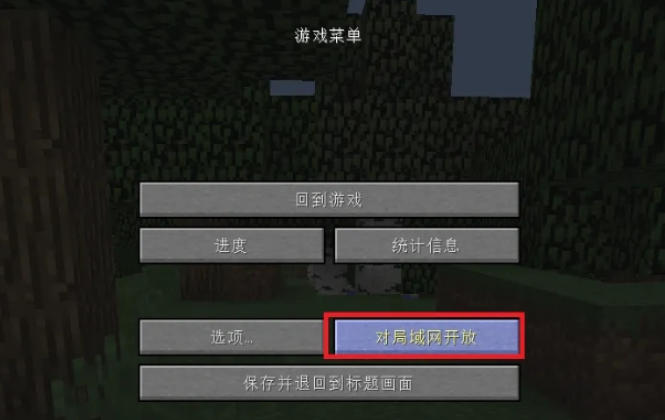
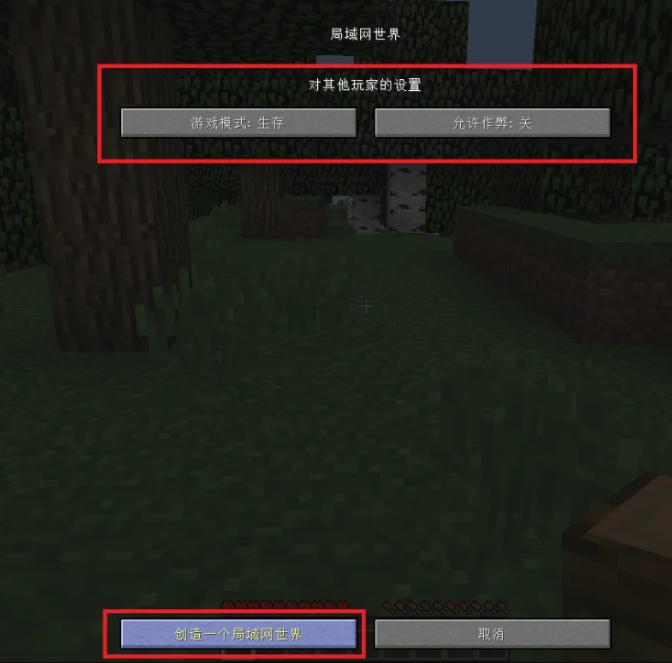
2. Set the following options in the pop-up window:
Game modes: Survival, Creative, Adventure or Spectator.
Allow cheating: turn it on or off (to turn it on, use commands such as /gamemode).
Click "Start LAN World".
The above is what Huajun editor compiled for you. How to create a LAN room in the international version of Minecraft? Here is how to create a LAN room in the international version of Minecraft. I hope it can help you.