Tencent Docs is a collaborative cloud Office tool. So how do you set the sorting of Tencent Docs? How to set the sorting of Tencent documents? Let the editor give you the answer below!

How to set the sorting of Tencent documents?
1. Open the table document
Start Tencent Documents App and enter the target form.
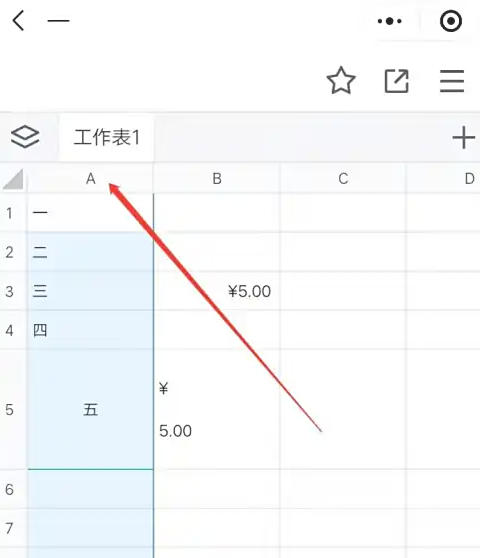
2. Select the sort column
Press and hold the column header you want to sort until a check box appears.
3. Enter the sort menu
Click the "Data" button on the bottom toolbar.
Select Sort → Ascending or Descending.
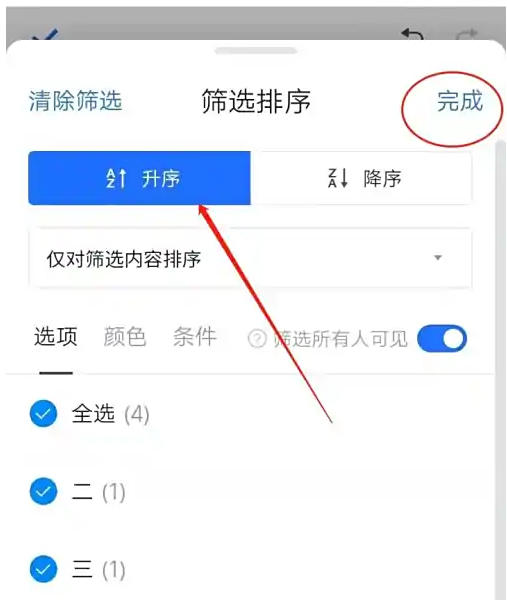
4. Confirm the sorting
The system automatically sorts the entire row of data, eliminating the need to manually expand the area.
The above is the Tencent document compiled by Huajun editor for you. How to set the sorting? Here is how to set the sorting of Tencent documents. I hope it can help you.