How to turn off ads in Tomato Novels? -How to turn off ads in Tomato novels
Time: 2025-08-21Source:Author: Ai Xiaomo
Tomato Novel is a reading and listening tool with massive genuine novel resources. So how do you turn off ads in Tomato Novel? How to turn off ads in Tomato Novels? Let the editor give you the answer below!

How to turn off ads in Tomato Novels?
1. Open the Tomato Novel APP and click "My" in the lower right corner.
2. On the “My” page, click the “Settings” icon in the upper right corner.
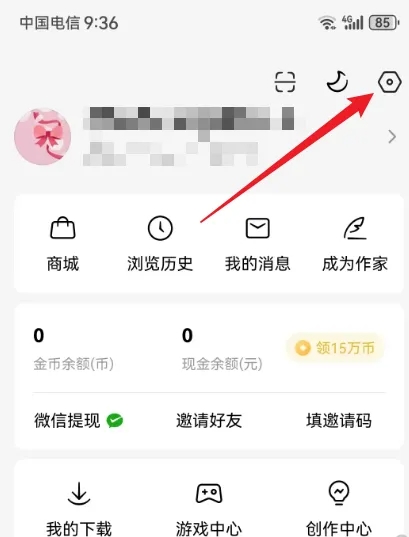
3. On the settings page, click "About Tomato".
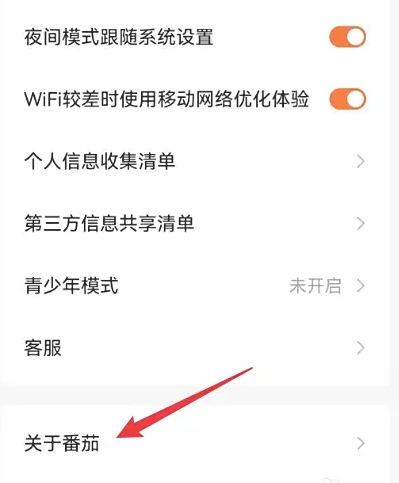
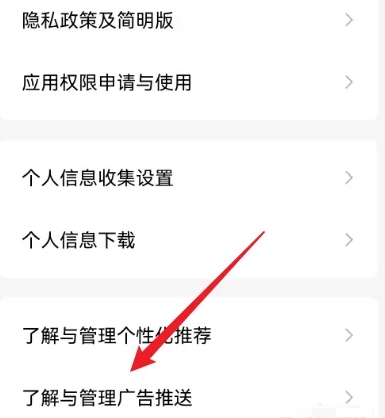
4. On the “About Tomato” page, click “Understand and manage advertising push”.
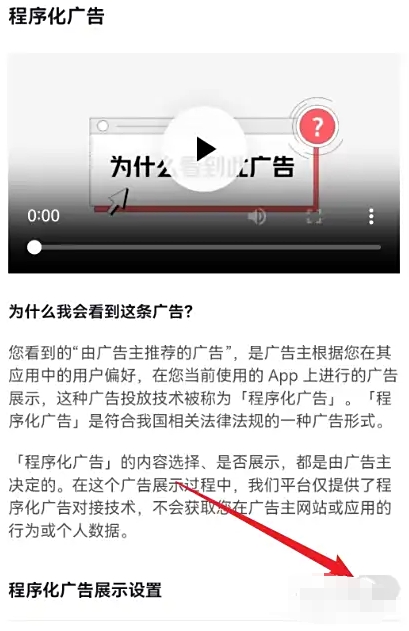
5. On the “Understand and Manage Advertising Push” page, turn off the “Programmatic Ad Display Settings” and “Personalized Ad Display Settings” options.
The above is the tomato novel compiled by Huajun editor for you. How to turn off ads? Here’s how to turn off ads in Tomato Novels, I hope it helps.
Popular recommendations
-
Migu is good at running
Version: PC version v6.13.5Size: 156.7 MB
Migu Shanpao is an "Internet +" sports and health platform launched by Migu Interactive Entertainment Co., Ltd. It takes "sports + public welfare" as its core and integrates sports records...
-
Want Want Chat PC version
Version: 3.6.0Size: 97.73 MB
The PC version of Wangwang Chat can be downloaded and used on the computer. This software can support everyone to chat with many users online. you...
-
Little Witch Legend
Version: PC version v9.88.00.01Size: 101.6 MB
The PC version of Little Witch Legend is a very good children's puzzle software. This Little Witch Legend software has a large map that can display different levels of adventure...
-
Miyoushe computer version
Version: 2.96.2Size: 37.87MB
Miyoushe computer version software functions
2. Cloud game distribution, providing game cloudization and cross-end distribution services to manufacturers;
...
-
read comics
Version: PC version v4.4.5Size: 83.7 MB
Comic reading software is a digital reading tool specially designed for comic lovers. It integrates a large number of comic resources, covering Chinese comics, Japanese comics, Korean comics, American comics and other global works...