How to set the download directory in 360 Browser? -How to set the download directory for 360 Browser
Time: 2024-12-31Source:Author: Huluwa
360 Secure Browser is a small, fast, safe and powerful browser. So how to set the download directory for 360 Browser? How to set the download directory in 360 Browser? Let the editor give you the answer below!

How to set the download directory in 360 Browser?
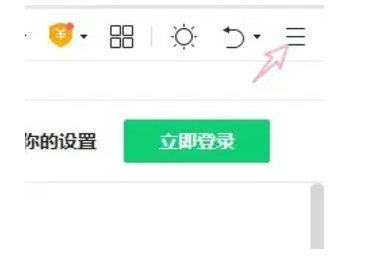
1. Open the 360 Browser and click the "three horizontal lines" menu button at the top of the browser.
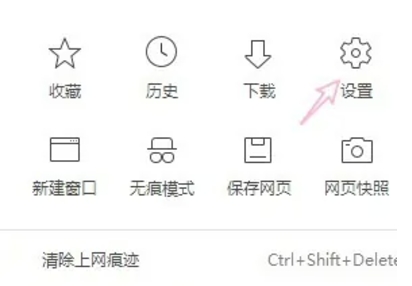
2. Click "Settings" in the drop-down menu.
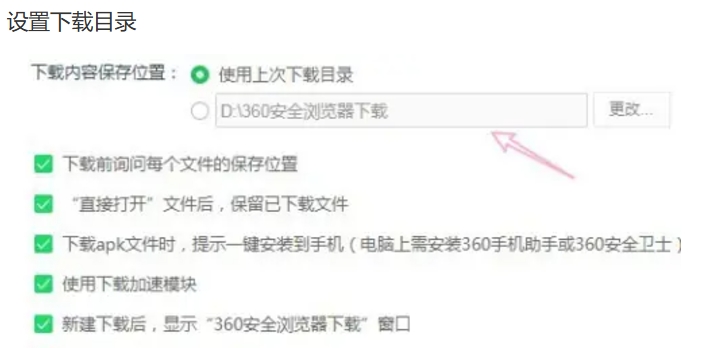
3. In the download settings section, find the "Save download location" option. Click the "Change" button next to it and select the download directory you want to set.
The above is what Huajun editor compiled for you. How to set the download directory for 360 browser? Here’s how to set the download directory for 360 Browser. I hope it can help you.
Popular recommendations
-
Xingyou Web Toolbox
Version: 2.0.0.2Size: 1.48MB
Xingyou Web Toolbox is a software tool for various processing of web pages, including text extraction, link extraction, image extraction,...
-
UC Browser
Version: 1.1.0.10Size: 165MB
The desktop version is the latest tool with most browser functionality. The official version of UC Browser can support browsing, browsing acceleration, mouse gestures, boss button,...
-
Ovi interactive map
Version: v10.3.8Size: 87.94 MB
Ovi interactive map browser is a powerful map browser. The computer version of Aowei Interactive Map supports Baidu Map, Sogou Map, Google Map...
-
White Shark Browser
Version: 20.25.11.20Size: 85.3MB
The personalized new tab page of White Shark Browser provides real-time weather, calendar, HD wallpapers, to-do reminders, AI assistant, online translation, online...
-
Microsoft Edge browser
Version: 142.0.3595.94Size: 1.56 MB
It is a web browser developed by Microsoft based on open source projects and other open source software. The Microsoft Edge browser adds language recognition to the original...