How to hide the scroll bar in QQ Browser - How to hide the scroll bar in QQ Browser
Time: 2022-06-19Source: Huajun Software TutorialAuthor: Qingchen
近日有一些小伙伴咨询小编QQ浏览器如何隐藏滚动条?下面就为大家带来了QQ浏览器隐藏滚动条的方法,有需要的小伙伴可以来了解了解哦。
The first step: First, open the QQ browser. As shown in the picture:

Step 2: Then, click the “Menu” button in the upper right corner.
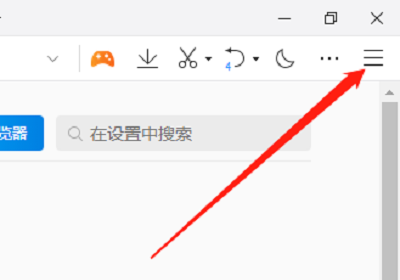
Step 3: Click "Settings" again. As shown in the picture:

Step 4: Next, click “Advanced”. As shown in the picture:

Step 5: Finally, in "Web Browsing", check the "Use hidden scroll bar style" option. As shown in the picture:

The above is the entire content of how to hide the scroll bar in QQ browser brought to you by the editor. I hope it can help you.
Popular recommendations
-
UC Browser
Version: 1.1.0.10Size: 165MB
The desktop version is the latest tool with most browser functionality. The official version of UC Browser can support browsing, browsing acceleration, mouse gestures, boss button,...
-
Ovi interactive map
Version: v10.3.8Size: 87.94 MB
Ovi interactive map browser is a powerful map browser. The computer version of Aowei Interactive Map supports Baidu Map, Sogou Map, Google Map...
-
White Shark Browser
Version: 20.25.11.20Size: 85.3MB
The personalized new tab page of White Shark Browser provides real-time weather, calendar, HD wallpapers, to-do reminders, AI assistant, online translation, online...
-
Microsoft Edge browser
Version: 142.0.3595.94Size: 1.56 MB
It is a web browser developed by Microsoft based on open source projects and other open source software. The Microsoft Edge browser adds language recognition to the original...
-
Quark
Version: V4.2.0.418Size: 247 MB
On January 10, 2024, the technology world ushered in exciting news - Quark officially launched the PC version and launched it on the Windows platform. Very...