What to do if Eclipse is garbled - Solution to Eclipse garbled code
Time: 2022-05-27Source: Huajun Software TutorialAuthor: Ai Xiaomo
Recently, some friends have asked the editor what to do if Eclipse is garbled. The following is a solution to Eclipse garbled code. Friends who need it can come and learn more.
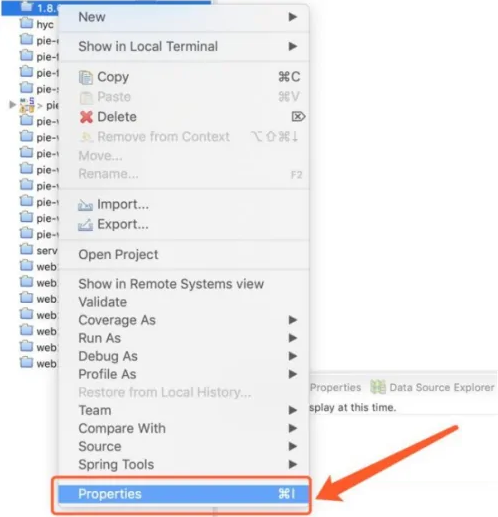
Step 1: First, open the Eclipse software, select the project and click the [right mouse button]->[Properties] function.
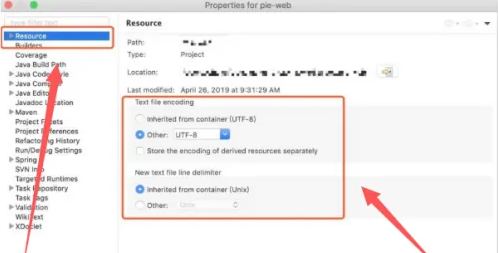
Step 2: Then, set the code encoding to [UTF-8] in [Resource]->[Text file encoding].
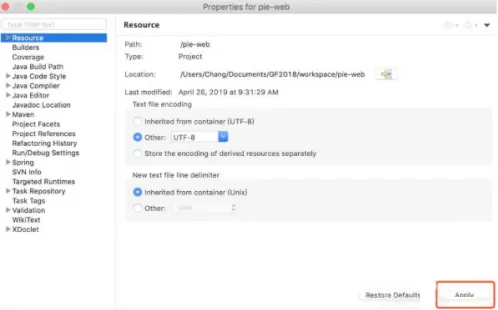
Step 3: Finally, click [Apply] to solve the garbled problem of the Eclipse project.
The above is all the content that the editor brings to you on how to deal with Eclipse garbled code. I hope it can help you.
Popular recommendations
-
Visual Studio
Version: 18.0.2Size: 4.24 MB
VisualStudio is the latest professional VS programming development tool officially launched by Microsoft. It has added
LiveCode and IntelliCode...
-
Visual Studio
Version: 18.0.2Size: 4.24 MB
Visual Studio is a powerful and comprehensive integrated development environment (IDE) launched by Microsoft. It supports multiple programming languages and development scenarios and is suitable for personal...
-
Visual Basic
Version: 6.0 latest versionSize: 96.44MB
Visual Basic 6.0 Chinese version is an event-driven programming language developed by Microsoft that includes an assisted development environment. It is derived from the BASIC programming language...
-
Redis Desktop Manager windows
Version: 2021.3.0Size: 10.6MB
The official version of RedisDesktopManagerwindows is an efficient and practical Redis desktop management software. RedisDesktopManagerwindows...
-
jdk1.8
Version: Official versionSize: 380.57 MB
JDK1.8 (JavaSE8) is a milestone version released by Oracle on March 18, 2014. It brings revolutionary new features and...