How to set Chinese in Eclipse-How to set Chinese in Eclipse
Time: 2022-05-27Source: Huajun Software TutorialAuthor: Ai Xiaomo
Friends, do you know how to set Chinese in Eclipse? Today I will explain how to set Chinese in Eclipse. If you are interested, come and take a look with me. I hope it can help everyone.
Step 1: Open eclipse and click the help menu.
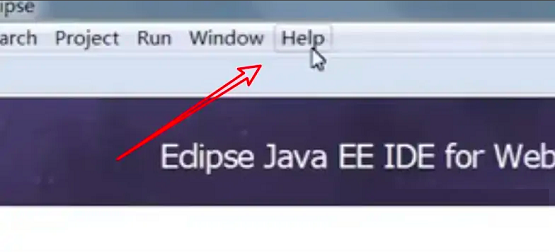
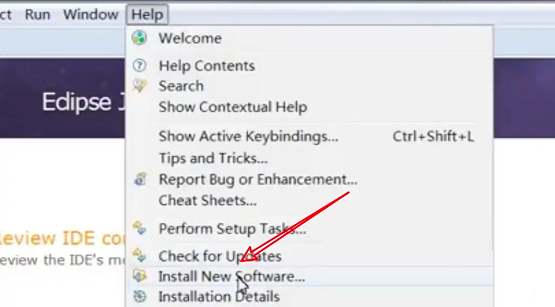
Step 2: Click the Install New Software option.
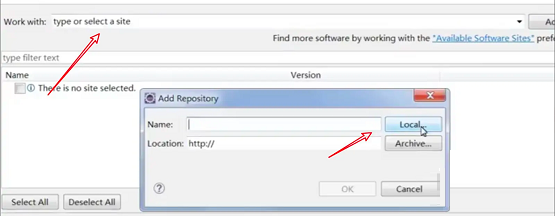
Step 3: Add the installation package locally.
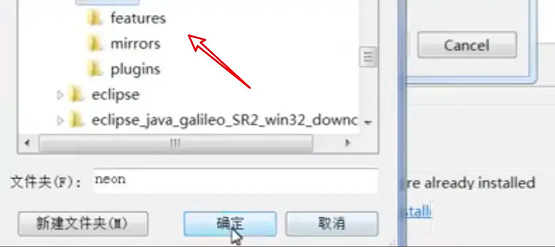
Step 4: Select the language pack folder of eclipse.
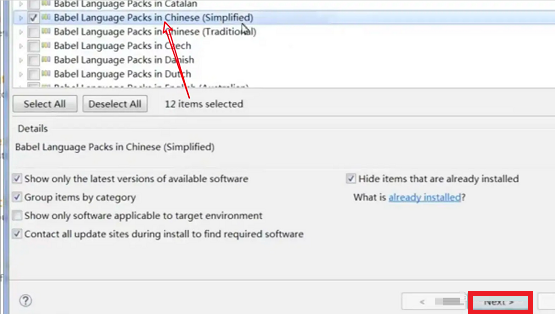
Step 5: Select the Simplified Chinese option and click Next.
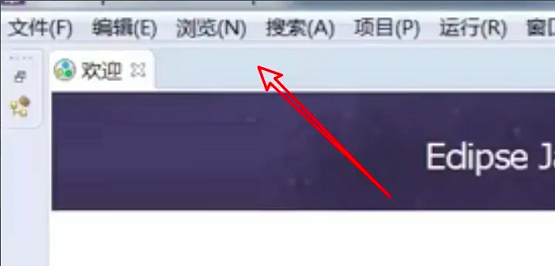
Step 6: After installation, the Chinese interface will appear.
The above is the entire content of how to set up Chinese in Eclipse brought to you by the editor. I hope it can help you.
Popular recommendations
-
Redis Desktop Manager windows
Version: 2021.3.0Size: 10.6MB
The official version of RedisDesktopManagerwindows is an efficient and practical Redis desktop management software. RedisDesktopManagerwindows...
-
jdk1.8
Version: Official versionSize: 380.57 MB
JDK1.8 (JavaSE8) is a milestone version released by Oracle on March 18, 2014. It brings revolutionary new features and...
-
jdk11
Version: 11.0.1 64 official versionSize: 149.52MB
The official version of jdk11 is a software development tool specially launched for Java programmers. JAVAJDK
The latest version 11 can help users easily obtain JAV...
-
JDhotkey
Version: 1.0.20201231Size: 5.31 MB
JDhotkey is a professional global hotkey customization and automation script tool that supports triggering system commands, launching programs or...
-
GitHub Desktop
Version: 3.5.3Size: 172.93 MB
GitHubDesktop (GitHub desktop version), GitHub is currently the most popular public code warehouse website, and most well-known open source project codes are hosted on it...