How to insert pagination in word 2016-How to insert pagination in word 2016
Time: 2021-12-27Source: Huajun Software TutorialAuthor: dim sum
Friends, do you know how to insert pagination in word 2016? Today I will explain it in word
If you are interested in the method of inserting paging in 2016, please come and take a look with the editor. I hope it can help everyone.
Step 1: Open the word document (as shown in the picture).
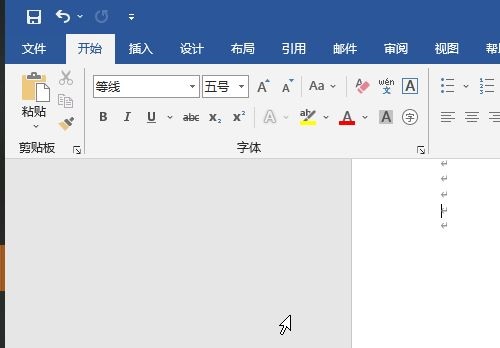
Step 2: Then place the mouse pointer where you want to insert the page break (as shown in the picture).

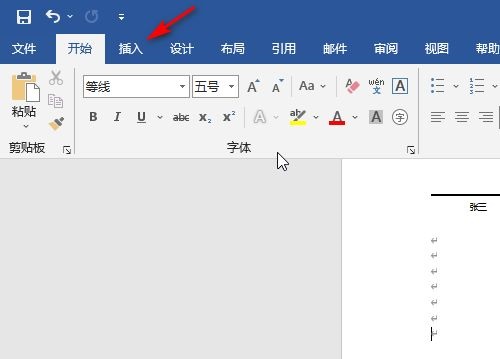
Step 3: Click the "Insert" menu at the top (as shown in the picture).
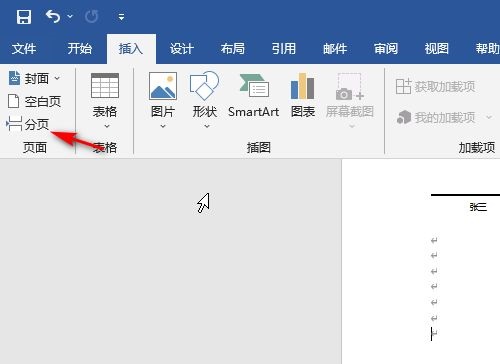
Step 4: Click "Page" (as shown in the picture).
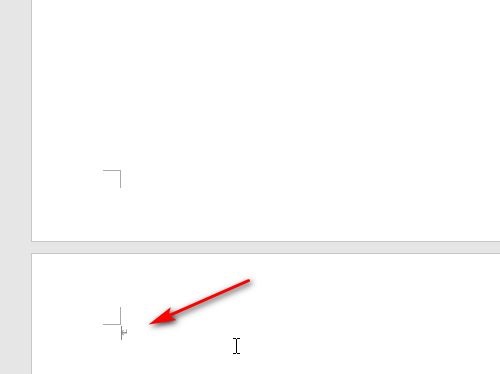
Step 5: At this time, a new blank page is added (as shown in the picture).
The above is the entire content of how to insert pagination in word 2016 brought to you by the editor. I hope it can help you.
Popular recommendations
-
Enjoy sales XP version
Version: 1.6.2Size: 27.1MB
The official version of Fenxiangxiike XP version is a professional and powerful WinXP-specific mobile office service platform. Fenxiangxiike XP version supports lead management, customer management, business...
-
Enjoy sales
Version: 3.1.2Size: 53 MB
The official version of Fenxiangxike is a very good desktop client for Windows. The official version of Fenxiangxike is more powerful and practical than mobile phones. It can make work communication faster...
-
iFlytek heard
Version: v25.10Size: 72.33 MB
iFlytek is a cloud conferencing software designed specifically for modern enterprises. It integrates advanced AI technology and stable audio and video communication technology. With its powerful AI...
-
iFLYTEK Hear Cloud Conference
Version: v3.0.2249Size: 171.79 MB
iFlytek Hearing Cloud Conference is an intelligent, efficient, safe and low-cost multi-person cloud video conferencing collaboration platform under iFlytek, dedicated to...
-
ToDoList (task management software)
Version: v9.1.6.0Size: 11.71MB
ToDoList is an open source and free task management tool with the core advantages of lightweight, high flexibility and strong scalability. It is suitable for individual and team collaboration situations...