How to set the image quality of the PCSX2 simulator - How to set the image quality of the PCSX2 simulator
Time: 2020-12-11Source: Huajun Software TutorialAuthor: Aotuman
How to use the PCSX2 simulator to set the image quality? Some friends may not know yet, so now the author has brought you the method of setting the image quality of the PCSX2 simulator. Friends in need can take a look. I hope it can help you.
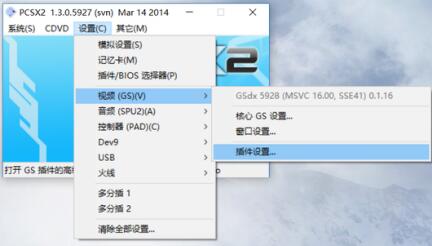
First, open the PCSX2 simulator and select Settings--Video--Plug-in Settings.
Uncheck the box next to Original Resolution.
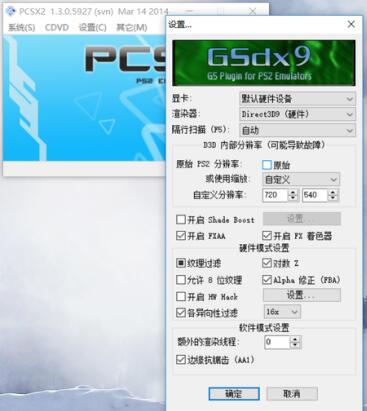
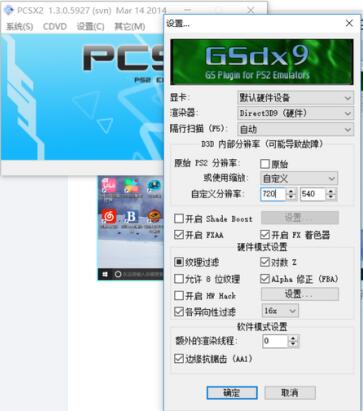
Enter the value you want in the custom resolution.
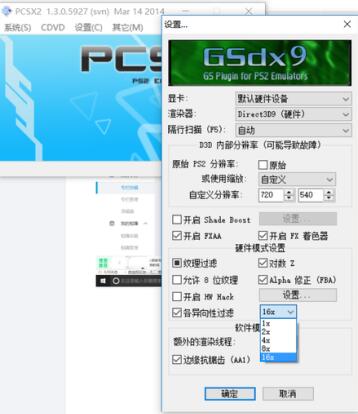
Anti-aliasing, select the anti-aliasing multiplier (up to 16 times).
The above is the PCSX2 simulator setting quality brought by the author. Friends who don’t know how to do it should come and learn it quickly.
Popular recommendations
-
Dynasty Warriors Overlord
Version: Official versionSize: 2.7MB
Dynasty Warriors PC version is an authentically authorized role-playing game with the background of the Three Kingdoms. In the official version of the Dynasty Warriors Warriors game, players can...
-
Snake War
Version: 5.28.6Size: 571.7 MB
The official version of Snake Battle is an online casual game that combines Snake and Ball Battle. In the PC version of Snake Battle, players need to eat...
-
Fairy Tail: The Power Awakens
Version: latest versionSize: 886.9MB
Fairy Tail: The Power Awakens PC version is a fun, classic role-playing game, adapted from the original authorized version of the Fairy Tail animation. Fairy Tail: Force...
-
FC emulator
Version: 2.2.1Size: 17.98 MB
The official version of FC Emulator is a classic game platform specially created for nostalgic players. It reshapes the pure fun of the Famicom era with extreme compatibility and user-friendly design...
-
Marvel Showdown
Version: PC versionSize: 3.5MB
Marvel Showdown PC version is a 3D card strategy game officially authorized by Marvel. The official Marvel Showdown game brings together hundreds of famous Marvel heroes...